🧮 Table of Contents ▼
Expert Reviews · 2026 Edition The 8 Best Calculators You Can Buy Right Now
Whether you’re a high school student facing the SAT, a finance professional working through a CFA exam, an engineer crunching complex equations, or simply someone who wants a reliable desk tool — the right calculator makes a genuine difference. We tested and evaluated dozens of models across every category to bring you this definitive ranked guide.
Quick Picks at a Glance
How We Tested
Our evaluation methodology covers five core dimensions applied consistently across every calculator in this guide. First, functionality — the breadth and depth of mathematical operations, the accuracy of results, and the reliability of advanced features under real-world conditions. Second, usability — key feel, display legibility, menu navigation logic, and the learning curve for first-time users. Third, exam compliance — whether each model is approved for SAT, ACT, AP, IB, CFA, and other major standardized examinations. Fourth, build quality and durability — housing materials, key longevity, and resistance to the drops and knocks of daily student and professional use. Fifth, value — performance and feature set relative to price.
We also considered community and ecosystem support — available tutorials, community forums, downloadable programs, and manufacturer documentation — since the learning resources surrounding a calculator can be as important as the device itself for long-term productive use.
Related Guide Best Desk Organizers — Keep Your Study Space Sharp Pair your new calculator with one of our top-rated desk organizers to create a workspace that keeps you focused and efficient.
The TI-84 Plus CE is the calculator that virtually every U.S. high school math teacher recommends, and for excellent reason. Its combination of full-color backlit display, thin and light design, rechargeable battery, and near-universal exam approval makes it the safest, most versatile graphing calculator on the market for students at any level from pre-algebra through calculus.
The 320×240 pixel color display is a genuine improvement over older TI-84 models — graphs are clearly distinguishable, on-screen text is crisp, and the full-color interface makes the learning experience significantly more intuitive. The rechargeable lithium-ion battery lasts around 30 hours of use between charges, which eliminates the AAA battery expense that older models demanded. At 190g, it is meaningfully lighter than its predecessors and noticeably more pocketable.
What truly sets the TI-84 Plus CE apart from competitors is its ecosystem. Texas Instruments’ TI-84 community is arguably the largest and most active calculator community in the world, with decades of accumulated tutorials, downloadable programs, and peer support. Every function is documented in depth. Every error message has been encountered and resolved by someone who has posted about it. For a student encountering graphing calculators for the first time, this support network is invaluable.
✓ Pros
- Approved for SAT, ACT, AP, IB, PSAT exams
- Vibrant full-color backlit display
- Rechargeable — no AAA batteries needed
- Massive user community and tutorial library
- Thin, lightweight, and durable design
- Supports Python programming and downloadable apps
✗ Cons
- Premium price point (~$109)
- No Computer Algebra System (CAS)
- Menus can feel dated vs. newer models
- Slower processor than TI-Nspire CX II

The Casio fx-991EX ClassWiz is, without question, the most impressive scientific calculator available at any price. For the cost of a paperback textbook, you get over 552 functions covering arithmetic, algebra, trigonometry, calculus, statistics, matrix operations, complex numbers, equations with multiple unknowns, and a spreadsheet mode capable of handling up to 45 variables. No other scientific calculator in this price range comes close to this feature set.
The high-resolution LCD display renders mathematical expressions in natural textbook notation — fractions appear as fractions, integrals as integral signs — which dramatically reduces transcription errors and makes checking work intuitive. The solar-plus-battery hybrid power system means the calculator effectively never needs a battery replacement under normal use, making it genuinely maintenance-free for years.
Casio also provides a free QR code function that links calculations to an on-screen representation you can view on your phone via the ClassWiz emulator website — a surprisingly useful feature for checking graphing behavior when a full graphing calculator is not available. For any student whose exam allows a non-graphing scientific calculator, the fx-991EX is the definitive choice. For professionals who need quick scientific computation, it is equally compelling.
✓ Pros
- Exceptional value — 552 functions under $20
- Natural textbook display reduces errors
- Solar + battery — virtually maintenance-free
- Spreadsheet mode with 45 variables
- QR code smartphone integration
- Matrix, vector, and equation solving
✗ Cons
- No graphing capability
- Not approved for all U.S. standardized tests
- Smaller display than graphing models
- Menu depth can be daunting initially
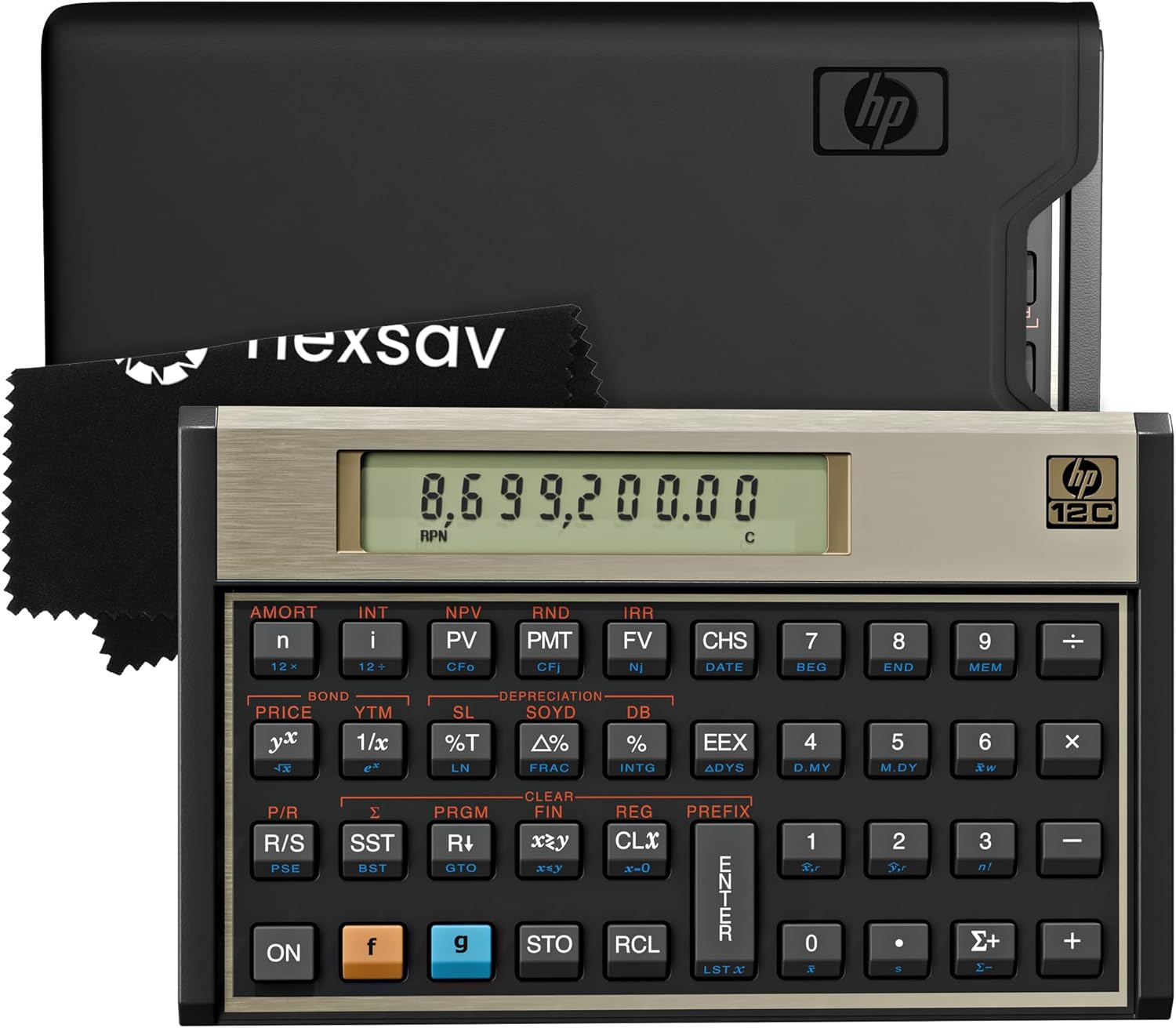
The HP 12C is perhaps the most legendary financial calculator ever produced. Originally launched in 1981, it remains the benchmark against which all financial calculators are measured, and the Platinum version updates the classic with expanded memory, both RPN (Reverse Polish Notation) and algebraic modes, and improved build quality while preserving the workflow that generations of finance professionals have trained on.
Understanding the HP 12C’s design philosophy requires appreciating what financial professionals actually compute. Time value of money calculations — present value, future value, net present value, internal rate of return, loan amortization, bond pricing, depreciation — are the daily vocabulary of finance, and the HP 12C handles all of them with a key layout specifically designed for speed and accuracy in these operations. A trained HP 12C user can perform complex financial calculations faster than anyone using a spreadsheet.
The connection between the HP 12C and the broader world of financial management is deep. Financial managers who understand how to organize and structure their financial documents and study materials alongside their calculation toolkit create workflows that are both efficient and professionally organized. For CFA candidates and finance professionals building serious study and work habits, the HP 12C belongs alongside premium organizational tools.
✓ Pros
- Approved for CFA, CFP, and most finance exams
- Industry-standard RPN logic for speed
- Premium stainless steel build — lasts decades
- Both RPN and algebraic modes available
- Complete TVM, IRR, NPV, amortization functions
- Trusted by finance professionals worldwide
✗ Cons
- RPN logic has steep learning curve for new users
- Small display with no backlighting
- Not suitable outside financial calculations
- Higher price than TI BA II Plus

The TI-Nspire CX II with CAS (Computer Algebra System) is the most capable handheld calculator Texas Instruments produces, and arguably the most capable graphing calculator available from any manufacturer. Its CAS engine can symbolically manipulate algebraic expressions — solving equations analytically rather than numerically, simplifying complex expressions, performing symbolic differentiation and integration — capabilities that represent a qualitative leap beyond standard graphing calculators.
The 3.2-inch full-color backlit display is the best on any handheld calculator, rendering graphs, spreadsheets, notes, and geometric constructions with exceptional clarity. The multi-document interface allows simultaneous work across graphs, calculations, notes, and data tables — creating a genuine mathematical environment rather than a single-function computing tool. Python programming support makes it equally valuable as an introduction to programming for mathematics students.
✓ Pros
- Full Computer Algebra System (CAS)
- Best-in-class 3.2″ color display
- Multi-document simultaneous workspace
- Python and Lua programming support
- Rechargeable battery with excellent life
- Comprehensive university-level mathematics
✗ Cons
- CAS version not approved for SAT/ACT
- Steeper learning curve than TI-84
- Higher price (~$150)
- Heavier than TI-84 CE

The TI BA II Plus Professional is the alternative CFA-approved financial calculator to the HP 12C, and for many users the more accessible choice. It uses conventional algebraic entry rather than RPN — which most people find more intuitive — and adds several functions to the standard BA II Plus including net future value, modified internal rate of return, modified duration, and convexity, all of which are particularly relevant to fixed-income analysis and CFA exam content.
The Professional version’s build quality is also a step up from the standard BA II Plus — better key feel, more durable housing, and a slightly larger display. For finance students and professionals building their calculation toolkit, the relationship between organized study materials and systematic practice is crucial. Keeping structured notes alongside financial calculations is much easier when your workspace and study materials are well organized.
✓ Pros
- CFA, CFP, FRM approved
- Algebraic entry — lower learning curve than RPN
- NFV, MIRR, modified duration, convexity functions
- Better build than standard BA II Plus
- More affordable than HP 12C Platinum
- Excellent documentation and CFA study resources
✗ Cons
- Less prestigious than HP 12C in banking culture
- No backlighting on display
- Slower for experienced RPN users
- Limited to financial/business calculations
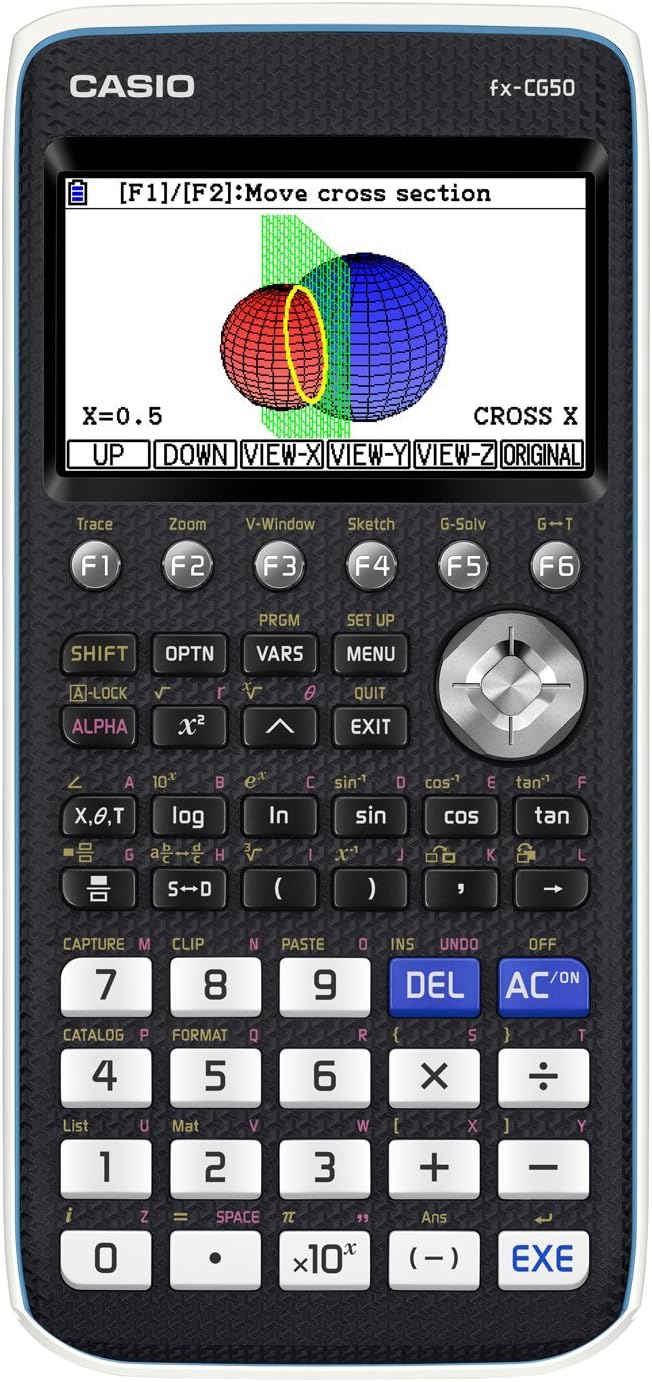
The Casio fx-CG50 offers the most visually impressive graphing experience of any calculator in this guide. Its 3-inch LCD delivers 65,000 colors with a natural 216×384 pixel resolution that renders mathematical graphs with a richness and clarity that the TI-84 CE’s 320×240 display cannot quite match. For visual learners and students who want to develop genuine geometric intuition, the fx-CG50’s display quality is a meaningful advantage.
Its 3D graphing capability is the standout feature: the ability to plot and rotate three-dimensional surfaces gives students a mathematical visualization tool that is unprecedented at this price point. For multivariable calculus, differential equations, and parametric surfaces, seeing the function in three dimensions dramatically accelerates conceptual understanding in ways that 2D projections cannot replicate.
✓ Pros
- Best-in-class color display quality
- Unique 3D graphing capability
- SAT, ACT, IB, AP approved
- Natural textbook display notation
- Lower price than TI-84 CE
- Python scripting support
✗ Cons
- Smaller user community than TI-84
- AAA batteries rather than rechargeable
- Bulkier design than TI-84 CE
- Fewer downloadable apps than TI ecosystem

Sharp’s EL-W516XBSL WriteView is a frequently overlooked scientific calculator that deserves far more attention. Its 556-function count actually edges out the Casio fx-991EX’s 552, and its unique WriteView display shows mathematical expressions across four lines simultaneously — which helps enormously when tracking multi-step calculations or working through complex equations where seeing the full expression context matters.
The solar-plus-backup battery power system is as reliable as the Casio’s, and the build quality feels solid and durable in ways that budget scientific calculators often fail to deliver. For students who want a capable scientific calculator without a strong brand preference and at the lowest possible price point, the Sharp EL-W516XBSL is a genuinely excellent choice that often falls under the radar simply because Sharp’s calculator marketing is less prominent than Casio’s.
✓ Pros
- 556 functions — most of any scientific here
- 4-line display for better expression tracking
- Solar + battery — long operational life
- Competitive price under $20
- Solid, durable build quality
✗ Cons
- Smaller community than Casio or TI
- No QR code / smartphone integration
- Less intuitive menu system than fx-991EX
- No graphing capability

The Canon P23-DHV-3 occupies a different category from every other calculator in this guide — it is a desktop printing calculator designed primarily for accountants, bookkeepers, and office professionals who need a printed audit trail of their calculations. In environments where financial accuracy is critical and every calculation needs to be verifiable, the ability to print a paper tape of every entry and operation is not a luxury but a professional requirement.
Canon’s P23-DHV-3 prints at 4.3 lines per second — fast enough to keep pace with rapid data entry — on a crisp, legible tape that distinguishes positive and negative numbers in different colors. The large 12-digit display is easy to read across a desk, and built-in functions for tax calculation, currency conversion, and cost-sell-margin analysis address the most common office calculation needs. Pairing this calculator with well-organized desk and filing systems is essential for professional accounting work — the discipline of organized physical space directly supports the accuracy and efficiency of financial computation.
Related Guide Best Binders for Organizing Financial Documents and Study Materials If you’re using a desktop calculator for accounting or finance work, pair it with our top-rated binders to keep printed calculation tapes, statements, and reports perfectly organized.✓ Pros
- High-speed two-color printing for audit trails
- 12-digit display — handles large numbers
- Tax, cost-sell-margin, currency functions
- Durable desktop build for daily heavy use
- Indispensable for bookkeeping and accounting roles
✗ Cons
- Not portable — requires AC power
- Ongoing cost of paper rolls and ink
- Niche use case — not for students
- No scientific or advanced math functions
Full Comparison Table: All 8 Calculators
| Calculator | Type | Price | Rating | SAT/ACT | CFA | Graphing | CAS | Best For |
|---|---|---|---|---|---|---|---|---|
| TI-84 Plus CE Top Pick | Graphing | ~$109 | 4.9 ★ | ✓ | ✗ | ✓ | ✗ | High school / SAT |
| Casio fx-991EX | Scientific | ~$18 | 4.8 ★ | ✓* | ✗ | ✗ | ✗ | College science / value |
| HP 12C Platinum | Financial | ~$75 | 4.7 ★ | ✗ | ✓ | ✗ | ✗ | Finance / CFA / banking |
| TI-Nspire CX II | CAS Graphing | ~$150 | 4.8 ★ | ✗† | ✗ | ✓ | ✓ | University STEM / advanced |
| TI BA II Plus Pro | Financial | ~$60 | 4.7 ★ | ✗ | ✓ | ✗ | ✗ | CFA / business finance |
| Casio fx-CG50 | Color Graphing | ~$90 | 4.6 ★ | ✓ | ✗ | ✓ | ✗ | Visual learners / 3D math |
| Sharp EL-W516XBSL | Scientific | ~$17 | 4.3 ★ | ✓* | ✗ | ✗ | ✗ | Budget scientific / school |
| Canon P23-DHV-3 | Desktop Printing | ~$55 | 4.4 ★ | ✗ | ✗ | ✗ | ✗ | Accounting / office |
* Verify with your specific exam board. † Non-CAS version of TI-Nspire is SAT/ACT approved. Prices approximate and subject to change.
Buyer’s Guide: How to Choose the Right Calculator
Step 1 — Identify Your Primary Use Case
The single most important purchase criterion is use case. A graphing calculator is essential for a student taking pre-calculus, calculus, or statistics, but an expensive waste for someone who only needs basic scientific functions. A financial calculator is indispensable for a CFA candidate but useless for a physics student. Before considering any other factor, ask: what will I actually use this calculator for most of the time?
Step 2 — Check Exam Approval Requirements
If you are purchasing for standardized testing, exam approval is non-negotiable. The College Board (SAT, AP), ACT, CFA Institute, IB Organization, and other examining bodies all maintain approved calculator lists. Verify your specific exam’s requirements before purchasing — an expensive calculator that is not approved for your exam is worse than a cheap one that is. The TI-84 Plus CE is the safest choice for maximum U.S. exam compatibility. The HP 12C Platinum and TI BA II Plus Professional are the approved options for CFA, CFP, and most finance designations.
Step 3 — Consider Display Type
Natural textbook display — where fractions appear as fractions, square roots as root signs, and integrals as integral notation — dramatically reduces transcription errors and makes checking work intuitive. Any calculator purchased for serious academic or professional use should have natural display. All models in this guide except the Canon P23-DHV-3 offer natural or equivalent display formats appropriate to their category.
Step 4 — Battery Considerations
For daily student use, rechargeable lithium-ion (TI-84 Plus CE, TI-Nspire CX II) eliminates the recurring cost and inconvenience of battery replacement. Solar-plus-battery (Casio fx-991EX, Sharp EL-W516XBSL) is effectively maintenance-free for scientific calculators and our recommended option for that category. Standard alkaline or lithium coin batteries (HP 12C, TI BA II Plus) need occasional replacement but typically last 1–2 years with normal use.
Step 5 — Build Quality and Durability
A calculator is a long-term investment. The TI-84 Plus CE and Casio models are designed to survive the rigors of student life — backpack tumbles, dropped on hard floors, stored without cases. The HP 12C Platinum’s stainless steel construction is in a different durability tier entirely; it is genuinely built to last decades, which is part of why finance professionals consider it a career tool. For desktop use, the Canon P23-DHV-3’s AC power and desktop weight make portability irrelevant and durability primarily about print mechanism reliability, where Canon has an excellent track record.
Frequently Asked Questions
What is the best calculator for high school students?
What is the best scientific calculator for college?
What is the best financial calculator for CFA and finance exams?
Are graphing calculators still worth buying in 2026?
What should I look for when buying a calculator?
What is the difference between a scientific and a graphing calculator?
Can I use any calculator on the SAT?
Is Casio or Texas Instruments better?
What is the best desktop calculator for an office?
How long do calculator batteries last?
Final Verdict: Which Calculator Is Right for You?
After reviewing all eight models, the right choice always comes down to use case. There is no single best calculator for everyone — but there is almost certainly one clear best calculator for you specifically.
If you are a U.S. high school student preparing for the SAT, AP exams, or college applications — the TI-84 Plus CE is your calculator. Its exam approval, community support, and color display make it the benchmark your teachers will assume you have. If you need maximum scientific computation per dollar — the Casio fx-991EX ClassWiz is extraordinary value that outperforms calculators costing five times as much for non-graphing use. Finance professionals and CFA candidates should choose between the HP 12C Platinum (RPN, prestigious, built for decades) and the TI BA II Plus Professional (algebraic, accessible, equally exam-approved). Advanced university STEM students who can use CAS tools in their coursework should seriously consider the TI-Nspire CX II — its capabilities are genuinely transformative. And for the office accountant who needs a reliable printed record of every calculation, the Canon P23-DHV-3 is the professional workhorse that delivers.
Whatever your choice, pair your calculator with a well-organized study and work environment. The right tools work best when your workspace supports them — which is why we recommend checking our guides to the best desk organizers and the best binders for keeping your study materials, printed tapes, and financial documents organized alongside your new calculator.
Find More Top-Rated Study & Office Picks
Browse our complete collection of expert reviews covering the best stationery, office tools, study accessories, and academic essentials — all curated and ranked with the same depth and rigor.
Browse All Reviews on Edmics →