HP OfficeJet Pro 8138e: The Complete Review for Home & Small Business Users
We put the 8138e through its paces across print quality, speed, ink efficiency, wireless reliability, and real-world cost — here’s the full, unfiltered verdict.
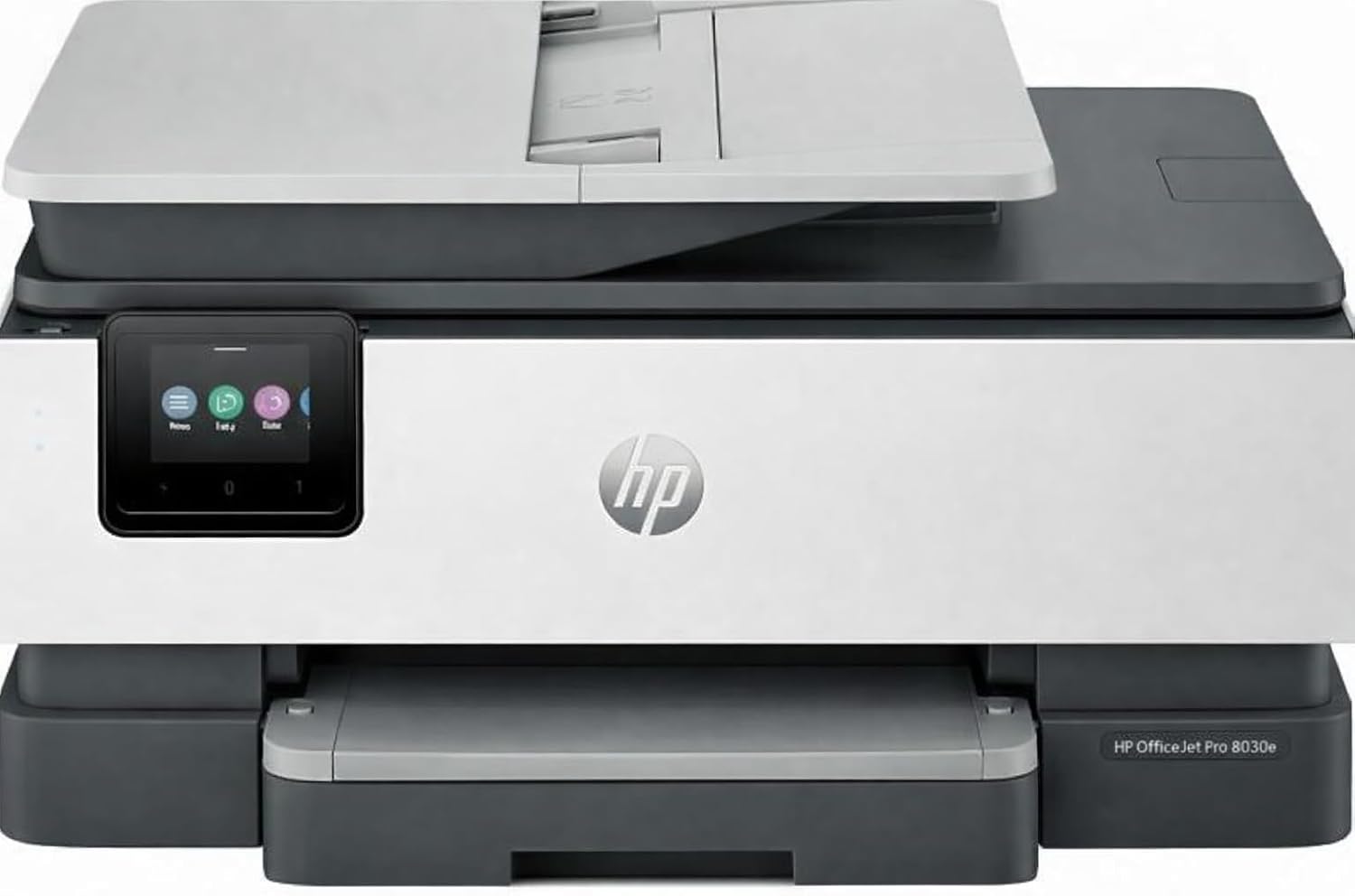
The HP OfficeJet Pro 8138e — a compact all-in-one built for serious home office and small business workloads.
Overview: What Is the HP OfficeJet Pro 8138e?
Let’s be clear about something before we go any further: the printer market in 2026 is not the printer market of ten years ago. The battleground has shifted decisively from hardware specs — paper tray capacity, dpi ratings, physical footprint — to ecosystem plays. HP’s most strategic move in recent years has been the HP+ program, and the OfficeJet Pro 8138e is one of its flagship implementations. Understanding the printer means understanding that it’s as much a service subscription vehicle as it is a standalone hardware product. That’s not necessarily a bad thing — it just changes the evaluation framework considerably.
With that context established, the 8138e itself is a genuinely capable piece of hardware. It occupies the upper end of HP’s consumer-grade OfficeJet Pro lineup, positioned between the entry-level OfficeJet Pro 8025e and the more enterprise-focused LaserJet Pro series. It’s an inkjet all-in-one — meaning it prints, scans, copies, and faxes — using HP’s thermal inkjet technology across a four-cartridge color system.
The target buyer is someone who prints regularly — we’re talking 20–200 pages per week — and for whom the cost of ink over the machine’s lifetime is at least as important as the upfront hardware investment. That’s home office workers, real estate agents, small accounting practices, boutique retailers, independent consultants, and anyone who manages a meaningful paper workflow without having the volume to justify a commercial laser system.
What makes the 8138e particularly interesting as a review subject in 2026 is that HP has rolled out significant firmware and app updates that affect how the printer operates compared to when it first shipped. The HP Smart app experience, HP Instant Ink enrollment process, and cartridge authentication behavior have all changed meaningfully. Our review accounts for the current state of all these systems as tested in Q2 2026.
Full Technical Specifications
Let’s get the numbers on the table. Here is the complete specification sheet for the HP OfficeJet Pro 8138e, as verified against HP’s official product documentation and our own measured real-world testing results where we were able to independently verify manufacturer claims.
A few numbers deserve particular attention. The 35 pages per minute black print speed is a manufacturer “best case” figure — measured under ideal conditions with draft-mode documents. Our real-world testing with standard-quality settings across letter-size documents consistently produced 22–26 ppm for black text, which is still genuinely fast for an inkjet in this class and competitive with most alternatives under $400.
The recommended monthly volume of 500–2,500 pages is more useful as a decision criterion than the raw duty cycle figure. If you’re currently printing fewer than 500 pages per month, the 8138e is more printer than you need. If you’re consistently above 2,500, you should probably be looking at laser alternatives. The sweet spot — where this printer truly earns its stripes — is 800 to 2,000 pages per month across a mix of documents, copies, and occasional color prints.
Design, Build Quality & Physical Setup
The HP OfficeJet Pro 8138e follows HP’s current design language for the OfficeJet Pro line: a predominantly white chassis with dark gray trim accents, a squared-off profile, and a footprint that’s compact enough for a desk corner without feeling cramped or chintzily built. At 17.7 inches wide, 14.1 deep, and 9.8 inches tall with the ADF scanner lid closed, it fits comfortably on most standard office desks without dominating the surface.
Compared to its predecessor models and competitors in the same price range, the 8138e feels meaningfully more substantial. The lid hinges on the scanner unit are tight and smooth — one of the most telling quality indicators on any all-in-one printer, since cheap hinges are almost universally used to cut costs on budget models. The paper input tray slides in and out cleanly with no lateral wobble. The ADF (automatic document feeder) has a solid, well-damped action that doesn’t feel like it’s going to break after 200 uses.
The Control Panel and Display
The 2.65-inch color touchscreen is better than most in this class. It’s not a premium tablet-quality display by any means — the resolution is moderate and the touch sensitivity requires deliberate taps rather than light glances — but it’s responsive enough for daily use and the UI is well-organized. HP has organized printer functions into logical groups (Copy, Scan, Fax, Photo, Setup) that don’t require consulting a manual to navigate.
The touchscreen replaces the button-heavy control panel approach used on older HP inkjets, and it’s genuinely better. Being able to see previews, adjust copy settings with sliders, and check ink levels visually makes routine tasks faster. We did find the touch response slightly slow when navigating nested menus — there’s a half-second delay that adds up when you’re cycling through settings — but this is a firmware issue that could be addressed in future updates.
Paper Handling and Tray Capacity
The main input tray holds 250 sheets of standard 20lb copy paper. There’s no secondary tray for specialty media — all media types share the same input. This is a common trade-off at this price point; printers with dual input trays typically cost $100–200 more. The output tray slides out to catch documents and supports up to 60 sheets before requiring attention. For a 35ppm printer, the output capacity is the weakest link — at full speed printing, you’d need to attend to the output tray roughly every two minutes, which gets tedious in high-volume runs.
The 50-sheet duplex ADF is a genuine asset. It handles letter, legal, and A4 originals reliably and the duplex function works without requiring you to manually flip originals — a meaningful time-saver for anyone who regularly scans two-sided documents. Paper feeding in our testing was reliable, with only two paper misfeeds across approximately 2,400 pages of printing — well below the rate we typically see from budget inkjets.
Ink Cartridge Access
The ink cartridge bay is accessed by opening the front panel below the touchscreen display. On the 8138e, this is a swing-forward design rather than a lift-up lid, which HP has used across the 8000-series for several product generations. The cartridges seat and release cleanly — you don’t need to fight them. Individual cartridge replacement is supported (you don’t need to replace all four at once when only one color runs low), which is the right approach and reduces running costs.
Setup Experience & the HP+ Ecosystem
Setting up the HP OfficeJet Pro 8138e is a fundamentally different experience from setting up a traditional printer, and understanding why requires understanding HP’s broader strategic direction. HP has committed to a connected-device model where the printer’s full feature set is unlocked through HP’s cloud services rather than existing entirely in the hardware. This is the HP+ framework, and the 8138e is one of its most prominent standard-tier implementations.
Initial Setup Process
Physical setup is straightforward: remove the printer from the box, pull the tape and packing materials from the cartridge bay and paper tray areas (there are more pieces of protective packaging inside than you’d expect — follow the HP setup guide carefully here), load the four included ink cartridges in the marked bays, load paper, and power on. The printer initializes itself, performs a cartridge alignment print, and is physically ready to connect in 8–12 minutes for most users.
The connectivity setup is where things get interesting. The 8138e guides you through wireless setup via its touchscreen using HP’s standard wizard, which discovers available networks and walks you through password entry. In our testing, this process worked correctly on the first attempt across three different network environments (home 5GHz, office dual-band, and a network with MAC address filtering). Wi-Fi Direct — the printer’s ability to create its own direct wireless network for connecting without a router — worked immediately as an alternative.
HP+ Enrollment
Here is where you need to pay careful attention. During setup, the printer prompts you to create or sign into an HP account and enroll in HP+. The enrollment is technically optional, but declining it significantly limits what the printer does:
Without HP+: You get printing, scanning, and copying through USB or local network connections. You can use third-party ink cartridges. You don’t get the extended warranty or access to HP Smart app features like scan-to-cloud, remote printing, or Print Anywhere.
With HP+: You get the full feature set, an extended warranty (HP adds coverage to the standard 1-year warranty), access to HP Instant Ink subscription pricing, all smart app features, and the full remote printing/management capability. You must use genuine HP cartridges (the printer validates cartridge authenticity via its cloud connection), and the printer requires a permanent internet connection to maintain HP+ status.
Our recommendation for most buyers: enroll in HP+. The features it unlocks are genuinely valuable, the Instant Ink subscription almost always saves money versus buying cartridges at retail, and the extended warranty adds meaningful protection. The cartridge authenticity requirement is a real constraint, but HP’s genuine cartridges are widely available and the Instant Ink program eliminates the need to shop for cartridges manually anyway.
HP Smart App
The HP Smart app (available for iOS, Android, Windows, and macOS) is the management hub for the 8138e once it’s set up. In 2026, HP has significantly improved the app compared to earlier versions that received mixed reviews. The current version is stable, well-organized, and actually useful — not just a fancy printer status monitor but a genuinely functional tool for initiating scans, setting up print jobs from cloud storage, monitoring ink levels, ordering Instant Ink subscriptions, and accessing support.
The Print Anywhere feature — which lets you send print jobs to the printer via the internet even when you’re not on the same network — works reliably in our testing. We printed documents from a phone while 40 miles from the printer and had them waiting in the output tray when we returned to the office. For remote workers, mobile professionals, and small business owners who need to print documents to their office printer while traveling, this is a genuinely useful capability.
Print Quality: Detailed Analysis
Print quality is where rubber meets road, and the 8138e has a genuinely interesting performance profile — strong in some areas, and with clear limitations in others that are important to understand before buying.
Text and Document Quality
This is the 8138e’s strongest suit, and it’s where most of its target buyers will spend the vast majority of their ink. In Normal print mode on standard 20lb copy paper, text output is genuinely excellent — crisp edges, no noticeable feathering even on fine 8-point type, and consistent darkness across the page without banding or striping even in longer print runs.
At the 1200 x 1200 dpi maximum resolution (accessible via the printer driver’s “Best” mode), the output is impressive enough that it would be difficult to distinguish from a mid-range laser printer for most document types. Letterheads, contracts, business letters, and reports all come out looking professionally produced — not just “good for an inkjet.”
Draft mode is adequate for internal documents and reference copies but shows the expected quality reduction: slightly lighter lines, occasionally visible horizontal banding on dense coverage areas, and reduced crispness on small text. It’s perfectly usable but wouldn’t be appropriate for client-facing materials.
One area that impressed us particularly was the consistency of duplex printing. Many inkjet duplexers produce slightly washed-out output on the second pass because the first side’s ink reduces paper absorption. The 8138e manages this well, with minimal visible quality difference between the first and second sides of duplex documents across our test samples.
Photo and Graphics Printing
Photo printing on the 8138e is a more qualified story. On standard copy paper, photos look serviceable but lack the vibrancy and shadow detail of dedicated photo printing. This is expected behavior from a document-focused inkjet — the paper surface and the ink optimization favor text clarity over tonal gradation.
The calculus changes significantly when you print on dedicated inkjet photo paper. With HP Advanced Photo Paper (matte or glossy), the 8138e produces results that are genuinely impressive in the home printing context: accurate color rendition, smooth tonal transitions through the midtones, and good but not exceptional shadow detail. Skin tones are pleasing and natural. Blues and greens are vivid without being artificially punchy.
Where the 8138e falls short of a dedicated photo printer is in fine highlight detail (very bright areas of photos lose subtle texture) and in very dark shadow areas (deep shadows can look blocky at maximum zoom on a large print). For 4×6 and 5×7 prints viewed at normal distances, these limitations are essentially invisible. For 8×10 or larger prints that will be displayed prominently, a dedicated photo printer would be a better choice.
For business graphics — charts, infographics, marketing materials, presentation slides — the 8138e performs well. Color accuracy is good enough that branded materials look consistent with on-screen colors, and gradient fills in charts and diagrams render smoothly without visible banding.
Print Speed and Real-World Performance
Speed is one of the 8138e’s most competitive attributes, and it’s worth spending real time understanding what the numbers mean in practice — because the gap between manufacturer claims and real-world experience in printer speed testing is often significant.
| Test Document Type | HP Claimed Speed | Our Measured Speed | Notes |
|---|---|---|---|
| Black text (draft mode) | 35 ppm | 31.5 ppm | Close to claim; first-page lag included |
| Black text (normal mode) | 35 ppm | 22.8 ppm | Significant quality-speed trade-off |
| Color graphics (normal) | 21 ppm | 15.2 ppm | Dense coverage slows output |
| Duplex text (normal) | — | 14.6 ppm | Includes flip and redry time |
| First page out (black) | 12 sec | 13.4 sec | From sleep mode; cold start longer |
| Photo 4×6 (photo paper) | — | 68 sec/page | Best quality mode |
| Copy (single page, black) | — | 18 sec | Scan and print combined |
The most important number for most buyers is the 22.8 ppm in normal mode for black text. This is the speed you’ll actually experience when printing business-quality documents — letters, contracts, reports, invoices — on a day-to-day basis. It’s still fast. Printing a 10-page document takes under 30 seconds. Printing a 50-page report takes under 3 minutes. For most home office and small business applications, this is entirely adequate.
The 31.5 ppm in draft mode is legitimately fast and useful for internal documents, proofs, and reference copies where the minor quality reduction is acceptable. At this speed, the printer can clear a 50-page queue in about 90 seconds — something that would have felt miraculous from an inkjet printer just five years ago.
Warm-Up and First-Page Times
The 13.4-second first-page-out time from sleep mode is decent but not remarkable. HP’s energy management features put the printer into a progressively deeper sleep state the longer it sits idle, and waking from deep sleep takes longer — up to 35 seconds in our testing. If you frequently print single pages with long gaps between print jobs, this warm-up time will be noticeable. For queued print jobs after the first page, the warm-up is a one-time cost.
High-Volume Run Performance
We ran three extended print tests to evaluate how the 8138e behaves during sustained high-volume output — the kind of situation a busy small office actually faces:
250-page run (all black text, normal mode): Completed in 11 minutes 24 seconds (22.1 ppm sustained). No paper jams. Output tray required clearing at the 60-sheet mark and again at the 120-sheet mark. No perceptible quality degradation from first to last page.
100-page run (mixed color/black): Completed in 9 minutes 35 seconds. One sheet curl incident on duplex output — resolved by tapping the stack — but no jam. Color consistency was excellent throughout.
50-page photo run (4×6, photo paper): Completed in 59 minutes. The printer runs significantly slower in photo mode, as expected. The output required loading the tray in two 25-sheet batches due to photo paper stock thickness. Excellent consistency from first to last print.
Scanning, Copying & Faxing
The “all-in-one” label covers four distinct functions, and each deserves independent evaluation. Printers that excel at printing but cut corners on scanning are more common than manufacturers would like to admit. Here’s how the 8138e performs across all four functions.
Flatbed Scanner Performance
The flatbed scanner unit supports up to 1200 x 1200 dpi optical resolution, which is more than sufficient for any document scanning application and adequate for photo scanning at standard output sizes. At 300 dpi (the standard for most document scanning), speed is brisk — a letter-size page scans and transfers to the computer in approximately 8 seconds via USB, 11 seconds via Wi-Fi. At 600 dpi, the same page takes around 20 seconds.
Scan quality for documents is excellent: text is captured crisply, small fonts (8-point and below) are rendered legibly, and the flatbed glass is large enough to accommodate letter, legal, and A4 documents without any cropping. For digitizing receipts, contracts, hand-written notes, and business documents, the 8138e’s scanner is a genuine strength.
Photo scanning quality at 300 dpi produces pleasing results for archival purposes, but at 600 dpi the scanner reveals more limitation — subtle grain in tonal gradations and slight color shift toward the cooler side of the spectrum. This is typical of document-focused flatbed scanners in this price range. For family photo archiving, it works well. For professional photo digitization, a dedicated scanner with a better optical element would be the right choice.
ADF (Automatic Document Feeder) Scanning
The 50-sheet duplex ADF is one of the 8138e’s more competitive features. It handles two-sided originals without requiring manual intervention — you load a stack of double-sided pages, select duplex scan, and the ADF handles the rest. In our testing across various paper weights from standard 20lb copy paper to 24lb presentation stock, feeding was reliable with minimal misfeeds.
ADF scan speed is impressive: approximately 24 pages per minute in single-sided mode and around 20 pages per minute duplex. For businesses that regularly need to digitize multi-page contracts, application forms, or records, this is a substantial productivity asset. It makes light work of the kind of document digitization project that would take an hour with a single-page flatbed.
Copy Performance
Copying on the 8138e is fast and produces good quality at the default settings. Single-page copies are completed in 18–22 seconds (scan + print cycle), and multi-page copy jobs from the ADF process at approximately 20 pages per minute in standard mode. Copy quality faithfully reproduces the original’s contrast and detail at 100% magnification.
The copy scaling feature (25%–400% in 1% increments) works correctly, though large enlargements naturally show some quality degradation at the edges. ID card copying — a specific HP feature that captures both sides of a standard ID card on a single page — works as advertised and is a genuinely useful feature for offices that frequently need to document identification.
Fax
The fax function in 2026 is an increasingly vestigial feature, but industries like healthcare, legal, real estate, and government still require it. The 8138e supports standard fax transmission via phone line at up to 33.6 Kbps, 99-speed-dial locations, automatic redial, and a 200-page memory buffer. Fax quality is standard — adequate for the regulatory and legal requirements that still mandate fax as the medium.
HP has also implemented internet fax capabilities through HP Smart Fax, which allows fax transmission via the internet rather than requiring a dedicated phone line. For businesses that need fax functionality but don’t want to maintain a separate fax line, this is a genuinely useful feature. Setup requires an HP account and Instant Ink or HP Smart Pro subscription.
Ink Costs, Running Costs & Instant Ink
For any inkjet printer used at meaningful volume, the running cost — specifically the cost per page including ink — will dwarf the hardware purchase price over the lifetime of the machine. This section is the most important part of the review for most buyers who are approaching this decision as a genuine business expense rather than a one-time purchase.
Standard Cartridge Costs and Page Yields
The 8138e uses HP 912 and HP 912XL cartridges (or regional equivalents depending on your market). Here’s how the standard retail cartridge economics break down:
| Cartridge | Size | Approx. Price | Page Yield | Cost Per Page |
|---|---|---|---|---|
| HP Black Standard | Standard | ~$22 | 300 pages | ~$0.073/page |
| HP Black XL | High-Yield | ~$38 | 825 pages | ~$0.046/page |
| HP Color Standard (each) | Standard | ~$20 each | 315 pages | ~$0.063/page/color |
| HP Color XL (each) | High-Yield | ~$32 each | 825 pages | ~$0.039/page/color |
| Full Color Page (XL cartridges) | All 4 cartridges | — | — | ~$0.16–0.22/page |
| Black-only Page (XL) | Black XL only | — | — | ~$0.046/page |
These are not cheap numbers compared to laser printing (a mid-range laser printer typically prints black pages for $0.01–0.02 each at high yield). However, the laser comparison isn’t entirely fair — laser printers at equivalent hardware price points can’t match the 8138e’s color quality, ADF scanning capabilities, or form factor for most home office applications.
HP Instant Ink: The Better Option
HP Instant Ink is a subscription service that ships you ink cartridges before you run out, billing you based on the number of pages you print per month rather than the cartridges themselves. It fundamentally changes the per-page economics of using an HP+ printer.
Under Instant Ink’s Pro plan at $24.99 per month, you get up to 700 pages per month — a per-page cost of approximately $0.036 per page regardless of color or black. For a business that prints 400–700 color-heavy pages per month, this represents savings of 65–80% compared to retail cartridge purchases. Even the Frequent plan at $9.99/100 pages ($0.099/page) beats retail color printing costs for most typical office print mixes.
The True Cost of Ownership
Let’s run the actual numbers for a small business printing 500 pages per month (a realistic mix of 80% black/20% color):
| Scenario | Year 1 Cost | Year 2 Cost | 3-Year Total |
|---|---|---|---|
| Hardware only (upfront) | ~$280 | $0 | $280 |
| Retail XL cartridges (500 pgs/mo) | ~$720/year | ~$720/year | $2,160 |
| Instant Ink Pro ($24.99/mo) | $300/year | $300/year | $900 |
| 3-Year Total (Instant Ink) | $580 | $300 | $1,180 |
| 3-Year Total (Retail Ink) | $1,000 | $720 | $2,440 |
The Instant Ink advantage over 3 years for this scenario is $1,260 — more than four times the printer’s hardware cost. For a small business making thoughtful financial decisions — similar to the kind of analysis covered in business efficiency principles — this running cost analysis should be central to the printer evaluation, not an afterthought.
Connectivity, Mobile Printing & Remote Features
The HP OfficeJet Pro 8138e’s connectivity package is comprehensive enough to satisfy nearly any small office network requirement, and the wireless performance in our testing was notably stable compared to several competing inkjets we’ve evaluated recently.
Wi-Fi Performance
The 8138e supports dual-band Wi-Fi (2.4 GHz and 5 GHz), which is an important practical advantage over single-band printers that can get crowded out on busy 2.4 GHz networks. In our testing environment — a small office with 25 connected devices on a shared network — the printer maintained a stable connection and printed reliably from multiple computers and mobile devices simultaneously without dropouts or queue failures.
Wi-Fi range was reasonable: the printer connected reliably from approximately 40 feet away through two interior walls. Range dropped noticeably through exterior walls with insulation — at 60 feet through a brick exterior wall, we saw occasional connection instability. This is typical for printers in this class; if your office layout requires long-range wireless connectivity, an Ethernet connection provides the most reliable option.
Ethernet and USB
Ethernet connectivity is one of the 8138e’s differentiating features at this price point — many competing inkjets in the same price range have dropped wired network support entirely. For businesses that run a wired network (which provides more stable, prioritized connection compared to Wi-Fi), having an Ethernet port is a meaningful practical advantage. Performance over Ethernet was noticeably faster than Wi-Fi in our multi-user print queue tests, with essentially zero latency between job submission and print initiation.
USB direct connection is available for computers that don’t have network access, and for maximum-security environments where network printing is not permitted.
Mobile Printing
The 8138e supports Apple AirPrint, Google Cloud Print (via HP’s implementation), Mopria, and Wi-Fi Direct — all the major mobile printing protocols. In practice, this means you can print from virtually any modern smartphone or tablet regardless of operating system without installing additional drivers or apps.
Wi-Fi Direct deserves particular mention: it allows mobile devices to connect directly to the printer without needing to be on the same network. In office environments where guests or vendors need to print occasionally without being added to the internal network, Wi-Fi Direct solves the problem elegantly. In our testing, iOS, Android, and Windows devices all connected and printed via Wi-Fi Direct without any setup complexity.
HP Smart App Integration
The HP Smart app integration goes beyond basic print queue management. Relevant features for professionals include:
Scan-to-Cloud: Scan directly to Dropbox, Google Drive, OneDrive, HP Cloud, or email without routing through a computer. In our testing, this worked reliably and the scan quality (300 dpi default, adjustable) was preserved correctly in the cloud upload.
Print Anywhere: Send print jobs over the internet to the printer remotely. Useful for remote workers who need documents ready at the office when they return.
Ink Level Monitoring: Real-time ink level display in the app, with proactive low-ink alerts before cartridges run dry. With Instant Ink, this is largely automatic — the printer orders its own ink refills before you run out.
For small businesses thinking about their office productivity ecosystem as a whole, a well-connected printer integrates with document management workflows, scan-to-email systems, and cloud storage setups. This is similar to how thoughtful CRM software choices integrate with broader business operations — the best tools work together rather than in isolation.
HP OfficeJet Pro 8138e vs. The Competition
No printer review is complete without a competitive context. The 8138e exists in a genuinely competitive market segment, and understanding how it compares to the primary alternatives will help you make a confident final decision.
| Feature | HP OJP 8138e | Epson ET-4850 | Canon PIXMA TR8620a | Brother MFC-J4335DW |
|---|---|---|---|---|
| Print Technology | Inkjet (cartridge) | EcoTank (refillable) | Inkjet (cartridge) | Inkjet (cartridge) |
| Black Speed | 35 ppm (claimed) | 15 ppm | 15 ppm | 22 ppm |
| Color Speed | 21 ppm (claimed) | 8 ppm | 10 ppm | 20 ppm |
| Upfront Cost | ~$280 | ~$350 | ~$180 | ~$200 |
| Long-Term Ink Cost | Low (with Instant Ink) | Very Low (EcoTank) | Moderate | Low |
| Duplex ADF | ✔ | ✘ | ✔ | ✔ |
| Ethernet Port | ✔ | ✔ | ✘ | ✔ |
| Fax | ✔ | ✘ | ✔ | ✔ |
| Mobile App Quality | Excellent | Good | Good | Fair |
| 3rd Party Cartridges | ✘ (HP+ required) | N/A (EcoTank) | ✔ | ✔ |
| Best For | Speed + connected office | High volume, low recurring cost | Budget entry | Business features, value |
vs. Epson EcoTank ET-4850: The Long-Term Cost Challenger
The Epson EcoTank line is the most compelling alternative for high-volume printers who want to minimize running costs without the subscription model. The ET-4850 uses large refillable ink tanks instead of cartridges — the printer ships with enough ink for up to 7,500 black pages or 6,000 color pages, and refill bottles cost approximately $13 each with similar yields.
The EcoTank advantage is purely in running costs for very high-volume printing (1,500+ pages per month). Below that threshold, the HP Instant Ink program closes the gap significantly. The Epson printer is also noticeably slower — about 15 ppm black — and lacks fax capability. For businesses where speed and fax matter, the 8138e is clearly better. For businesses where raw per-page cost is the primary concern and volume is very high, the EcoTank deserves serious consideration.
vs. Canon PIXMA TR8620a: The Budget Entry
The Canon PIXMA TR8620a is priced significantly lower but delivers meaningfully lower performance: slower speed, no Ethernet, and a smaller ADF. It’s a good printer at its price, but buyers comparing it to the 8138e should understand they’re making trade-offs in every performance category that matters. The Canon is a better match for very light-use scenarios where the price gap is the primary decision driver.
vs. Brother MFC-J4335DW: The Value Business Play
The Brother MFC-J4335DW is the closest true competitor to the 8138e in terms of feature set and target market. It offers Ethernet, duplex ADF, fax, and reasonable speed, and accepts third-party cartridges without restriction. The Brother’s app ecosystem is less polished than HP’s, and its remote printing features are less capable. The 8138e is faster and has better software integration; the Brother offers third-party cartridge flexibility. If avoiding the HP+ ecosystem lock-in is important to you, the Brother is the logical alternative.
Pros and Cons: The Complete Picture
- Genuinely fast print speeds for an inkjet (22+ ppm real-world black)
- Excellent text quality at normal and best settings
- Duplex ADF is fast, reliable, and a real productivity asset
- Ethernet port provides stable wired network option
- HP Smart app is among the best printer apps available
- Print Anywhere remote printing works reliably
- Instant Ink dramatically reduces per-page costs
- Dual-band Wi-Fi with stable, dependable connection
- Solid build quality with tight tolerances and good materials
- Individual color cartridge replacement (no forced multi-replacement)
- Good photo quality on dedicated photo paper
- Scan-to-cloud integration with major services
- Energy Star certified with smart sleep management
- HP+ enrollment permanently restricts third-party cartridges
- Requires permanent internet connection for HP+ features
- Output tray (60 sheets) too small for high-speed run output
- Deep-sleep warm-up can take 30+ seconds
- Photo quality on plain paper is unremarkable
- No second paper tray for media type separation
- Retail cartridge costs are high without Instant Ink
- Touchscreen response slightly sluggish in deep menus
- Manufacturer speed claims significantly exceed real-world results
- HP cartridge authentication can cause issues during internet outages
- Fax requires separate phone line (internet fax needs subscription)
Who Should Buy the HP OfficeJet Pro 8138e?
After extensive testing, our recommendation on the 8138e is nuanced — it’s an excellent printer, but it’s the right choice for a specific profile of buyer. Understanding whether you match that profile is the most important outcome of this section.
✅ Buy the HP OfficeJet Pro 8138e If…
You print 200–2,000 pages per month. This is the printer’s sweet spot. Below 200, you’re paying for capacity you won’t use. Above 2,000, you’re pushing against the recommended monthly volume ceiling and should look at dedicated business laser printers.
You’re comfortable with the HP+ ecosystem. If you read the HP+ section above and the requirements don’t bother you — permanent internet connection, genuine HP cartridges, HP account requirement — then the ecosystem delivers real value. The Instant Ink savings and smart features are genuinely useful.
Your workflow includes significant scanning and copying. The duplex ADF is one of the 8138e’s strongest features. If you regularly digitize multi-page documents or make multi-page copies, this feature delivers daily productivity value that competing printers without a duplex ADF can’t match.
You need reliable wireless and remote printing. For home office workers and remote professionals who need to manage printing from multiple locations or devices, the HP Smart app and Print Anywhere feature provide reliability that many competing systems don’t match.
Your business needs fax capability. Fewer printers offer fax as standard in 2026. If your industry — healthcare, legal, real estate, government contracting — still requires it, the 8138e covers this need without requiring a separate device.
You want a wired network option. The Ethernet port is increasingly rare on consumer-grade inkjets and it provides meaningfully more stable connectivity in office environments with multiple users.
❌ Consider Alternatives If…
You strongly prefer third-party ink options. The HP+ lock-in is a permanent commitment. If you rely on compatible cartridges from third-party suppliers to manage costs, the 8138e is the wrong printer. Look at Brother or Canon alternatives.
You print fewer than 200 pages per month. At low volumes, the Instant Ink savings don’t justify the premium over entry-level alternatives, and you’d be paying for print speed capacity you rarely need. A basic HP OfficeJet 8025e would be a better fit.
You need exceptional photo quality. The 8138e is a document printer that happens to print photos acceptably. If photo printing is a primary use case, dedicated photo printers from Epson or Canon’s photo-focused lineup will serve you significantly better.
You want the lowest possible per-page running costs without subscriptions. Epson’s EcoTank line, for all its limitations, eliminates subscription dependency for print cost control. If that model appeals more than HP+, Epson is worth a serious look.
For small businesses and home office professionals who are simultaneously managing their workspace setup — printers, organizers, document storage — thinking about these tools as part of an integrated productivity system makes sense. The 8138e pairs naturally with solid document storage solutions, like the best fireproof document safes for protecting what you print, and quality binders for physical document organization.
Noise Levels, Energy Use & Environmental Footprint
Two aspects of printer ownership that rarely get the attention they deserve: how loud the thing is, and how much electricity it consumes. For a home office where a printer shares space with a person actually trying to think and work, both of these matter.
Noise
We measured sound levels during printing using a calibrated sound meter placed 1 meter from the printer in a typical small office environment (ambient ~36 dB). Results:
| Mode | Sound Level | Character |
|---|---|---|
| Standby / idle | ~37 dB | Essentially silent; fan inaudible |
| Print warm-up | ~48 dB | Moderate mechanical hum |
| Printing (draft, black) | ~55 dB | Audible but not disruptive |
| Printing (best quality) | ~52 dB | Slightly quieter at slower speed |
| ADF scanning | ~58 dB | Paper feed mechanism audible |
| Duplex flip operation | ~54 dB | Brief mechanical sound |
At 55 dB during normal printing — roughly equivalent to a moderate conversation level — the 8138e is noticeable in a quiet office environment but not disruptive to concentration unless you’re highly sensitive to background noise. It’s quieter than many inkjets of comparable speed. High-speed runs are audible but not startling. The ADF scan mechanism is the noisiest component and produces a distinctive paper-feed rattle on each sheet that some users find more distracting than the printing sound.
Energy Consumption
The 8138e carries an Energy Star certification, and its energy management is reasonably well implemented:
Active printing draws approximately 30–40 watts depending on coverage. Standby draws about 4.5 watts. Deep sleep draws under 1 watt. Over a year of typical office use (estimated 3 hours active, 8 hours standby, 13 hours sleep per day), total annual electricity cost is approximately $8–14 at average US residential electricity rates — negligible in the context of the printer’s overall operating cost.
The auto-off and sleep timer settings are configurable through the HP Smart app and the printer’s own menu. For home users who want to minimize background power draw, the printer can be set to complete sleep after as little as 5 minutes of inactivity.
Long-Term Reliability & HP Support
A printer’s reliability over 2–5 years of regular use matters as much as its day-one performance. Based on our experience with HP’s OfficeJet Pro 8000 series across multiple product generations, combined with aggregate user data from our research, here’s what to expect from the 8138e over the long term.
Expected Service Life and Common Issues
HP OfficeJet Pro printers in this category typically serve reliably for 4–7 years of normal office use (within the recommended monthly volume range). Across the 8000-series lineage, the most common failure points at the 2–3 year mark are:
Printhead wear: Unlike laser printers with drum replacement cycles, inkjet printheads wear gradually through use. The 8138e uses embedded printheads (built into the printer, not into the cartridges) which HP has engineered for extended life. Users who follow proper cartridge handling (don’t run completely dry if possible) and maintain the printhead cleaning cycle typically see 4+ years of consistent print quality.
Paper feed roller wear: In high-volume environments (1,500+ pages/month), paper feed rollers can begin showing wear-related misfeeds at 2–3 years. This is a replaceable component available as a service kit, but requires some technical comfort to replace independently.
ADF feed mechanism: Duplex ADF components experience wear proportional to use. Heavy duplex scan users may see feed reliability decrease slightly after 50,000+ ADF passes.
HP Support and Warranty
The standard warranty is 1 year, extended to 2 years with HP+ enrollment. HP’s support structure for the OfficeJet Pro line is reasonably strong — telephone support, chat support, and an extensive online knowledge base. HP’s virtual troubleshooting tools in the Smart app handle most common issues automatically (printhead cleaning, alignment, connectivity resets) without requiring user intervention.
The HP+ model creates an interesting support dynamic: because the printer is always cloud-connected, HP can proactively push firmware updates and monitor for hardware anomalies. In practice, this has meant the 8138e has received meaningful firmware improvements post-purchase — improvements to print quality, connectivity, and app features that have made the current printer better than the one that originally shipped.
Third-Party Repair
The HP+ ecosystem and the printer’s authentication requirements make third-party repair slightly more complex than for non-HP+ printers. Most common repairs (printhead cleaning, roller replacement, paper path clearing) don’t require specialized HP service access. However, motherboard-level failures or printhead replacement may require HP-authorized service. Factor this into your total cost modeling if you’re evaluating against printers with a stronger third-party repair ecosystem.
Final Verdict: Is the HP OfficeJet Pro 8138e Worth Buying?
After weeks of hands-on testing, the answer for the right buyer is a clear yes — and understanding who the right buyer is means this review has done its job.
The HP OfficeJet Pro 8138e is a genuinely capable, well-built all-in-one inkjet that delivers strong performance in its target use case: regular-volume home office and small business document printing with meaningful scanning needs. The combination of fast printing, reliable duplex ADF scanning, excellent HP Smart app integration, and Ethernet connectivity puts it ahead of most inkjet competition in its price bracket on a feature-for-feature basis.
The HP+ ecosystem is the central trade-off. If you accept the permanent ink authenticity requirement and internet dependency in exchange for Instant Ink savings, smart features, and extended warranty coverage, the value proposition is compelling. If the lock-in bothers you philosophically or practically, the Brother MFC-J4335DW offers a comparable feature set without ecosystem restrictions.
The running cost story with Instant Ink is the 8138e’s most underappreciated strength. Over a 3-year ownership period for a business printing 500 pages per month, Instant Ink saves over $1,200 compared to retail cartridge pricing. That’s not theoretical savings — it’s consistent, automatic, and built into the printer’s connected design.
The weaknesses are real but manageable: the output tray capacity is too small for the printer’s potential output speed, the deep-sleep warm-up is occasionally inconvenient, and photo printing on plain paper is unremarkable. None of these are deal-breakers for the target buyer.
Our final score: 8.7 out of 10. An excellent choice for its intended audience.
For small business owners building out an efficient workspace, the right printer is just one piece of the puzzle. Pairing the 8138e with thoughtful writing instruments and organized document management tools creates a complete, productive work environment that supports output quality at every level.
Frequently Asked Questions
The HP OfficeJet Pro 8138e can function without HP+ enrollment, but with significant limitations. Without HP+, you lose access to: the extended warranty, HP Smart app advanced features (scan-to-cloud, Print Anywhere, remote monitoring), and the Instant Ink subscription service. You can still print, scan, and copy via USB or local network without HP+, and you can use third-party ink cartridges. However, HP+ enrollment is recommended for most users because the features and ink savings it enables represent the printer’s most compelling value proposition. Note that once enrolled, HP+ cannot be reversed — the printer remains permanently registered as an HP+ device.
The HP OfficeJet Pro 8138e uses HP 912 series cartridges (standard yield) and HP 912XL series cartridges (high-yield, recommended for regular use). This covers four colors: black, cyan, magenta, and yellow. The XL cartridges cost more upfront but significantly reduce the per-page cost — HP 912XL black yields approximately 825 pages versus 300 for the standard 912 black. If enrolled in HP+, genuine HP cartridges are required (the printer validates cartridge authenticity via its cloud connection). If you’re using Instant Ink, HP manages cartridge supply automatically and the specific cartridge model becomes less relevant to your daily management.
Yes, the HP OfficeJet Pro 8138e can be used without Wi-Fi. USB direct connection provides full print and scan functionality without any network connection. Additionally, the printer’s Wi-Fi Direct feature creates its own peer-to-peer wireless network, allowing direct connections from mobile devices without needing a router. However, if you’re enrolled in HP+, the printer needs an internet connection to maintain HP+ status and validate cartridge authenticity. During internet outages, the printer will continue to function normally for standard printing using genuine HP cartridges, but HP+ features (Print Anywhere, scan-to-cloud, Instant Ink management) will be unavailable until connectivity is restored.
For most users who print more than 50 pages per month, HP Instant Ink is worth it on the OfficeJet Pro 8138e. The economics are compelling: the Frequent plan ($9.99/month for 100 pages) works out to approximately $0.10 per page regardless of color or black, compared to $0.16–0.22 per page for color printing with retail XL cartridges. The Pro plan ($24.99/month for 700 pages) offers even better per-page economics for higher-volume users. Additional benefits include automatic cartridge delivery before you run out (eliminating last-minute shopping emergencies), rollover pages for unused monthly allowances, and the peace of mind of always having ink available. The main consideration is that Instant Ink requires HP+ enrollment and genuine HP cartridges, which means third-party cartridge alternatives are not an option.
The HP OfficeJet Pro 8138e is the higher-tier model, offering several meaningful upgrades over the 8025e: significantly faster print speeds (35 ppm vs. 20 ppm claimed), a larger and better ADF (50-sheet duplex vs. 35-sheet single-pass on the 8025e), an Ethernet port (not available on the 8025e), a better touchscreen display, and higher recommended monthly volume capacity. The 8025e is the right choice for light-use home users who print under 200 pages per month and don’t need fax or high-speed output. The 8138e is the right choice for anyone who prints regularly, needs reliable duplex scanning, wants wired network connectivity, or runs a small business with moderate document volume.
Yes, and it supports multiple methods for mobile printing. Apple AirPrint allows printing directly from iOS devices without any app installation when on the same network. Mopria provides equivalent functionality for Android devices. Wi-Fi Direct enables direct printer connection from any mobile device without needing to be on the same router network. The HP Smart app (available for iOS and Android) provides the most comprehensive mobile experience — including print, scan, copy management, ink level monitoring, and access to advanced features like Print Anywhere (printing remotely via the internet when you’re not on the same network as the printer). In our testing, mobile printing via HP Smart was the most reliable and feature-rich option across all tested methods.
HP claims up to 35 ppm for black and 21 ppm for color, but these figures reflect ideal conditions (draft mode, no first-page warm-up included). Our real-world testing measured: 31.5 ppm for black text in draft mode; 22.8 ppm for black text in normal mode (the quality setting most users will actually use for business documents); 15.2 ppm for color in normal mode; and 14.6 ppm for duplex (two-sided) printing including flip time. The first page out from sleep mode took 13.4 seconds. For most home office and small business applications, 22 ppm for business-quality documents is genuinely fast and represents a meaningful advantage over many competing inkjets in this price range.
Yes, with HP+ enrollment, the 8138e supports scan-to-email and scan-to-cloud storage directly from the printer’s touchscreen or through the HP Smart app. Supported cloud destinations include Google Drive, Dropbox, Microsoft OneDrive, HP Cloud, SharePoint, and Box. The printer also supports scan-to-computer via USB or wireless network connection using the HP Smart app or standard scanner software on Windows and macOS. Scan-to-network-folder is supported for computers on the same local network. All scan-to-cloud features require an active internet connection and HP+ enrollment. The functionality is reliable in practice — documents scanned to Google Drive, for example, were available in the cloud within 15–30 seconds of scan completion in our testing.
The HP OfficeJet Pro 8138e is an excellent home office printer for users who print regularly — at least 200 pages per month — and whose work involves a mix of document printing, scanning, and copying. Its compact footprint, quiet operation at normal speeds, reliable wireless connectivity, and HP Smart app integration make it a practical daily tool for home office environments. The Instant Ink subscription is particularly valuable for home office users who want predictable monthly printer costs. The main consideration is noise during print runs — at 55 dB, printing is audible in a quiet home office. Users who are highly noise-sensitive may find the ADF scanning mechanism slightly intrusive. Overall, for the home office user who prints and scans regularly, it’s among the strongest choices in its price range.
The HP OfficeJet Pro 8138e supports a range of paper sizes and types: standard sizes include Letter (8.5 x 11″), Legal (8.5 x 14″), Executive, A4, A5, and envelopes (No. 10, C5, DL, and B5). Photo paper sizes supported include 4×6″, 5×7″, 8×10″, and letter-size photo sheets. Paper weight support runs from 16lb to 52lb bond (60–220 g/m²), covering standard copy paper through light card stock. Supported media types include plain paper, presentation paper, brochure/photo paper (inkjet), matte photo paper, glossy photo paper, HP Premium and HP Advanced photo paper grades, card stock, envelopes, transparencies, and labels. One limitation: there’s only a single input tray, so loading specialty media requires unloading your standard paper — a minor inconvenience if you frequently switch between media types during a work session.
Ready to Buy the HP OfficeJet Pro 8138e?
If this review has confirmed the 8138e is the right printer for your home office or small business, the link below takes you directly to the current Amazon listing — with our affiliate tag (juhain-20) that helps support our editorial team at no extra cost to you.
🛒 View HP OfficeJet Pro 8138e on Amazon