
Best Tablets for Students: Top Picks for Study, Note-Taking & Productivity
Tablets have become the defining study tool of modern students. Whether you need a lightweight companion for lecture note-taking, a digital canvas for diagrams and annotations, or a portable powerhouse for research and productivity apps, the right tablet can genuinely transform how you learn — and how efficiently you get things done.
Choosing the right tablet for school is no longer a simple task. The market is flooded with options at every price point, from affordable octa-core Android tablets under $120 to premium Samsung flagships with AMOLED displays and built-in S Pens. This guide cuts through the noise with honest, in-depth assessments of the top student tablets available right now — organized by use case, budget, and learning style.
Whether you’re managing coursework on a tight budget, hunting for the ideal note-taking canvas, or looking for something rugged enough to survive a busy campus life, you’ll find a tailored recommendation here. We’ve also included a comprehensive buying guide, a side-by-side comparison table, and answers to the questions students ask most before making a purchase. If you’re also considering tools like laptops built for MBA programs or laptops optimized for finance students, a tablet can serve as a powerful complement to your primary computing device.
Why Every Student Needs a Tablet
The case for a tablet in a student’s backpack has never been stronger. Tablets occupy a unique middle ground between smartphones and laptops — more portable than a full notebook computer, far more capable than a phone for reading, annotating, and creating visual content. For students whose courses involve dense reading materials, lecture slides, diagrams, or lab reports, a tablet is not a luxury; it is a productivity multiplier.
Consider the practical advantages: a 10-inch tablet weighs roughly 450–500 grams, slips easily into any bag, and delivers 8–12 hours of battery life on a single charge. Compare that with hauling a 1.5kg laptop to every lecture. When you factor in the ability to highlight PDFs, sketch diagrams, record voice notes, and connect to campus Wi-Fi for research, a tablet begins to look like the smarter daily carry — especially when paired with good noise-cancelling headphones for focused study sessions in busy environments.
Beyond portability, tablets shine in note-taking workflows. Handwritten notes have been shown in cognitive science research to improve memory retention compared to typed notes — and a tablet with stylus support lets students combine the memory benefits of handwriting with the organizational power of digital storage: searchable, backed-up, and shareable instantly. From a mechanical pencil on paper to a digital stylus on glass, the evolution of the note-taking toolkit mirrors the evolution of student learning itself.
For students exploring top MBA programs or online business degrees, tablets are especially useful for asynchronous learning — watching recorded lectures, reviewing case studies, and annotating textbooks in a format that feels natural and flexible.
Tablet Buying Guide for Students: What Actually Matters
Before diving into individual product reviews, it helps to understand which specifications genuinely impact the student experience — and which are just marketing numbers you can safely ignore. Here is what to evaluate when selecting a tablet for academic use.
Processor Performance
For everyday student tasks — browsing, note-taking, video playback, spreadsheets, and PDF annotation — any modern octa-core processor handles everything smoothly. You do not need a Snapdragon 8 Elite to read your biology textbook. What you want is a chip that stays cool, manages background app switching efficiently, and does not throttle under sustained load during a three-hour study session. Mid-range SoCs from MediaTek and Qualcomm hit that mark comfortably for most students. Only if you plan to run heavy video editing or 3D modeling software do you need to invest in premium silicon.
Display Quality
The display is where you’ll spend every hour of use, so it deserves serious weight in your decision. Look for at minimum a 1920×1200 Full HD resolution at the 10-inch size. Higher resolution matters more as screen size grows. AMOLED panels offer richer colors and deeper blacks (excellent for media), while IPS LCD panels typically deliver better outdoor visibility and color accuracy. Brightness — measured in nits — is crucial if you study in bright environments; aim for 400+ nits for comfortable daytime use outdoors.
Stylus Support
Not all tablets support stylus input, and among those that do, the quality varies enormously. Capacitive rubber-tip styluses work on any touchscreen but lack pressure sensitivity and precision. Active EMR styluses (used by Wacom-licensed devices and Samsung S Pen) offer 4,096 levels of pressure sensitivity, tilt detection, and palm rejection — which is what transforms a tablet into a genuine notebook replacement. If note-taking is your primary use case, prioritize active stylus support above almost everything else.
Battery Life & Charging Speed
A student’s tablet needs to survive from morning lectures through afternoon study sessions without a charge. A 6,000–8,000mAh battery is the practical minimum; many student-oriented tablets include 7,000–10,000mAh cells. Pay attention to charging speed as well — 18W or faster quick charging means you can top up meaningfully during a 30-minute break between classes.
Storage and RAM
RAM and storage are the two areas where budget tablets most often cut corners. 4GB of RAM is workable but will show strain with multiple apps open; 6–8GB is the comfortable middle ground. For storage, 64GB is a floor, 128GB is recommended, and 256GB is ideal for students storing large lecture recordings or creative project files. Always check whether the tablet supports microSD expansion — it is a cost-effective way to extend storage without paying premium price-tier rates upfront. Students managing detailed financial records or studying accounting fundamentals will appreciate the extra room for document-heavy workflows.
Student Tablet Checklist
- Display: Full HD (1920×1200) minimum at 10-inch; higher for larger screens
- Processor: Octa-core or higher for smooth multitasking
- RAM: 6GB minimum; 8GB preferred for heavy multitaskers
- Storage: 128GB minimum; microSD slot is a major bonus
- Battery: 7,000mAh+ for all-day use; 18W+ charging preferred
- Stylus: Active EMR or equivalent for handwritten note-taking
- Widevine L1 for HD streaming on Netflix, Prime, and course platforms
- Weight under 520g for comfortable daily carry
- Keyboard compatibility if you intend to type lengthy assignments
- OS ecosystem: Android for flexibility, iPadOS for polish and education apps
1. Samsung Galaxy Tab A9+ — Best Overall Student Tablet
The Samsung Galaxy Tab A9+ represents Samsung’s commitment to delivering flagship-quality features at a price that does not require a student loan. Equipped with the Snapdragon 695 5G processor and up to 8GB of RAM, it handles everything a student demands with a level of polish and responsiveness that feels premium long after the unboxing.
The 11-inch display runs at 1920×1080 resolution with a 90Hz refresh rate — meaning scrolling through lecture slides and switching between apps feels silky smooth. The display is bright enough for daylight use and handles color-accurate rendering well, which is valuable for students in design, architecture, or any field where color fidelity matters. Samsung DeX mode transforms the tab into a desktop-like interface when connected to an external monitor, effectively turning your student tablet into a laptop workstation without extra cost.
Battery life routinely exceeds 10 hours under moderate use, and the included fast charging adaptor gets you from 20% to 80% in under an hour. The quad-speaker system is one of the best in class for tablets under $300, which matters for students watching recorded lectures or collaborating on video projects. Samsung Knox security ensures your academic files stay protected — relevant whether you’re storing research notes or studying balance sheet analysis materials.
✓ Pros
- Smooth 90Hz Full HD display
- Snapdragon 695 handles multitasking effortlessly
- Excellent quad-speaker audio
- Samsung DeX desktop mode
- Strong Samsung ecosystem integration
- MicroSD expandable storage
- Widevine L1 certified
✗ Cons
- S Pen not included in standard box
- No AMOLED panel at this price point
- Heavier than some competing 10-inch tablets

Samsung Galaxy Tab A9+ — 11″ Display, Snapdragon 695
The top all-around student tablet: premium display, strong performance, quad speakers, and DeX desktop mode in one value-packed package.
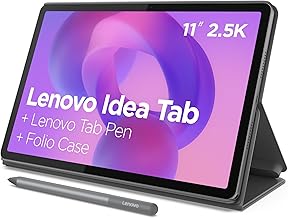
2. Lenovo IdeaTab with Integrated Keyboard — Best All-in-One Productivity Bundle
For students who write a lot — long essays, research papers, project reports — carrying a separate Bluetooth keyboard alongside a tablet is an organizational burden. The Lenovo IdeaTab solves this elegantly by bundling an integrated keyboard directly with the tablet, giving you a genuine two-in-one device from day one. It is a thoughtful package designed specifically around student workflows, eliminating the compatibility guesswork that often accompanies third-party keyboard covers.
The IdeaTab’s display delivers crisp Full HD resolution with accurate color reproduction that makes reviewing spreadsheets and design mockups equally comfortable. The touchscreen responds accurately and fluently to both finger touch and stylus input. Lenovo’s educational software suite — built on top of Android — includes preloaded productivity apps, Google Classroom integration, and a streamlined UI that reduces the clutter common on consumer Android tablets, making it easier to focus on what you are actually studying.
The keyboard itself is a genuine asset rather than an afterthought. The key travel, spacing, and layout have been engineered to support comfortable extended typing sessions — vital for students who spend hours drafting papers or working through bookkeeping exercises or financial statement analyses. Lenovo’s build quality is also reliably solid, with the hinge mechanism holding the display at a consistent, stable angle that does not wobble on a desk or your lap.
✓ Pros
- Integrated keyboard included in the box
- Google Classroom ready out of the box
- Well-designed, comfortable keyboard layout
- Educational software suite pre-loaded
- Solid build quality and stable hinge
- Full HD display with accurate colors
✗ Cons
- Heavier than tablet-only alternatives
- Integrated keyboard limits standalone tablet flexibility
- Less ideal for artists who prefer a clean tablet form factor
Lenovo IdeaTab with Integrated Touchscreen Keyboard
The smart all-in-one choice for students who need a tablet and laptop replacement in a single, streamlined package.
3. Jeazans Tablet with Wireless Keyboard — Best Budget Keyboard Combo
If you want the productivity benefits of a keyboard-and-tablet combo without committing to a higher-priced Lenovo or Samsung bundle, the Jeazans tablet delivers a surprisingly complete package at a fraction of the cost. It ships with a wireless keyboard, offering the flexibility to detach and use the tablet independently — a design advantage over permanently integrated keyboard alternatives.
The Jeazans runs on an octa-core processor paired with enough RAM to handle note-taking apps, browser-based research, and cloud document editing without hiccups. The touchscreen is responsive, and the wireless keyboard connects via Bluetooth with low enough latency to feel natural during active typing. For students who primarily use their tablet for attending online classes, typing lecture notes, and submitting assignments through a browser-based learning management system, this combo covers all the bases.
Portability is where the Jeazans setup truly earns its keep. The combined weight of tablet plus wireless keyboard remains manageable for backpack carry, and the keyboard doubles as a protective cover during transit. Students exploring AI certification programs or following MBA programs without GMAT online will appreciate having a reliable, lightweight typing tool for forum posts, discussion boards, and written case analyses.
✓ Pros
- Wireless keyboard detaches for flexible use
- Octa-core processor handles daily student tasks
- Great value for the keyboard-bundled price
- Keyboard doubles as protective cover
- Expandable storage via microSD
✗ Cons
- Display resolution is modest compared to premium tablets
- Camera performance is average
- Battery life slightly shorter under heavy keyboard use

Jeazans Tablet with Wireless Keyboard & Expansion Ports
A smart budget pick for students who need typing capability, portability, and expandable storage without premium pricing.
4. UMIDIGI Active T1 — Best Rugged Tablet for Students
Most student tablets are built with the assumption that you treat your devices with care. The UMIDIGI Active T1 assumes the opposite — and the result is a tablet built to handle the inevitable drops, splashes, and rough-and-tumble realities of campus life. This is the tablet for students in engineering fieldwork, marine biology, environmental science, or physical education programs — anywhere that a standard glass-and-metal slab is a liability.
The Active T1 carries an IP rating that makes it waterproof against submersion, meaning it survives rain, accidental spills, and even short dunks without complaint. The reinforced corners and ruggedized chassis can withstand drops from table height without cracking — a durability level that would cost two to three times as much on a standard consumer device protected only by a case. For students who study outdoors, conduct field research, or simply have a history of accidentally damaging their tech, the built-in ruggedness removes a persistent source of academic stress.
Beyond durability, the Active T1 delivers a solid octa-core performance profile capable of running research apps, note-taking software, camera tools for field documentation, and standard Android productivity suite. The display is bright enough for outdoor use, and the large battery ensures it can handle extended field sessions without requiring a power source. Students interested in real estate investing principles or other fieldwork-adjacent subjects will find the rugged form factor genuinely useful during site visits and outdoor seminars.
✓ Pros
- Waterproof build — survives splashes and rain
- Drop-resistant ruggedized chassis
- Bright display suitable for outdoor use
- Octa-core processor for reliable daily performance
- Large battery for field-session endurance
- No need for a protective case
✗ Cons
- Heavier than standard consumer tablets
- Display not optimized for creative work
- Rugged chassis limits ultra-slim aesthetics

UMIDIGI Active T1 — Waterproof, Octa-Core Rugged Tablet
Built to survive campus life, field research, and the unexpected. The only student tablet that handles a genuine soaking without a second thought.
5. TECLAST ArtPad Pro — Best Tablet for Note-Taking and Digital Art
The TECLAST ArtPad Pro is the standout recommendation for students whose academic work involves significant handwriting, sketching, or visual content creation. Its 2176×1600 high-resolution display is notably sharper than Full HD competitors at a similar price, delivering text and line quality that makes detailed note-taking feel genuinely satisfying — closer to writing on paper than anything most budget tablets achieve.
The display’s pixel density makes a visible difference when annotating small-text PDFs, drawing circuit diagrams, sketching architectural floor plans, or writing mathematical notation. Colors are reproduced faithfully, which is important for design students who use their tablet for both study and creative work. The TECLAST ArtPad Pro supports stylus input with enough precision for consistent, clean line work — and the palm rejection is tuned to actually work, so you can rest your hand naturally on the screen while writing without triggering accidental marks.
A 10,000mAh battery is another notable specification here — generous enough to support extended creative sessions without the anxiety of running out of charge mid-project. The Widevine L1 certification ensures you can stream course videos, documentary research material, and educational content in Full HD on every major platform. For students who have also invested in quality mechanical pencils and organized study binders — the ArtPad Pro fits naturally into a high-quality stationery-meets-digital workflow.
✓ Pros
- 2176×1600 — exceptional display sharpness
- 10,000mAh battery for marathon study and creative sessions
- Accurate stylus input with palm rejection
- Widevine L1 HD streaming certified
- Great for both note-taking and digital art
- Competitive price for its resolution tier
✗ Cons
- Brand less established globally than Samsung or Lenovo
- Speaker quality is average
- Software updates may lag behind major brands

TECLAST ArtPad Pro — 2176×1600 Display, 10,000mAh, Widevine L1
The sharpest display in its price range. Purpose-built for students who write, sketch, and annotate their way through coursework.
6. COLORROOM Octa-Core Tablet — Best Budget Tablet for Students
Not every student has a flexible budget, and the COLORROOM Octa-Core tablet is proof that you do not need to spend several hundred dollars to get a capable daily study companion. Priced at the accessible end of the spectrum, it delivers a touchscreen Android experience that covers the core bases — browsing, note-taking, streaming, and light productivity — without the financial strain of premium options.
The octa-core processor keeps the interface fluid for everyday tasks, and the inclusion of Widevine L1 certification means you can stream your online course materials and educational video content in Full HD on Netflix, Amazon Prime, and all major platforms — something that budget tablets often skip. The large battery capacity ensures it stays powered through a full day of classes and study hours without needing a top-up. A USB-C charging port and expandable microSD storage round out a practical feature set that punches well above what the price tag suggests.
This is the right choice for students who need a reliable, portable device for reading, note-taking, browsing research databases, and attending virtual lectures — without overcomplicating the decision with features they will not use. Pair it with a set of noise-cancelling headphones and a good desk organizer setup, and you have a clean, cost-effective study station. Students also following financial planning strategies to manage college budgets will appreciate keeping discretionary spending lean here while still getting real academic utility.
✓ Pros
- Exceptional value for budget-conscious students
- Widevine L1 HD streaming — rare at this price
- Octa-core smooth daily performance
- Large battery for all-day use
- USB-C charging port
- MicroSD storage expansion
✗ Cons
- Display resolution below premium tiers
- Not suitable for heavy video editing or 3D work
- Limited brand ecosystem support

COLORROOM Octa-Core Tablet — Widevine L1, Large Battery, USB-C
The smartest spending decision for students on a tight budget — full HD streaming, solid performance, expandable storage, at the most accessible price on this list.
7. Samsung Galaxy Tab (Note-Taking Edition) — Best Samsung for Digital Notebooks
Samsung’s latest Galaxy Tab in the note-taking category refines everything the brand does well — display quality, software ecosystem, S Pen integration, and build robustness — into a tablet that feels designed specifically for students who live inside their notes. The large battery and expandable storage address the two most common pain points of daily academic use, while Samsung’s Notes app has matured into a genuinely excellent digital notebook that syncs across all your Samsung devices seamlessly.
The S Pen experience on Samsung Galaxy Tab devices remains the benchmark by which all other Android stylus systems are judged. Pressure sensitivity, tilt response, and low latency combine to make handwritten notes feel natural and expressive. For students in STEM fields who need to write equations, draw diagrams, and annotate lab results, this level of stylus fidelity is transformative. The large battery means this remains a concern-free companion through a full study day and into the evening library session.
Samsung’s broad compatibility with third-party accessories — keyboard covers, standing cases, screen protectors — gives students flexibility to customize the setup as their study needs evolve. Students who enjoy researching investments alongside their studies may find it useful for referencing investment opportunities or monitoring dividend-paying stocks, all from the same device they use for lecture notes. The Galaxy ecosystem also integrates tightly with Samsung laptops and Galaxy smartphones for seamless file transfer and cross-device clipboard sharing.
✓ Pros
- Best-in-class S Pen integration and stylus experience
- Large battery for all-day note-taking
- Expandable storage for growing file libraries
- Samsung Notes syncs across Galaxy ecosystem
- Premium display quality
- Wide accessory compatibility
✗ Cons
- Higher price point than budget alternatives
- S Pen may need separate purchase on some configs
- Samsung One UI may feel heavy for users wanting a clean Android experience

Samsung Galaxy Tab — Large Battery, Expandable Storage, Note-Taking
The definitive Samsung choice for students who take handwritten notes seriously — S Pen integration, marathon battery, and a mature software ecosystem.
Full Comparison Table: Best Student Tablets at a Glance
Use the table below to compare the seven tablets side-by-side across the specifications that matter most for student use. All tablets support Android, and all are available on Amazon with Prime shipping.
| Tablet | Display | Processor | Battery | Stylus | Keyboard | Widevine L1 | Best For |
|---|---|---|---|---|---|---|---|
| Samsung Galaxy Tab A9+ | 11″ FHD 90Hz | Snapdragon 695 | 7,040mAh | Optional | Optional | ✓ Yes | Overall Best |
| Lenovo IdeaTab | 10.9″ FHD | Octa-Core | 7,700mAh | Optional | ✓ Included | ✓ Yes | Typing Heavy |
| Jeazans Tablet | 10.1″ FHD | Octa-Core | 6,000mAh | Optional | ✓ Wireless | Varies | Budget Typing |
| UMIDIGI Active T1 | 10.1″ IPS | Octa-Core | 8,000mAh | No | No | Varies | Rugged/Field Use |
| TECLAST ArtPad Pro | 10.4″ 2176×1600 | Octa-Core | 10,000mAh | ✓ Active | Optional | ✓ Yes | Notes & Art |
| COLORROOM Octa-Core | 10.1″ HD | Octa-Core | 8,000mAh | Optional | No | ✓ Yes | Budget Pick |
| Samsung Galaxy Tab (Note) | 11″ FHD | Octa-Core/Premium | 8,000mAh+ | ✓ S Pen | Optional | ✓ Yes | Note-Taking |
Matching the Right Tablet to Your Study Style
The “best” tablet is not a single device — it depends entirely on how you learn, what subjects you study, and what your campus lifestyle demands. Below is a practical breakdown of which tablets on this list best serve specific student profiles.
🎓 The General Arts or Business Student
If your coursework is primarily reading, essay writing, and attending online lectures, you do not need the most powerful tablet on the list. The Samsung Galaxy Tab A9+ or COLORROOM Octa-Core will serve you brilliantly. The A9+ is the better long-term investment; the COLORROOM is ideal if budget is the priority. For finance and business students especially, a tablet that handles spreadsheet apps, PDF annotation, and video lectures is more than sufficient — pair it with resources like financial planning guides and investment basics to make the most of your study time.
✏️ The Note-Taking Obsessive
If you are the kind of student who fills notebooks by the dozen, who color-codes lecture materials, and who sketches diagrams to understand complex concepts, the TECLAST ArtPad Pro or Samsung Galaxy Tab (Note-Taking Edition) are your two best options. The ArtPad Pro wins on display sharpness and battery size at a competitive price; the Samsung wins on ecosystem integration and S Pen quality. Either way, you will want to pair your setup with the best mechanical pencils available for when you study away from the screen.
💻 The Essay Writer and Researcher
If you write long-form academic content frequently — dissertations, case studies, literature reviews — the keyboard-enabled options shine. The Lenovo IdeaTab offers a more polished, integrated keyboard experience; the Jeazans offers more budget flexibility with a detachable wireless keyboard. Both transform the tablet into a functional two-in-one that reduces the need to carry a separate laptop to campus. Students exploring the five Cs of effective writing will find the keyboard-first workflow naturally supports clear, structured academic prose.
🌿 The Field Researcher or Outdoor Student
Environmental science, biology, geology, physical education, and agriculture students who spend significant time outside lecture halls should prioritize the UMIDIGI Active T1 without hesitation. The waterproof rating and drop-resistant body provide peace of mind that no standard consumer tablet can match. The cost of repairing or replacing a cracked screen or water-damaged device typically exceeds the price premium of buying rugged from the start. Students interested in understanding how to evaluate investments — including in durable goods — may find wealth management strategies applicable to these purchasing decisions.
Must-Have Accessories to Maximize Your Student Tablet
A tablet alone rarely represents the complete student productivity setup. The right accessories can transform a solid device into a genuinely powerful academic workstation. Here are the accessories most worth investing in alongside your tablet purchase.
Stylus Pen
If your tablet supports active stylus input but does not include one in the box, a quality stylus is the single highest-impact accessory you can add. Samsung’s S Pen is the reference standard for Android tablets; the Apple Pencil for iPads. Budget-friendly third-party active styluses from Staedtler and STAEDTLER are worth researching for Wacom-compatible tablets. The transformation from finger touch to stylus note-taking is significant enough to change how you engage with every lecture.
Keyboard Cover
For tablets that do not already bundle a keyboard, a keyboard cover is the next essential upgrade. It converts your tablet into a genuine productivity machine for extended writing sessions, reduces screen smudging, and provides basic drop protection. Look for covers with backlit keys if you study in dim environments, and ensure the keyboard layout is full-sized enough for comfortable touch-typing.
Protective Case
Unless you chose the rugged UMIDIGI Active T1, a slim folio case or shockproof case is essential. Campus life involves crowded backpacks, busy corridors, and the occasional table edge. A good case absorbs the shocks that glass-and-metal bodies cannot, and a folio case doubles as a stand for desk and lap use.
Noise-Cancelling Headphones
Library distractions, dormitory noise, and campus ambient sound are the enemies of deep focus. A pair of quality noise-cancelling headphones paired with your tablet creates a portable focus bubble that works anywhere. Headphones also improve the video lecture experience dramatically when the tablet’s built-in speakers fall short.
Desk Organizer
Your physical workspace organization directly affects how efficiently you work digitally. A well-organized desk reduces friction and distraction. Explore top-rated desk organizers that complement your tablet-based study setup — keeping charging cables, styluses, and physical notebooks organized alongside your digital tools.
MicroSD Card
For tablets with expandable storage, a microSD card is a low-cost, high-impact upgrade. A 128GB card allows you to download an entire semester’s worth of lecture recordings, textbook PDFs, and project files for offline access — invaluable on flights, commutes, and in locations without reliable Wi-Fi.
Frequently Asked Questions
The Samsung Galaxy Tab A9+ and Samsung Galaxy Tab (Note-Taking Edition) are consistently top-rated for college students, thanks to their balance of display quality, stylus support, battery life, and productivity app ecosystems. For budget-conscious students, the Lenovo IdeaTab and TECLAST ArtPad Pro offer excellent value.
iPads generally offer a more polished ecosystem with better stylus integration (Apple Pencil) and more education-focused apps. Android tablets like Samsung Galaxy Tab give more flexibility, better value at mid-range price points, and often include the S Pen in the box. Choose based on what ecosystem your other devices use — Android syncs better with Android phones, iPads sync better with Macs and iPhones.
For most students, 10–11 inches is the sweet spot — large enough for reading PDFs and taking notes, yet still portable in a backpack. Artists and architecture students may prefer 12–13 inch screens for more canvas space, while students who prioritize portability above all may prefer 8–9 inch devices.
It depends on your workload. If you type long essays or use productivity software heavily, a keyboard cover converts the tablet into a laptop replacement. Many students use the tablet alone for note-taking and reading, then pair it with a Bluetooth keyboard for longer writing sessions. The Lenovo IdeaTab and Jeazans bundle keyboards directly, simplifying this decision.
64GB is a minimum, but 128GB or more is recommended if you store videos, presentations, and offline course materials. Many Android tablets support microSD cards for expandable storage, which is a cost-effective upgrade. Students storing lecture recordings and project files regularly will find 128GB fills up faster than expected.
Look for at least 8–10 hours of screen-on time. Most modern tablets in the 10–12 inch range hit 8–12 hours under moderate use — enough for a full day of classes without hunting for an outlet. The TECLAST ArtPad Pro with its 10,000mAh battery is especially strong in this category.
Yes, it is one of the best in its price range. The TECLAST ArtPad Pro features a 2176×1600 high-resolution display — notably sharper than Full HD — and supports stylus input with palm rejection, making it an excellent choice for handwritten notes, sketching, and PDF annotation. The 10,000mAh battery also supports marathon study sessions.
For many students — especially those in humanities, business, or creative fields — a tablet with a keyboard cover can replace a laptop for 80–90% of daily tasks. Programming, heavy data analysis, or running desktop-only software still requires a dedicated laptop. Students in those fields are better served using a tablet as a complement to their laptop rather than a full replacement. Check out our finance student laptop guide for pairing options.
The UMIDIGI Active T1 is the clear answer for waterproof durability among the tablets on this list. It carries a genuine IP rating for water submersion resistance, reinforced corners for drop protection, and a bright display for outdoor use — making it ideal for students in environmental science, biology, physical education, or any program with significant fieldwork.
Absolutely. Budget tablets under $200 have improved dramatically over recent product generations, with octa-core processors, Full HD displays, and increasingly Widevine L1 HD streaming. For note-taking, reading, and online learning, brands like COLORROOM and Jeazans offer solid performance at accessible prices. The COLORROOM in particular stands out for including Widevine L1 at a budget price point.
Widevine L1 is Google’s highest DRM certification level, enabling Full HD and HDR playback on streaming platforms like Netflix, Amazon Prime Video, Disney+, and most online course platforms. Without L1 certification, even if a tablet has a great display, streaming services cap video quality at 480p or 720p. Students who rely on video-based learning should always verify a tablet’s Widevine level before buying.
It varies by model and configuration. Some Samsung Galaxy Tab models include an S Pen; many budget tablets do not. The TECLAST ArtPad Pro is designed with stylus support and some bundles include a stylus. Always check the “what’s in the box” section of the Amazon listing before purchasing, especially if stylus functionality is essential to your workflow.
Final Verdict: Which Student Tablet Should You Buy?
After reviewing all seven tablets in depth, the Samsung Galaxy Tab A9+ stands as the best overall recommendation for most students — it delivers the strongest combination of display quality, performance, audio, software ecosystem, and long-term reliability at a price that is competitive without asking you to compromise meaningfully on any major specification.
For students who prioritize note-taking precision above everything else, the TECLAST ArtPad Pro’s 2176×1600 display and 10,000mAh battery represent exceptional value per dollar. For budget-first buyers, the COLORROOM Octa-Core with its Widevine L1 certification is an honest, capable device that covers all the essentials. And for students who spend significant time outdoors or in demanding environments, the UMIDIGI Active T1’s rugged waterproof construction is a genuinely smart long-term investment.
Whatever you choose, a tablet will serve you well as a note-taking canvas, research companion, and lecture sidekick through every year of your academic career. Pair it with the right accessories, a structured approach to financial planning to protect your study budget, and a clear understanding of your own learning style — and your tablet becomes one of the smartest educational investments you can make.
🛒 Browse All Student Tablets on Amazon