Best Laptops for Finance Students — Built for Spreadsheets, Not Just Lectures
From Bloomberg Terminal to massive Excel models and multi-tab financial research, your laptop needs to keep pace with the most demanding coursework in any business school. Here is every pick worth your consideration.
Why the Right Laptop Makes or Breaks Finance Coursework
Finance students operate in a different computing environment than most of their peers. While a communications major might get through their degree on a basic $300 laptop running Google Docs, a finance student faces a fundamentally different set of demands: large Excel models that chew through RAM, financial databases that require stable internet plus processing headroom, Bloomberg Terminal sessions that need a proper Windows environment, and the constant multitasking of research PDFs, spreadsheets, and financial calculators running simultaneously.
The wrong laptop does not just slow you down — it actively costs you grades. Waiting for a spreadsheet to recalculate, watching your laptop throttle during a timed exam, or discovering that your machine is incompatible with a critical piece of school-licensed software are real scenarios that happen to students who bought on price alone.
That said, you also do not need a $2,000 gaming machine. Finance coursework sits in a very specific performance sweet spot — and understanding that sweet spot is exactly what this guide covers. Whether you are working through accounting fundamentals, building financial models, or wrestling with the mechanics of double-entry bookkeeping, the right hardware lets you focus on the content rather than fighting your tools.
What Finance Workloads Actually Demand from a Laptop
Before jumping to product recommendations, it is worth being precise about what finance coursework actually asks of a computer — because the requirements are specific and different from general student use.
Microsoft Excel: The Non-Negotiable Core
Excel is not optional for finance students. It is the primary tool for financial modeling, valuation analysis, accounting problem sets, and data analysis across virtually every finance course. Large workbooks with complex formulas, pivot tables, multiple sheets, and data validation rules consume significant RAM and processor cycles. A laptop that struggles with Excel will struggle throughout your entire degree.
Excel’s desktop version (required for finance — the web version does not support all features) is Windows-native, which is one reason Windows laptops have a natural advantage for finance students. Understanding Excel vs. Google Sheets and where each fits in a finance workflow is useful context for new students setting up their study environment.
Financial Databases and Research Platforms
Bloomberg Terminal, FactSet, Refinitiv (formerly Thomson Reuters Eikon), and similar platforms are Windows-only or Windows-primary applications. Most universities provide terminal access through their finance labs, but students who want to work from home or need off-campus access will need a compatible Windows machine.
Accounting Software
Courses covering QuickBooks, Xero, and similar platforms increasingly run in browsers, reducing compatibility concerns. However, some older or specialized accounting software still requires Windows. Checking your specific program’s software requirements before buying is always worth doing.
Multitasking Load
A typical finance study session might involve: Excel with a complex model, a PDF of course notes, three browser tabs with financial data sources, a financial calculator application, and a video lecture or Zoom session running in the background. This is a genuine multitasking workload, and it is where RAM becomes the differentiating spec.
Key Specs: What Every Finance Student Should Know
Shopping for a laptop by comparing spec sheets without context is a fast path to a bad decision. Here is what each specification actually means for a finance workload.
RAM — The Most Critical Spec
RAM determines how many tasks your computer can run simultaneously without slowing down. For finance students, 8GB is the absolute floor and 16GB is the smart target. Large Excel models with thousands of rows and complex formulas, combined with open browser tabs and a video lecture, will push 8GB systems into uncomfortable territory — especially as the semester progresses and models grow more complex.
Processor — Intel Core i5/i7 or AMD Ryzen 5/7
Modern Intel Core i5 and AMD Ryzen 5 processors handle finance coursework with ease. You do not need an i9 or Ryzen 9. The key is to avoid the bottom-tier processors (Intel Celeron, Pentium, or very old Core i3 models) that appear in budget machines — these will create frustrating bottlenecks when Excel needs to recalculate a complex formula across thousands of cells.
Storage — SSD Is Non-Negotiable
A solid-state drive (SSD) dramatically improves startup time, file-loading speed, and application responsiveness compared to traditional hard drives. 256GB is workable if you use cloud storage consistently. 512GB provides comfortable headroom for offline storage of large datasets and software installations.
Display — Size and Resolution
A 1080p (Full HD) display is the minimum for comfortable spreadsheet work. Higher resolutions are a bonus, but resolution matters less than screen real estate. A 14- or 15-inch screen lets you view more rows and columns simultaneously without constant scrolling — which genuinely speeds up financial modeling work.
Battery Life — Campus Reality
A full day of classes, study sessions, and group work without hunting for an outlet requires 8+ hours of real-world battery life. Manufacturers’ battery claims are typically optimistic; look for laptops with 10+ hour rated battery life to ensure you clear the 8-hour mark under normal use.
Don’t overspend on GPU: Finance coursework is CPU and RAM-bound, not GPU-bound. A laptop marketed as a “gaming” machine with a dedicated GPU costs significantly more — and that GPU does almost nothing for Excel, Bloomberg, or financial modeling. Put the budget toward RAM and battery life instead.
Our Top 5 Laptops for Finance Students
These five laptops were selected based on real finance student workloads — specifically their performance with Excel, multitasking capability, battery life for long campus days, and value relative to their price point. Each pick is on Amazon with the direct link below.

Pros
- Extremely lightweight for campus carrying
- Thin, clean design that travels well
- FHD display is bright and usable
- Most affordable entry point on this list
- Solid for note-taking and basic coursework
Cons
- Intel Celeron struggles with complex Excel models
- 4GB RAM is below ideal for multitasking
- 64GB eMMC storage is very limited
- Windows S mode restricts software installs
- Not suited for heavy financial modeling
The ASUS VivoBook L510 is an honest starting point for students whose finance coursework is still at the foundational level — introductory accounting, economic theory, and lecture-heavy modules. Its Intel Celeron processor and 4GB RAM will handle basic spreadsheets and note-taking apps without breaking a sweat. However, it will show its limits once you progress to advanced financial modeling, large pivot table analysis, or running multiple data-intensive applications at once.
One important note: Windows S mode restricts you to apps downloaded from the Microsoft Store only. You will want to switch out of S mode immediately upon setup to allow full Excel and browser installations. This is a free, one-way switch — but it is essential for finance use.
Best for: first-year students on a strict budget who plan to upgrade after their first year, or students whose program is largely theory-focused early on.
ASUS VivoBook L510KA
Ultra-light Windows laptop — best entry-level pick for budget-conscious finance students.
Buy on Amazon →
Pros
- 16GB RAM handles any finance workload
- 512GB SSD — generous storage for datasets
- Microsoft Copilot AI key for productivity
- Intel Core Ultra delivers excellent performance
- Full Windows 11 — all software compatible
Cons
- Higher price point than budget options
- 15.6″ size is less portable than 13/14″
- Build quality is functional, not premium
- Battery life varies with load
The HP Flagship Student and Business Laptop is our top overall pick for finance students, and the reasoning is straightforward: it ships with 16GB RAM and a 512GB SSD at a price that still makes sense for a student budget. The Intel Core Ultra processor belongs to a generation specifically designed for AI-assisted productivity tasks — including the Microsoft Copilot integration that finance students will find genuinely useful for research summarization and report drafting.
For the workload we described earlier — multiple Excel sheets, browser tabs, video lectures, and financial research tools running simultaneously — this laptop has legitimate headroom. It is not the slimmest machine on this list, and a 15.6-inch form factor means your backpack needs to accommodate it, but the screen real estate is valuable when you are working through a financial model that needs to show two sheets side by side.
If you are interested in building skills beyond coursework and looking at the best investment strategies, a laptop like this gives you the power to run portfolio analysis tools and financial planning software without throttling.
HP Flagship Student & Business Laptop
16GB RAM + 512GB SSD + Intel Core Ultra — our top recommendation for finance and accounting students.
Buy on Amazon →
Pros
- Quad-core processor handles spreadsheets well
- HP’s strong build quality and reliability
- Full Windows 11 for complete software access
- Good price-to-performance ratio
- Decent display for coursework
Cons
- 8GB RAM may feel tight with heavy multitasking
- 256GB storage fills up with case files + datasets
- Not the most portable size
- No standout premium features
The HP Student Laptop with a quad-core processor sits in the sweet spot of the market — capable enough to handle genuine finance coursework without carrying a premium price tag. Its quad-core CPU provides a meaningful step up from entry-level processors, and HP’s reputation for solid build quality means it is likely to last through your full degree without hardware failures.
The 8GB RAM is adequate for most undergraduate finance workloads, though students heading into advanced financial modeling courses or planning to run Bloomberg-style platforms will feel the ceiling. Using OneDrive or Google Drive aggressively for file storage will offset the 256GB SSD limitation and make this machine feel more spacious in practice. Our guide on best financial calculators pairs well with a machine like this — the combo of a reliable mid-range laptop and a quality calculator covers most of what you need at the desk and in the exam room.
HP Student Laptop — Quad-Core
Reliable performance from HP’s trusted student line — a solid choice for most undergraduate finance programs.
Buy on Amazon →
Pros
- Fingerprint login adds quick security
- User-upgradeable RAM — future-proof
- USB-C charging is convenient
- FHD display for clear spreadsheet work
- Good value relative to spec sheet
Cons
- Lesser-known brand — limited long-term support data
- Fewer service center options than HP/ASUS
- Build feel is not as premium as branded competitors
- Community support forums are smaller
The Auusda T152A earns its “dark horse” label because it includes something most laptops at this price point skip: user-upgradeable RAM and a built-in fingerprint reader. For a finance student who wants to start with adequate specs and upgrade memory as coursework intensifies, the ability to add RAM without buying a new machine is genuinely valuable.
The fingerprint reader is a small but meaningful feature for finance students who regularly access banking apps, financial portals, and university systems requiring frequent secure logins. Biometric authentication on a laptop you carry everywhere removes a low-level but constant friction point.
The caution here is brand reliability data — Auusda is a newer market entrant, and there is less long-term durability data compared to HP, ASUS, or Lenovo. For students who want to buy with more confidence in long-term support, the HP options on this list are lower-risk alternatives.
Auusda T152A — Upgradeable + Fingerprint
A compelling dark-horse pick with future-proof upgradeable RAM and biometric security.
Buy on Amazon →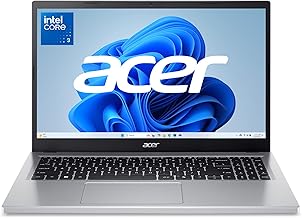
Pros
- 16GB RAM and 512GB SSD — excellent headroom
- IPS display quality for long work sessions
- Intel Core i5 handles all finance software
- Intel Xe graphics for smooth rendering
- Acer’s solid mid-tier build quality
Cons
- 15.6″ size reduces portability
- Heavier for daily campus transport
- Design is functional rather than stylish
- Battery life moderate under load
The Acer Aspire AG15 earns the “best display” crown for a specific reason: the IPS panel at 15.6 inches gives finance students the screen real estate and color accuracy to work with large spreadsheets, financial charts, and presentation slides without eye strain during extended study sessions. Paired with 16GB RAM and a 512GB SSD, this is a genuinely capable machine for serious coursework.
Where it trades off is portability. At 15.6 inches and the weight that comes with it, this is a laptop best suited to students who work primarily from a desk — home, library, or classroom — rather than students who want a light machine for moving between buildings all day. If you pair it with the right study setup and a good desk organizer, it becomes an excellent home base for finance coursework.
Intel Xe integrated graphics handle the visual workload of financial charts and presentations smoothly, and the Core i5 processor has plenty of headroom for the multitasking demands we outlined earlier. This is a strong secondary recommendation to the HP Flagship for students who prioritize display quality.
Acer Aspire AG15-32P-39R2
16GB RAM, 512GB SSD, and a vivid IPS display — ideal for desk-based finance students.
Buy on Amazon →Side-by-Side Spec Comparison
All five picks together in one table so you can see exactly where each machine stands on the specs that matter most for finance coursework.
| Laptop | CPU | RAM | Storage | Display | Finance Fit | Best For |
|---|---|---|---|---|---|---|
| ASUS VivoBook L510 | Intel Celeron | 4GB | 64GB eMMC | 15.6″ FHD | 72/100 | Light coursework, Y1 budget |
| HP Flagship | Intel Core Ultra | 16GB | 512GB SSD | 15.6″ FHD | 91/100 | Overall best — all years |
| HP Student Quad-Core | Quad-Core CPU | 8GB | 256GB SSD | 15.6″ | 83/100 | Best value mid-range |
| Auusda T152A | Intel | Upgradeable | SSD | 15.6″ FHD | 79/100 | Future-proof, biometric |
| Acer Aspire AG15 | Intel Core i5 | 16GB | 512GB SSD | 15.6″ FHD IPS | 82/100 | Display quality, desk use |
Clear Winner for Most Finance Students
The HP Flagship Student and Business Laptop is the clearest recommendation for the majority of finance students. Its 16GB RAM and 512GB SSD put it well above the minimum threshold, the Intel Core Ultra processor handles all financial software without throttling, and it ships with full Windows 11 for complete software compatibility. If your budget can reach it, this is the machine to buy.
Finance Software Compatibility Guide
Knowing which tools you will encounter during your degree — and whether your laptop runs them natively — is more important than most students realize before they buy.
| Software | Windows | macOS | Browser | Notes for Finance Students |
|---|---|---|---|---|
| Microsoft Excel (full) | Yes | Yes | Limited | Desktop version required for advanced functions |
| Bloomberg Terminal | Yes | No | No | Windows only — most universities have lab access |
| QuickBooks Desktop | Yes | No | QBO web | Desktop version is Windows-only; Online version cross-platform |
| QuickBooks Online | Yes | Yes | Yes | Fully browser-based — any platform works |
| TurboTax Desktop | Yes | Yes | Online ver. | Both platforms supported — see our TurboTax vs H&R Block guide |
| MATLAB / Stata | Yes | Yes | No | Common in quantitative finance programs |
| SAP / Oracle Finance | Yes | Partial | Web client | Enterprise systems taught in advanced programs |
| Google Sheets | Yes | Yes | Yes | Good for collaboration, not full Excel replacement |
| Power BI | Yes | No | Web | Desktop app is Windows-only |
The software compatibility picture strongly favors Windows for finance students. Bloomberg Terminal, QuickBooks Desktop, and Power BI are all Windows-exclusive in their full desktop versions. A Windows laptop ensures you will never encounter a software compatibility wall during your program — whether you are working through the golden rules of accounting or building complex financial models in advanced coursework.
Budget Breakdown: What to Expect at Each Price Range
Finance students are working with real budget constraints. Here is an honest look at what different spending levels actually get you — and where the smart money sits.
| Budget Range | What You Get | Finance Suitability | Recommendation |
|---|---|---|---|
| Under $300 | Celeron/Atom, 4GB RAM, eMMC storage | Marginal | Avoid for finance-specific coursework |
| $300–$500 | Core i3/Ryzen 3, 8GB RAM, 256GB SSD | Adequate | Works for Y1–2; may struggle later |
| $500–$700 | Core i5/Ryzen 5, 8–16GB, 256–512GB | Good | Sweet spot for most finance students |
| $700–$1,000 | Core i5/i7, 16GB+, 512GB+, better display | Excellent | Covers all 4 years plus early career |
| $1,000+ | Premium build, ultrabook form, 16GB+ | Overkill | Only if longevity and premium UX matter most |
The $500–$700 range is the genuine sweet spot for most finance students. Machines in this bracket typically ship with 8–16GB RAM, a capable mid-range processor, and 256–512GB SSDs — which covers the full undergraduate finance curriculum comfortably. Students looking at graduate finance programs or CFA exam preparation should aim for the $700–$1,000 range to ensure the machine keeps pace through advanced quantitative work.
Understanding budgeting principles applies to tech purchases too. The same logic from our guide on prioritizing your budget effectively applies here: buy once for the full need, not twice for a series of inadequate steps.
HP Flagship — Our Top Finance Student Pick
16GB RAM, 512GB SSD, Intel Core Ultra. The most complete laptop for finance and accounting students on this list.
View on Amazon →Mac vs. Windows for Finance Students: The Definitive Answer
The Mac vs. Windows debate in finance is not purely a performance question — it is a software compatibility and ecosystem question. Here is the complete picture.
| Factor | Windows Laptop | MacBook |
|---|---|---|
| Bloomberg Terminal | Full compatibility | Not compatible |
| Microsoft Excel | Full feature parity | Minor feature gaps |
| QuickBooks Desktop | Yes | No (use Online only) |
| Power BI Desktop | Yes | No |
| Battery Life | Varies (6–14hr) | Excellent (10–18hr) |
| Build Quality | Varies by brand | Consistently premium |
| Price/Spec Value | Significantly better | Premium pricing |
| Virus Risk | Moderate (manage with AV) | Lower |
| Long-term Durability | Brand dependent | Excellent track record |
The honest answer for most finance students is: buy Windows. Not because MacBooks are inferior machines — they are objectively excellent — but because the finance ecosystem was built on Windows, and that reality creates real friction for Mac users throughout their degree. Bloomberg Terminal alone is a Windows-only requirement that affects any student in a program with capital markets or investment analysis coursework.
If you already own a MacBook or are deeply committed to the Apple ecosystem, you can navigate a finance degree on macOS by using your university’s Bloomberg lab, running Windows via virtualization for specific software, and relying on the web versions of accounting platforms. But this creates ongoing overhead that a Windows machine eliminates entirely. For students also considering the best laptops for MBA programs, the same logic applies — though MBA students sometimes have more flexibility, and the brand signaling of a MacBook matters in certain contexts.
Essential Accessories for Finance Students
The right accessories can transform a good laptop into a great workstation — and for finance students specifically, a few investments pay significant dividends in productivity.
External Monitor
Working with large Excel models on a single 15-inch screen is a constant source of friction. A second monitor — even a budget 24-inch FHD display — lets you keep your spreadsheet on one screen and your research, course notes, or Bloomberg data on the other. Students who build financial models report this as the single biggest productivity upgrade to their study setup.
External Numerical Keypad
Most 15-inch laptops include a built-in number pad, but if you opt for a 13 or 14-inch machine for portability, an external USB numeric keypad is invaluable for data entry speed in Excel. Prices start under $15 — it is one of the best-value upgrades available.
Financial Calculator
Most finance and CFA exams permit only specific approved calculators — primarily the TI BA II Plus and the HP 12C. These cannot be replaced by your laptop during exams, making a quality financial calculator a non-negotiable purchase. Our best financial calculators guide covers every option in detail.
Scientific Calculator
For statistics, econometrics, and quantitative methods modules, a scientific calculator is also useful. Our guide to the best scientific calculators has picks at every price point for students who need both types.
Noise-Cancelling Headphones
Library study sessions, video lectures, and online exams all benefit from quality audio isolation. Our noise-cancelling headphones guide covers the best options for extended study use without fatigue.
Laptop Bag or Padfolio
Finance students attend presentations, internship interviews, and professional networking events where appearance matters. A quality leather padfolio or professional laptop bag signals the right image. Our guide to the best leather padfolios covers options from budget to investment-grade.
Printer
Printing financial reports, case studies, and exam submissions is an ongoing need. An all-in-one printer handles printing, scanning (for receipts and documents), and copying. Our best all-in-one printers guide has recommendations across budgets.
Buying Tips and Mistakes to Avoid
Finance students make the same laptop purchasing mistakes repeatedly. Knowing these in advance saves you money and frustration.
Mistake #1: Buying the Cheapest Machine Available
The temptation to spend $250 on a laptop “just to get through first year” is understandable but expensive in the long run. Budget laptops with 4GB RAM and eMMC storage will create a terrible experience by the middle of your second year, forcing a replacement purchase. The math works out better to spend $600 once than $250 twice.
Mistake #2: Prioritizing Looks Over Specs
Ultra-thin, stylish laptops often achieve their form factor by cutting battery size and cooling efficiency. A laptop that overheats and throttles during a three-hour exam prep session is a problem that cosmetic appeal cannot solve.
Mistake #3: Ignoring Battery Life
Campus life involves moving between buildings, studying in locations without power outlets, and sitting through three-hour lectures. A laptop with five hours of real-world battery life forces you to carry a charger everywhere and creates anxiety during critical moments. Prioritize battery ratings of 10+ hours.
Mistake #4: Not Checking Your Program’s Software Requirements
Your university’s finance department will often publish a recommended or required software list. Check it before buying. If Bloomberg Terminal, specialized econometrics software, or a specific accounting platform is on the list, confirm compatibility with the machine you are considering. This takes 10 minutes and can save you significant frustration.
Mistake #5: Buying a Mac Without Checking Software Requirements
As covered in the Mac vs. Windows section — macOS is an excellent platform but creates genuine compatibility issues for finance-specific software. Verify your program’s requirements before defaulting to a MacBook based on brand preference alone.
Pro tip: Check whether your university offers Microsoft 365 (including full Office suite) for free through a student license. Most universities do — which means you do not need to budget separately for Excel or Word. Log into your university email at office.com to check what is included in your student account.
Good financial decisions start before you are formally enrolled in a finance program. Applying the same financial planning principles you will learn in your coursework to your laptop purchase — total cost of ownership over the degree, not just sticker price — is already thinking like a finance professional.
Undergraduate vs. MBA Laptop Requirements
The laptop needs of an undergraduate finance student and an MBA student differ in some meaningful ways — and understanding those differences helps both groups make better buying decisions.
MBA students face higher workload demands and different context demands than undergraduates. Case study analysis, complex group projects, consulting-style presentations, and the professional optics of MBA programs all push toward a higher-quality machine. Many top MBA programs also expect students to have Bloomberg Terminal access outside of school — which requires a capable Windows machine (or a well-spec’d Windows partition on a Mac).
The MBA context also shifts the brand equation. When you are presenting in front of a class, meeting with recruiting firms, or sitting in a boardroom strategy session, the visible brand of your laptop carries meaning. This is not a trivial consideration — it is part of the professional image investment that MBA students are consciously making. For the full picture on graduate finance program requirements, our guide to the best MBA programs in the US covers academic context, and our best laptops for MBA students covers the gear side in detail.
Acer Aspire AG15 — Best Display Pick
16GB RAM, Intel Core i5, IPS display — excellent for finance students who work from a primary desk setup.
View on Amazon →Final Verdict: The Right Laptop for Every Finance Student
After covering specs, software, budgets, and use cases, the conclusions sharpen into a few clear recommendations that match your situation.
For the vast majority of finance and accounting students, the HP Flagship Student and Business Laptop is the clear recommendation. It ships with the specs that cover your full degree, avoids every compatibility issue, and delivers the kind of performance that makes long study sessions productive rather than frustrating. If your budget is tighter, the HP Student Quad-Core model gives you HP’s reliability and solid performance at a lower price — and the step-down is manageable for most undergraduate programs.
Your laptop is not just a study tool — it is the platform on which you will learn to read balance sheets, build your first financial models, work through cash flow statements, and understand income statement analysis. Getting the hardware right from the start means you spend your cognitive energy on the finance, not on fighting your tools.
Finance is also about long-term thinking. The same principle applies here: buy the machine that serves the full four years, not just the first semester. The incremental cost of a better laptop pays for itself many times over in reduced friction, full software compatibility, and a machine that keeps pace with your skills as they grow.
Frequently Asked Questions
-
Finance students need at minimum 8GB RAM (16GB preferred), an Intel Core i5 or AMD Ryzen 5 processor, 256GB SSD storage, and a 1080p display. Excel, financial modeling software, and multitasking with multiple browser tabs and PDFs demand RAM and processor headroom above entry-level specs. Battery life of 8+ hours is also a practical necessity for campus use.
-
Both platforms work, but Windows laptops have a clear advantage for finance students. Bloomberg Terminal, QuickBooks Desktop, Power BI Desktop, and some specialized academic software are Windows-only. MacBooks offer superior build quality and battery life, but create real compatibility friction throughout a finance degree. Unless you have specific reasons to prefer macOS, a Windows laptop is the lower-risk choice for finance students.
-
8GB RAM is the practical minimum for finance coursework, but 16GB is strongly recommended. Large Excel models with complex formulas, combined with open browser tabs, PDFs, and a video call can push 8GB systems into uncomfortable multitasking territory. Models with large datasets, pivot tables, and multiple interconnected sheets can consume 4–6GB of RAM on their own, leaving little headroom for other applications.
-
No. Finance and accounting coursework does not require a dedicated GPU. Integrated graphics from modern Intel or AMD processors handle spreadsheets, presentations, video calls, and web browsing without issues. A dedicated GPU adds cost and heat to a laptop without providing meaningful benefit for typical finance workloads. Put that budget toward RAM or battery life instead.
-
Bloomberg Terminal runs on Windows only. You need a Windows laptop with at minimum an Intel Core i5 or Ryzen 5 processor, 8GB RAM, and a reliable internet connection. A 15-inch display is preferred for Bloomberg’s multi-panel layout, but a well-configured 13 or 14-inch laptop connected to an external monitor also works well. Most finance programs provide Bloomberg access through on-campus terminals, but students who want off-campus home access need a qualifying Windows machine.
-
256GB SSD is sufficient for most finance students who store large files in cloud services and stream course materials rather than downloading everything locally. If you plan to store large financial datasets, run heavy statistical software like MATLAB, maintain large offline libraries of case studies, or run a Windows virtual machine on a Mac, 512GB is a more comfortable choice for the long term.
-
The HP Student Quad-Core Laptop offers the best combination of reliability, processing capability, and value for finance students on a tight budget. The ASUS VivoBook L510 is an even lower-cost entry point but comes with meaningful spec limitations that will show in later coursework. If you can stretch to the $500–$700 range, the HP Student Quad-Core is the smarter longer-term investment.
-
A number pad is genuinely useful for finance students who do heavy data entry and spreadsheet work — it speeds up numerical input significantly. Most 15-inch laptops include one built-in. If you prefer a lighter 13 or 14-inch laptop, an external USB numeric keypad costs under $15 and provides the same benefit without the added weight of a larger machine. It is one of the most cost-effective accessories a finance student can buy.
-
A Chromebook is not recommended for finance students. Bloomberg Terminal, MATLAB, QuickBooks Desktop, advanced Excel with full add-in support, and many specialized academic finance platforms do not run on ChromeOS. A Windows laptop provides complete compatibility with every tool you will encounter during your degree without workarounds or limitations.
-
A touchscreen is not necessary for finance coursework. Most finance work is keyboard-heavy — data entry, formulas, report writing — where a trackpad or mouse delivers more speed and precision than touch input. Touchscreens add cost, can reduce battery life, and introduce display glare in some configurations. Skip it and allocate the budget to RAM or battery life instead.
-
A well-specced laptop should last through a full four-year undergraduate degree and ideally carry through your first years of professional work. Choosing a model with at least 16GB RAM, a current-generation processor, a fast SSD, and a reputable build quality brand — HP, ASUS, Acer, Lenovo, Dell — gives you the best chance of reaching that lifespan without forced upgrades. Buying underpowered to save money up front often results in a replacement purchase by year two or three, which costs more in total.
Conclusion: Invest in the Right Tool From Day One
Finance is a demanding discipline, and your laptop is the tool through which you engage with nearly all of it. The wrong machine does not just inconvenience you — it slows your learning, limits your software options, and creates unnecessary friction during some of the most cognitively demanding periods of your academic career.
The good news is that the right laptop for a finance student does not need to be expensive. The $500–$700 bracket contains genuinely capable machines — and our top pick, the HP Flagship Student and Business Laptop, delivers 16GB RAM and 512GB SSD at a price that makes financial sense even on a student budget.
Buy Windows, prioritize RAM and battery over GPU and aesthetics, verify your program’s software requirements before you buy, and think in terms of total cost over the full degree rather than sticker price alone. These are the same principles you will be applying to financial decisions throughout your career — starting with your laptop purchase is a satisfying way to put them to work immediately.
Find Your Perfect Finance Student Laptop
All five picks are on Amazon with real specs and competitive pricing. Start with our top recommendation or browse all options to find the right fit for your budget and program.