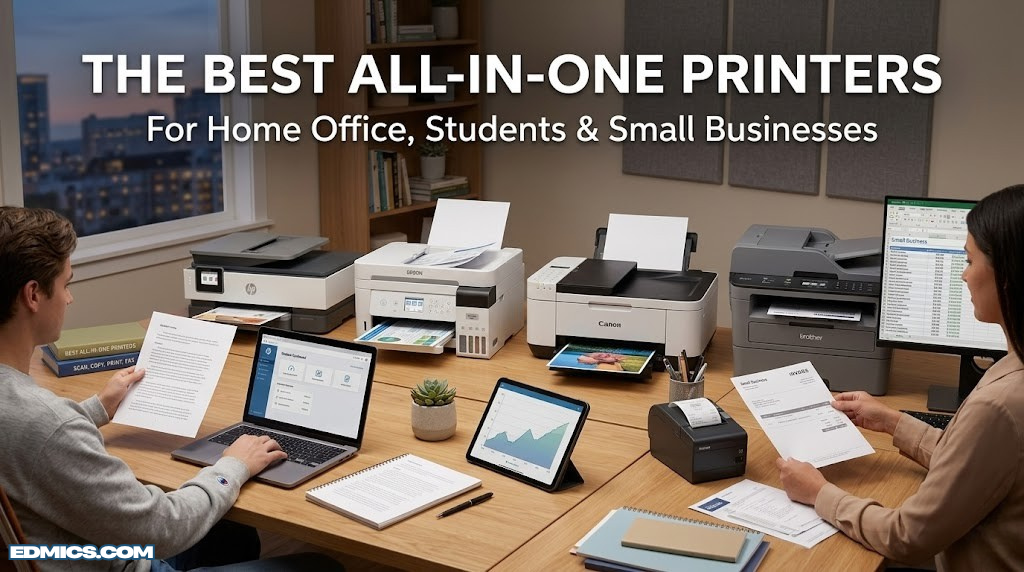
The Best All-in-One Printers for Home Office, Students & Small Businesses
What Is an All-in-One Printer?
Whether you’re a student printing lecture notes and essays, a remote worker handling contracts and reports, or a small business owner scanning receipts and invoices, an all-in-one printer (AIO) simplifies your workflow considerably. These multifunction devices have matured dramatically — today’s models offer Wi-Fi, automatic duplex printing, touchscreen control panels, mobile app integration, and cloud scanning capabilities that would have seemed extraordinary just a decade ago.
The challenge isn’t whether to buy an AIO printer — it’s which one to buy. The market is packed with options from Brother, Epson, Canon, and HP, each targeting slightly different users with different ink philosophies, speed profiles, and feature sets. Some models prioritize low upfront cost; others trade a higher purchase price for dramatically lower ink costs over time. Choosing the wrong printer can cost you significantly more in consumables than the device itself.
This guide cuts through the noise. We’ve evaluated six of the top all-in-one printers available right now — comparing print quality, ink economy, feature depth, and value — so you can make a genuinely informed decision. If you’re also looking to streamline your broader home office setup, don’t miss our guides to the best desk organizers and best cable management boxes that pair perfectly with a tidy printing station.
Let’s start by covering the foundational concepts, then dive into the reviews. If you’ve already done your research and just want to see the head-to-head comparison, jump to the full comparison table.
Why Choose an All-in-One Over Separate Devices?
It’s a fair question. If you already have a decent standalone printer and scanner, why consolidate? The answer comes down to three things: space, cost, and simplicity.
Space Efficiency
A quality flatbed scanner, a printer, and a fax machine combined would occupy a substantial portion of your desk or shelf. A modern AIO typically takes up no more room than a standard home printer — sometimes less, since manufacturers have spent years optimizing form factors. For home offices, dorm rooms, and small business setups where every square foot matters, this is a genuine advantage.
Cost Consolidation
Buying three separate devices — even budget ones — quickly adds up. A mid-range AIO printer at $150–$300 replaces hardware that could individually run $80 for a standalone printer, $70 for a basic scanner, and another $50 for a fax-capable device. Beyond hardware savings, you eliminate the need to manage multiple power supplies, cables, and software drivers.
Workflow Integration
Modern AIOs come with unified software ecosystems. From a single app — HP Smart, Epson Connect, Canon PRINT, or Brother iPrint&Scan — you control every function on the device. You can scan directly to cloud storage, send a fax from the same touchscreen you used to print, and manage ink levels in one place. This is a quality-of-life improvement that standalone devices simply can’t match.
If your printing needs are primarily documents (contracts, reports, schoolwork), a laser AIO will save you money long-term. If you print photos or need versatility, an inkjet or supertank AIO is the better choice. We break down exactly which type fits your needs in the next section.
Just as smart financial planning means consolidating your tools and reducing unnecessary overhead — as discussed in our guide to improving business efficiency — choosing the right multifunction printer is about maximizing output while minimizing inputs. The same principle applies whether you’re managing a balance sheet or a print queue.
The feature grid below summarizes the core functions you get in a quality all-in-one printer:
Color or monochrome documents and photos at home office speeds
Scan
Flatbed scanning with ADF for multi-page documents
Copy
One-touch copying without a connected computer
Wi-Fi & Mobile
AirPrint, Mopria, and companion app support
Duplex
Automatic two-sided printing to save paper
Cloud Integration
Scan to Google Drive, Dropbox, and email
Inkjet vs. Laser vs. Supertank: Which Technology Is Right for You?
Before getting into individual product reviews, it’s critical to understand the three printing technologies you’ll encounter in the AIO market. Choosing the wrong type — not just the wrong model — is the most common mistake buyers make.
Inkjet All-in-One Printers
Inkjet printers work by spraying microscopic droplets of liquid ink onto paper through tiny nozzles. They excel at color accuracy, photo printing, and handling a variety of media types including glossy photo paper, envelopes, and labels. The tradeoff is ink cost: standard cartridges run out faster than you’d expect, and replacement ink is notoriously expensive on a per-page basis.
Inkjet AIOs are ideal for: households with mixed printing needs, students who occasionally need color prints, and anyone who values photo quality. The Canon PIXMA TS6520 and HP DeskJet 4255e in this guide are classic inkjet AIOs.
Laser All-in-One Printers
Laser printers use a laser beam to electrostatically transfer toner powder onto paper, then fuse it with heat. The result is crisp, sharp text that is genuinely superior to inkjet for monochrome documents. Toner cartridges last significantly longer than ink cartridges, and laser printers handle high-volume printing without the maintenance issues that can plague inkjet heads.
Laser AIOs are ideal for: small businesses, students printing heavy volumes of text, and anyone who primarily prints black-and-white documents. The Brother DCP-L2640DW is our top laser AIO recommendation. Separately, our comprehensive best laser printers guide goes deeper if you’re laser-only.
Supertank (EcoTank) Printers
Supertank printers are a relatively recent innovation pioneered by Epson that fundamentally changes the economics of inkjet printing. Instead of disposable cartridges, they use large refillable ink reservoirs that you top up with bottled ink. The upfront cost is higher ($200–$350 for a quality model), but the per-page cost plummets to a fraction of what cartridge-based printing costs. A single set of ink bottles can print thousands of pages.
Supertank AIOs are ideal for: high-volume home printers, families with school-age children, home-based businesses, and anyone frustrated by the ongoing cost of traditional cartridges. The Epson EcoTank ET-4850 is the gold standard in this category.
| Technology | Upfront Cost | Ink/Toner Cost | Photo Quality | Text Quality | Best For |
|---|---|---|---|---|---|
| Inkjet | Low–Mid ($60–$200) | High ($40–$80/set) | ⭐⭐⭐⭐⭐ | ⭐⭐⭐⭐ | Mixed home use |
| SupertankBest Value Long-Term | Mid–High ($180–$350) | Very Low ($8–$15/set) | ⭐⭐⭐⭐⭐ | ⭐⭐⭐⭐ | High-volume users |
| Laser (Mono) | Mid ($150–$300) | Low ($25–$50/toner) | ⭐⭐ | ⭐⭐⭐⭐⭐ | Heavy doc printing |
If you print less than 30 pages per month on average, even the cheapest printer with costly ink will serve you fine. The economics of supertank and laser printers only really shine with consistent, higher-volume printing. Think of it like the difference between index funds and actively managed funds — lower ongoing costs compound dramatically over time.
Key Features to Look For in an All-in-One Printer
With dozens of models on the market, how do you narrow down the field? These are the features that genuinely matter for everyday home and office use.
Print Speed (PPM)
Print speed is measured in pages per minute (PPM). Manufacturers typically list two figures: a higher number for monochrome and a lower one for color. For home use, 10–15 PPM for color and 20–30 PPM for black-and-white is more than adequate. Only high-volume office environments need to prioritize speed above this threshold.
Automatic Document Feeder (ADF)
An ADF lets you stack multiple pages in a tray, and the printer feeds them through the scanner one at a time automatically. This is invaluable for scanning or copying multi-page contracts, tax documents, or research papers. Some ADFs are single-sided only; the best models offer duplex ADF scanning, which scans both sides of each page automatically.
Wireless Connectivity
Every AIO printer worth considering in the current market supports Wi-Fi. But the quality of wireless implementation varies. Look for dual-band Wi-Fi support, a reliable companion app (HP Smart, Epson Connect, Canon PRINT), and mobile printing standards like Apple AirPrint and Android Mopria. If you want to print from anywhere in your home without being physically near the printer, this matters more than raw print speed.
Automatic Duplex Printing
Automatic duplex printing (printing on both sides of the page) saves paper and is a standard feature on mid-range and premium AIOs. Some budget models only support manual duplex — you print one side, then manually flip the paper. Auto-duplex is worth the small price premium for frequent users.
Paper Capacity
Standard home printer paper trays hold 100 sheets. Better models hold 150–250 sheets, which means fewer interruptions to refill. If you print high volumes regularly, tray capacity is a quality-of-life factor that’s easy to overlook when comparing specs.
Ink Subscription Services
HP Instant Ink and Epson ReadyPrint are subscription services that automatically ship replacement ink before you run out, based on your actual usage. They can be cost-effective for predictable print volumes and eliminate the frustration of running out mid-document. Both Brother and HP models in this guide are subscription-compatible.
Display and Control Panel
A color touchscreen display makes navigating menus, adjusting settings, and initiating scans significantly easier than button-and-LED setups. For a shared household or office printer, a 2.7″–3.5″ touchscreen is a meaningful usability upgrade. Entry-level models sometimes cut costs here with a smaller monochrome display or physical buttons only.
Don’t just compare the printer price — calculate the total cost of ownership. Factor in ink costs for your estimated monthly page volume over two to three years. A $100 printer with $80-per-year ink costs can easily end up more expensive than a $250 supertank printer over that period. This mirrors the kind of financial planning thinking that applies to any long-term purchase decision.
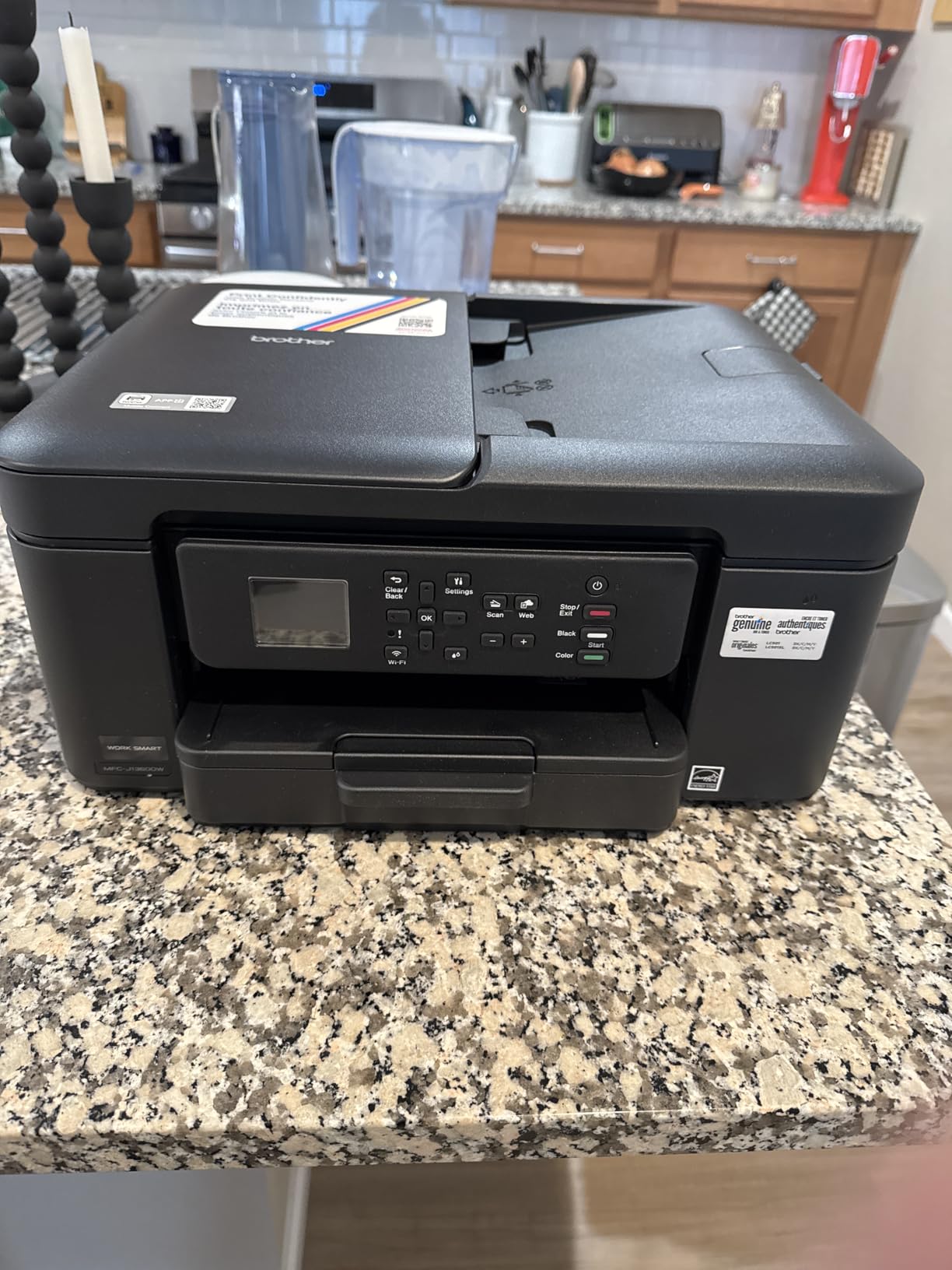
Brother MFC-J1360DW Review: Best Budget All-in-One Printer
Brother MFC-J1360DW

The Brother MFC-J1360DW represents a significant step forward for budget-conscious home office users. Its INKvestment Tank technology bridges the gap between traditional cartridges and true supertank systems — the cartridges are larger capacity and deliver dramatically more pages per replacement cycle than standard OEM cartridges.
Print, scan, copy, and fax functions are all present and genuinely well-implemented. The 20-sheet ADF handles multi-page scan jobs without complaint, and automatic duplex printing works reliably. At under $150, it’s one of the most feature-complete printers at its price point.
Where it impresses most is wireless reliability. Connection setup through the Brother iPrint&Scan app is straightforward, and the printer stays connected consistently — a problem that plagues some competitors. Apple AirPrint and Android Mopria are both supported, so printing from a phone or tablet is frictionless.
✓ Pros
- Excellent value for money
- Reliable wireless connectivity
- INKvestment tanks reduce cartridge frequency
- Full ADF for multi-page scanning
- Compact, home-friendly footprint
- Compatible with ink subscription service
✗ Cons
- Smaller touchscreen than premium models
- Photo output not class-leading
- Slower color print speed vs. laser
- Fax setup can be fiddly
Best budget AIO with full wireless and ADF. Perfect for home offices and students.
🛒 Check Price on AmazonThe MFC-J1360DW is particularly well-suited to students and remote workers who need all the core AIO functions without overpaying. If you’re setting up a home office, pair it with our picks for the best calculators and best binders to build a complete, organized workspace.
Epson EcoTank ET-4850 Review: Best Overall All-in-One Printer
Epson EcoTank ET-4850

The Epson EcoTank ET-4850 is our overall top pick, and the reasoning is straightforward: it delivers premium-tier print quality with the lowest ongoing ink costs of any printer in its class. The supertank system means you’re filling reservoirs with bottled ink rather than swapping cartridges — one set of ink bottles can print up to 7,500 pages in black and 6,000 in color.
Print quality is genuinely excellent across both documents and photos. The 4,800 x 1,200 DPI resolution produces sharp text and vibrant colors. The 35-sheet ADF — larger than most competitors at this price — handles scanning and copying jobs quickly and reliably. Auto-duplex scanning and printing are both supported.
The 2.4-inch color touchscreen is intuitive. Epson’s companion app connects reliably, and features like scan-to-cloud (Google Drive, Dropbox, email) work as advertised. If you regularly deal with important documents — contracts, financial records, anything you need to scan and store digitally — this printer’s scanning capabilities are genuinely impressive.
✓ Pros
- Dramatically lower ink costs than cartridge models
- Excellent print quality for both documents and photos
- Large 35-sheet ADF with duplex scanning
- Reliable Wi-Fi and solid companion app
- Cloud scanning and fax included
- Included ink lasts for thousands of pages
✗ Cons
- Higher upfront cost than basic inkjet models
- Larger physical footprint
- Slower first-print-out time vs. laser
- Touchscreen smaller than premium competitors
The supertank system makes this the smartest long-term investment in printing. Thousands of pages per ink fill.
🛒 Check Price on AmazonFor a deeper look at Epson’s AIO lineup, check out our dedicated Epson EcoTank review. The long-term cost savings are comparable in principle to compound interest — small, consistent savings that accumulate significantly over time.
Canon PIXMA TS6520 Review: Best for Students and Creatives
Canon PIXMA TS6520

Canon’s PIXMA TS6520 has earned a loyal following among students and creative users for one compelling reason: its five-color individual ink system produces some of the best photo quality in its class. Unlike many competitors that use three or four color cartridges, the TS6520 uses separate tanks for black, cyan, magenta, yellow, and a dedicated photo black — the additional pigment delivers noticeably richer shadow detail and more accurate skin tones.
For everyday document printing, it performs solidly. Text is sharp, and the automatic duplex printing works without paper jams on standard 20lb copy paper. The wireless setup is among the fastest and most foolproof in this review — the Canon PRINT Inkjet/SELPHY app walks you through connection in under three minutes.
It lacks a built-in ADF, which is a meaningful limitation for users who frequently scan multi-page documents. But for students printing essays, photos, and assignments from a laptop or smartphone, this is a non-issue. The compact footprint is also a genuine advantage for dorm rooms and tight desk setups.
✓ Pros
- Outstanding photo print quality
- 5-color individual ink system
- Fastest wireless setup in this review
- Compact, lightweight design
- Good value for photo-oriented users
- AirPrint and Mopria supported
✗ Cons
- No built-in ADF
- Ink costs higher than supertank models
- No fax capability
- Smaller paper tray (100 sheets)
5-color ink system delivers stunning photo quality. Compact, wireless, and easy to set up.
🛒 Check Price on AmazonStudents who need a reliable, compact printing solution will find the TS6520 pairs perfectly with a well-organized desk setup. Along with our picks for the best tablets for students and best mechanical pencils, it completes a solid student productivity toolkit.
HP DeskJet 4255e Review: Best Entry-Level AI-Capable Printer
HP DeskJet 4255e

HP’s DeskJet 4255e occupies an interesting position in the market. Its “AI-Capable” designation refers to features within the HP Smart app ecosystem — automatic print optimization, predictive ink ordering through HP Instant Ink, and smart diagnostics that can identify and fix connectivity issues automatically. These features are genuinely useful for users who want a maintenance-light printing experience.
Print quality is solid for everyday documents and good for casual photo printing. The HP Smart app is arguably the best-designed companion app in this review — clean, intuitive, and feature-rich. Mobile printing from an iPhone or Android device is genuinely seamless, and the scan-to-PDF workflow is particularly smooth.
The DeskJet 4255e includes automatic duplex printing and connects over Wi-Fi without issue. It lacks an ADF and fax capability at this price point, but for basic home use those omissions are unlikely to matter. HP’s Instant Ink subscription service integrates tightly with this model and can dramatically reduce ink costs for predictable monthly usage volumes.
✓ Pros
- Best companion app in this review
- AI-assisted diagnostics and print optimization
- Very low entry price
- HP Instant Ink compatible
- Seamless mobile printing
- Compact form factor
✗ Cons
- No ADF — flatbed scan only
- No fax capability
- Ink costs add up without subscription
- HP+ requires ongoing HP account connection
The best HP Smart app experience in the lineup. Ideal for casual users and HP Instant Ink subscribers.
🛒 Check Price on AmazonFor users who primarily need a wireless printer that works reliably from a phone and handles occasional document and photo printing, the HP DeskJet 4255e is a solid, no-fuss choice. For a more detailed look at HP’s AIO offerings, our HP OfficeJet Pro in-depth review explores the full HP ecosystem.
Brother DCP-L2640DW Review: Best Laser All-in-One Printer
Brother DCP-L2640DW

For users who print primarily documents — reports, contracts, academic papers, invoices — the Brother DCP-L2640DW is the standout choice in this entire review. As a monochrome laser AIO, it doesn’t do color printing, but everything else it does, it does better and cheaper than any inkjet equivalent.
The laser print quality on text documents is exceptional — genuinely razor-sharp in a way that even the best inkjet cannot quite replicate. At 32 pages per minute, it’s more than twice as fast as any inkjet AIO in this guide. And that speed matters when you’re printing 50-page reports or a semester’s worth of course materials.
The 50-sheet ADF (the largest in this review) handles even substantial scan jobs without issue. Duplex scanning and printing are both automatic. Ethernet connectivity makes it an excellent shared printer for a small office or household with multiple computers. Toner cartridges yield approximately 1,200 pages at standard coverage, and high-yield options push that to 3,000 pages — at a cost that’s a fraction of equivalent inkjet printing.
✓ Pros
- Fastest print speed in this review (32 PPM)
- Sharpest text output of all models tested
- Lowest per-page cost for document printing
- Largest ADF (50 sheets)
- USB + Wi-Fi + Ethernet connectivity
- High-yield toner available
✗ Cons
- No color printing at all
- Larger and heavier than inkjet models
- No fax in base model
- Initial toner setup takes more time
32 PPM laser speed with the sharpest text quality in this review. Built for high-volume document printing.
🛒 Check Price on AmazonSmall business owners and professionals who output heavy document volumes will find the DCP-L2640DW pairs well with our recommended CRM software tools and AI productivity training for a modern, efficient small business setup. See also our broader laser printer guide for more monochrome options.
HP OfficeJet Pro Review: Best Premium All-in-One Printer
HP OfficeJet Pro

The HP OfficeJet Pro represents HP’s premium play in the home office AIO market. Its “AI-Capable” label here goes beyond the DeskJet — the OfficeJet Pro integrates HP’s smart routing technology, which intelligently optimizes print jobs for speed, quality, or ink economy based on document type without requiring manual adjustment.
The 35-sheet ADF handles both single-sided and duplex scanning automatically, and the 2.7-inch color touchscreen is the most responsive in this review. Color print quality is excellent — suited for client-facing documents, brochures, and marketing materials — and the ISO-rated print speed of 20 PPM in color is among the fastest inkjet AIOs available.
Dual-band Wi-Fi delivers notably more stable connectivity than single-band models, particularly in homes with crowded 2.4GHz networks. The HP Smart app integrates cloud printing, fax, and the Instant Ink subscription service in a unified dashboard that genuinely earns its premium positioning.
✓ Pros
- AI-optimized print routing
- Dual-band Wi-Fi for superior connectivity
- 35-sheet ADF with duplex scanning
- Fast 20 PPM color printing
- Excellent color print quality
- Best-in-class HP Smart ecosystem
✗ Cons
- Premium price point
- Ink costs higher than EcoTank long-term
- HP+ account required for full features
- Larger footprint than compact models
AI-optimized printing, dual-band Wi-Fi, and the fastest color inkjet speed in this review.
🛒 Check Price on AmazonProfessionals who need reliable, high-quality color output for client communications and business documents will appreciate the OfficeJet Pro’s balance of speed, quality, and smart features. It’s the kind of tool that fits naturally alongside solid financial planning practices — a slightly higher upfront investment that pays for itself in output quality and reduced friction.
Full Side-by-Side Comparison Table
Here’s how all six all-in-one printers stack up across the most important specifications and features. Use this table to identify which model best fits your specific needs.
| Model | Type | Speed (Color) | ADF | Auto Duplex | Fax | Ink Economy | Best For |
|---|---|---|---|---|---|---|---|
| Brother MFC-J1360DW | Inkjet | 9 PPM | 20-Sheet | ✓ | ✓ | Good | Budget home office |
| Epson EcoTank ET-4850 TOP PICK | Supertank | 10 PPM | 35-Sheet | ✓ | ✓ | ⭐ Excellent | High-volume users |
| Canon PIXMA TS6520 | Inkjet | 10 PPM | ✗ | ✓ | ✗ | Average | Students, photos |
| HP DeskJet 4255e | Inkjet | 8 PPM | ✗ | ✓ | ✗ | Average | Casual home use |
| Brother DCP-L2640DW | Laser (Mono) | N/A | 50-Sheet | ✓ | ✗ | ⭐ Excellent | Document volume |
| HP OfficeJet Pro | Inkjet | 20 PPM | 35-Sheet | ✓ | ✓ | Good | Premium home office |
Wi-Fi and Connectivity Comparison
| Model | Wi-Fi | Ethernet | Bluetooth | AirPrint | Mopria | Cloud Print |
|---|---|---|---|---|---|---|
| Brother MFC-J1360DW | ✓ | ✗ | ✗ | ✓ | ✓ | ✓ |
| Epson EcoTank ET-4850 | ✓ | ✗ | ✗ | ✓ | ✓ | ✓ |
| Canon PIXMA TS6520 | ✓ | ✗ | ✗ | ✓ | ✓ | ✓ |
| HP DeskJet 4255e | ✓ | ✗ | ✗ | ✓ | ✓ | ✓ |
| Brother DCP-L2640DW MOST PORTS | ✓ | ✓ | ✗ | ✓ | ✓ | ✓ |
| HP OfficeJet Pro | ✓ Dual | ✗ | ✗ | ✓ | ✓ | ✓ |
Who Should Buy Which All-in-One Printer?
Not every printer is right for every user. Here’s a clear breakdown of which model fits which buyer profile. Making this decision is analogous to smart resource allocation in investing — the right choice depends entirely on your specific needs, not just headline specifications.
Compact, fast wireless setup, excellent photo quality for assignments and presentations. No ADF needed for typical student use.
Families print a lot. The EcoTank’s ultra-low ink costs pay for the premium upfront price within a year of regular use.
The fastest color AIO in the review with dual-band Wi-Fi and the most capable HP Smart ecosystem for professional workflows.
Full-featured AIO with fax and ADF at the lowest upfront price. INKvestment tanks reduce cartridge frequency.
Nothing beats laser for text documents. 32 PPM speed and lowest per-page cost for high-volume black-and-white printing.
Occasional printing with the best companion app in the market. HP Instant Ink subscription keeps costs predictable.
If you print more than 50 pages per month consistently, the Epson EcoTank or Brother laser models will save you hundreds of dollars over three years compared to standard inkjet alternatives. We break down the math in the ink costs section below — it’s the same compound advantage principle discussed in our best investments guide.
Understanding All-in-One Printer Ink Costs: The Full Picture
The single most important and most overlooked factor in choosing a printer is the ongoing cost of consumables. Manufacturers deliberately price entry-level printers cheaply to lock customers into expensive ink replacement cycles. Understanding this dynamic is essential to making a smart purchasing decision.
The Cartridge Trap
Standard inkjet cartridges yield anywhere from 150 to 250 pages at standard coverage. A typical multicolor ink set costs $35–$55. At standard usage of 100 pages per month, you’re replacing ink every 1.5–2.5 months — which translates to $170–$440 per year in ink costs alone for a printer you may have paid $80 to buy.
This is the fundamental irrationality of cheap inkjet printer buying: the printer is the razor, the ink is the blade. Manufacturers often make more money from ink sales over the life of a product than from the initial hardware sale. This is a well-known pattern in product strategy and pricing — similar to what we explore in our discussion of price mechanisms and how companies structure long-term revenue.
High-Yield Cartridges: A Partial Solution
Every inkjet printer manufacturer offers high-yield (XL) cartridges for their printers. These typically cost 30–50% more than standard cartridges but yield 2–3x the page count. Switching to XL cartridges can reduce per-page costs by 40–60% and is always worth doing if you print regularly. The Brother MFC-J1360DW’s INKvestment Tank system is essentially a formalized version of this philosophy built into the product design.
The Supertank Advantage
The Epson EcoTank series fundamentally breaks the cartridge model. Instead of disposable cartridges, you buy bottled ink that refills large internal tanks. A set of EcoTank ink bottles (black, cyan, magenta, yellow) yields approximately 7,500 pages in black and 6,000 in color — and costs around $8–$15 per bottle. The math over three years of typical household printing is dramatic:
| Printer Type | Hardware Cost | Annual Ink Cost* | 3-Year Total Cost |
|---|---|---|---|
| Standard Inkjet (100 pgs/mo) | ~$100 | ~$240 | ~$820 |
| High-Yield Inkjet (100 pgs/mo) | ~$150 | ~$110 | ~$480 |
| Epson EcoTank (100 pgs/mo)Cheapest Long-Term | ~$280 | ~$18 | ~$334 |
| Brother Laser (100 pgs/mo) | ~$200 | ~$30 | ~$290 |
*Estimated at approximately 100 pages per month with typical document and photo mix. Actual costs vary based on coverage density and print habits.
Ink Subscription Services
HP Instant Ink and Epson ReadyPrint offer monthly subscription plans that automatically ship replacement ink before you run out, based on actual page usage rather than time elapsed. Plans start around $1–$3/month for basic usage tiers and scale up from there. For casual users who print infrequently, a basic subscription tier can be more economical than buying individual cartridges, and eliminates the frustration of running out mid-job.
The key consideration: ink subscription services typically require keeping your printer online and connected to the manufacturer’s servers. If your printer loses connectivity for extended periods, or if you cancel the subscription, you may lose access to ink even in partially filled cartridges — a manufacturer-imposed limitation that’s worth understanding before committing. It’s the kind of fine-print consideration that applies to many modern SaaS-style service agreements, as discussed in our guide to effective written communication — knowing what’s in the terms matters.
Several printer manufacturers now ship cartridges that are only “activated” once connected to the internet and verified with the manufacturer’s servers. If you rely on your printer for important documents — especially for business or document security purposes — consider whether a subscription-locked model fits your reliability requirements.
Frequently Asked Questions About All-in-One Printers
The Bottom Line: Choosing the Right All-in-One Printer
The best all-in-one printer is the one that matches your actual use pattern — not the one with the lowest sticker price or the most impressive spec sheet headline. After reviewing all six models in depth, here’s the clearest possible summary:
Best Overall: Epson EcoTank ET-4850 — unbeatable long-term ink economics with premium print quality. Best Value: Brother MFC-J1360DW — full-featured AIO at a budget price. Best for Students: Canon PIXMA TS6520 — compact, fast setup, excellent photo quality. Best Laser: Brother DCP-L2640DW — fastest speed and sharpest text for document-heavy workflows.
For more home office and productivity resources, explore our full all-in-one printer archive, our desk organizer picks, and our scientific calculator guide for students.
🛒 Shop Top Pick: Epson EcoTank ET-4850