
QuickBooks vs FreshBooks: Which Accounting Software Actually Fits Your Business?
A no-fluff, deep-dive comparison of features, pricing, ease of use, and the winner for every business type — from solo freelancers to growing teams.
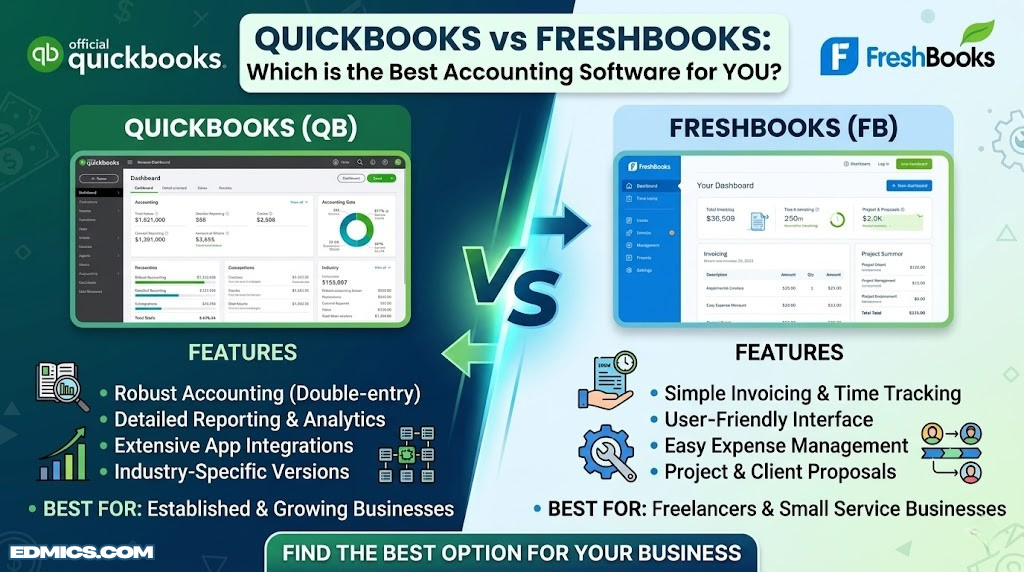
Overview: What Are QuickBooks and FreshBooks, Really?
When small business owners search for accounting software, two names almost always come up in the same sentence: QuickBooks and FreshBooks. Both are cloud-based platforms that promise to simplify the financial side of running a business — but beneath that surface-level similarity, they were built with very different users in mind and have followed very different evolutionary paths.
QuickBooks, developed by Intuit, has been the dominant force in small business accounting since the mid-1990s. Originally a desktop application, it has evolved into a sprawling cloud ecosystem with products that range from solo self-employment tools all the way up to enterprise-level platforms. If you’ve ever worked in a business office, you’ve almost certainly encountered QuickBooks in some form. It’s the industry standard — powerful, deep, and, for many users, slightly intimidating.
FreshBooks came to market in the early 2000s, originally as an invoicing tool for freelancers who were tired of emailing Word document invoices. It built its reputation on simplicity and elegance. Over the years it has expanded considerably — adding double-entry accounting, project management, team collaboration features, and more — but it has never lost its identity as the tool that non-accountants can actually enjoy using.
A full-featured accounting platform built for depth. Favored by accountants, bookkeepers, and businesses that need serious financial infrastructure — from inventory management to payroll to tax preparation support.
An invoicing-first platform with accounting capabilities built on top. Loved by designers, consultants, agencies, and any service professional who wants clean invoices out the door and minimal accounting friction.
This guide is built for anyone standing at that decision point: you’re running a business or about to start one, you know you need to track money properly, and you want to make the right call the first time. Switching accounting platforms mid-stride is genuinely painful — data migrations are messy, your accountant has to relearn your system, and your historical records can become fragmented. Choosing wisely now saves a significant amount of frustration later.
We’ll look at pricing, features, ease of use, accounting depth, invoicing, expense tracking, payroll, reporting, mobile apps, customer support, and integration ecosystems — and for each one, we’ll tell you clearly who wins and why. Understanding the golden rules of accounting will help you appreciate why some of these differences matter more than they might initially appear.

Stock Up on Accounting Essentials
From bookkeeping guides to financial planning workbooks — browse top-rated accounting resources on Amazon.
Shop Accounting Books on Amazon →Who Each Platform Targets (And Why It Matters)
One of the most important things to understand about this comparison is that QuickBooks and FreshBooks are not simply two versions of the same thing at different price points. They were designed with genuinely different users in mind, and that distinction runs all the way through their feature sets, pricing models, and user experiences.
The QuickBooks User
QuickBooks is built for people who either have accounting knowledge themselves or work closely with someone who does. Its natural habitat is the small business with employees, inventory, multiple accounts to reconcile, and a CPA who reviews the books quarterly. It handles the kind of complexity that arises when a business starts growing: managing payroll for six employees, tracking inventory across multiple product lines, running class-level profit and loss statements by department, managing accounts payable with multiple vendors.
QuickBooks is also the dominant choice among professional accountants and bookkeepers. This matters in practice: if you hire a bookkeeper or work with a CPA, there is a near-certainty they will be comfortable with QuickBooks — and some bookkeepers actively prefer only working with QuickBooks clients because it fits their workflow. This network effect is real and worth considering.
Understanding how the accounting equation underpins financial tracking helps explain why QuickBooks appeals to those who want complete financial visibility. It’s also worth noting that QuickBooks is often the go-to choice for businesses that need to understand their balance sheet in granular detail.
The FreshBooks User
FreshBooks speaks to a different kind of business owner: someone who is deeply skilled at their craft but doesn’t think of themselves as a “business person” in the traditional accounting sense. The freelance graphic designer invoicing three clients a month. The marketing consultant billing 40 hours a week and tracking project profitability. The small architecture firm managing client retainers and project milestones. The IT consultant who needs to log time and convert it to an invoice without jumping through hoops.
These users don’t want to learn accounting terminology to get a bill out. They want to log time, click “send invoice,” and get paid. FreshBooks understands this deeply and has built every part of its product around that experience. You can get a professional invoice out to a client within minutes of creating your account — something that takes considerably longer with QuickBooks.
The takeaway: there is no single winner here without knowing who you are as a business. Both platforms are genuinely excellent within their intended context. The goal of this guide is to figure out which context matches yours.
Pricing & Plans: What You Actually Pay
Pricing is where many buyers start their comparison — and it’s also where the most misleading claims tend to appear. Both platforms advertise aggressively discounted “introductory” rates that expire after a few months, reverting to full price. Always look at the standard price when planning your budget. Below is a clean side-by-side breakdown at full list price to give you an apples-to-apples view.
QuickBooks Online Plans
| Plan | Monthly Price | Users | Best For |
|---|---|---|---|
| Simple Start | ~$30/mo | 1 | Sole proprietors with basic needs |
| Essentials | ~$60/mo | 3 | Small businesses tracking bills & time |
| Plus | ~$90/mo | 5 | Businesses with inventory and projects |
| Advanced | ~$200/mo | 25 | Scaling businesses needing advanced reporting |
FreshBooks Plans
| Plan | Monthly Price | Billable Clients | Best For |
|---|---|---|---|
| Lite | ~$19/mo | 5 clients | Solo freelancers with few active clients |
| Plus | ~$33/mo | 50 clients | Growing freelancers and small teams |
| Premium | ~$60/mo | Unlimited | Agencies and established service businesses |
| Select | Custom | Unlimited | High-revenue businesses with dedicated support |
Hidden Costs to Watch
Both platforms have a habit of charging extras that new users don’t always anticipate. With QuickBooks, payroll is a significant additional expense — typically $50–100 per month plus a per-employee fee. Additional users beyond your plan’s allowance also cost extra. FreshBooks charges for each additional team member on your account ($11 per person per month), which can add up quickly for agencies. Payment processing fees apply on both platforms when clients pay invoices online.
For businesses weighing the cost-benefit of investing in proper financial tools versus going manual, this financial planning guide provides useful context on why getting accounting infrastructure right from the start typically pays for itself many times over.

Financial Planners & Business Journals
Track expenses, revenue goals, and financial milestones with top-rated business planning journals on Amazon.
Browse Financial Planners on Amazon →Ease of Use & Learning Curve: Day One Experience
For most small business owners, the accounting software they choose is something they’ll interact with daily. The friction of a confusing interface compounds fast — and the learning curve you’re willing to tolerate is a major factor in which platform will actually serve you well long-term.
QuickBooks Interface: Powerful But Dense
QuickBooks Online has improved significantly in its design over the years, but it remains a platform built around accounting concepts first and user experience second. When you log in for the first time, you’re presented with a dashboard packed with widgets — profit and loss summaries, bank balances, expenses, invoices outstanding. It’s informative, but it can feel overwhelming if you’re not already comfortable with accounting terminology.
Setting up QuickBooks properly requires a reasonable investment of time. You need to connect bank accounts, categorize transactions, establish your chart of accounts, set up sales tax rules (if applicable), and configure your invoice templates. Many users find the initial setup benefits from watching tutorial videos or working with an accountant, particularly if they’re not familiar with concepts like double-entry bookkeeping.
That said, QuickBooks has invested heavily in guided setup wizards and an extensive help documentation library. Once you understand the platform’s logic, it becomes second nature — but that initial investment is real.
FreshBooks Interface: Designed for Non-Accountants
FreshBooks is genuinely a pleasure to use, especially for someone without a financial background. The dashboard is clean, the navigation is straightforward, and the most common tasks — creating an invoice, logging an expense, tracking time — can be completed in seconds. The terminology is plain English rather than accounting jargon wherever possible.
From initial signup to sending your first invoice, FreshBooks takes most users under 15 minutes. There are no complex setup wizards or chart of accounts configurations required. You enter your business name, upload your logo, enter a client, add a line item, and hit send. This simplicity is not accidental — it’s the core product philosophy.
Overall UX Score
Invoicing & Billing: The Heart of Getting Paid
Both platforms let you create and send invoices — that’s a given. But the quality, flexibility, and client experience of those invoices differs substantially. For any service business, invoicing is the single most important workflow in the platform, so this section deserves close attention.
FreshBooks Invoicing: The Industry Standard for Service Businesses
FreshBooks built its entire reputation on invoicing, and it shows. The invoice creation interface is clean and intuitive. You can add your logo, customize colors to match your brand, write personalized notes to clients, and set up automatic payment reminders that fire on a schedule you define. The resulting invoices look polished and professional without any design work on your part.
What makes FreshBooks invoicing genuinely special is its integration with time tracking. You can log hours against a project throughout a billing period, then with a single click convert all unbilled time into a clean, itemized invoice. For consultants, designers, developers, and anyone who bills by the hour, this workflow is a significant time saver.
FreshBooks also supports recurring invoices, deposits, late payment fees, and multi-currency billing — all presented through the same clean interface. Clients receive an email with a link to a branded payment page where they can pay by credit card, bank transfer, or through payment integrations. The payment experience for clients is genuinely smooth.
QuickBooks Invoicing: Functional, With Room to Grow
QuickBooks invoicing is solid and covers all the basics well. You can create professional invoices, set up recurring billing, send payment reminders, and accept online payments. The templates are customizable, though less intuitively so than FreshBooks. QuickBooks also supports progress invoicing — billing a percentage of a project quote in installments — which is something FreshBooks introduced more recently.
Where QuickBooks invoicing can feel clunkier is in its integration with the rest of the platform. The accounting connections are deeper (invoices update your books automatically, which is essential), but the creation workflow involves more steps and the client-facing payment experience is less elegant. For businesses where invoicing is a daily high-volume activity, this friction adds up.
Key Invoicing Features Comparison
| Feature | QuickBooks | FreshBooks | Winner |
|---|---|---|---|
| Custom invoice templates | Yes (limited) | Yes (more flexible) | FreshBooks |
| Automatic reminders | Yes | Yes | Tie |
| Recurring invoices | Yes | Yes | Tie |
| Time-to-invoice conversion | Basic | Seamless | FreshBooks |
| Progress invoicing | Yes (Plus+) | Yes (Premium) | QuickBooks |
| Client payment portal | Yes | Yes (more polished) | FreshBooks |
| Multi-currency | Yes (Essentials+) | Yes (all plans) | FreshBooks |
| Late payment fees | Yes | Yes | Tie |
Invoice Books & Receipt Pads
Keep paper backup records with professional invoice and receipt books. Perfect for in-person billing alongside your digital software.
Shop Invoice Books on Amazon →Accounting & Bookkeeping Depth: The Numbers That Run Your Business
This is the category where the platforms diverge most sharply — and where the choice can have real financial consequences if you pick the wrong one for your complexity level.
QuickBooks: Full-Spectrum Accounting
QuickBooks Online is a genuine, full-featured accounting system. It implements complete double-entry bookkeeping natively — every transaction creates corresponding debit and credit entries across your chart of accounts automatically. This matters because double-entry bookkeeping is not just accounting orthodoxy; it’s what enables accurate balance sheets, catches errors, and gives you the audit trail that serious financial reporting requires.
QuickBooks supports a comprehensive chart of accounts that you can customize to your business. It handles accounts payable and receivable properly, can manage multiple currencies, provides bank reconciliation tools that are genuinely robust, and generates the full suite of standard financial reports: profit and loss, balance sheet, cash flow statement, accounts aging reports, and much more. For businesses that need to understand their accounts payable vs receivable in real time, QuickBooks is the clear choice.
For businesses that need to think about depreciation in accounting, QuickBooks handles fixed asset tracking and depreciation schedules in a way FreshBooks simply cannot match. Similarly, for understanding an income statement in the context of overall business health, QuickBooks’ reporting suite provides the detail that finance-minded owners need.
FreshBooks: Accounting Made Accessible
FreshBooks introduced double-entry accounting on its Plus and higher plans, which was a significant step forward. Before that update, FreshBooks was essentially a cash-flow management tool rather than a complete accounting system. Today it handles the fundamentals reasonably well for service businesses: it tracks income and expenses, generates profit and loss statements, and provides a basic balance sheet.
However, FreshBooks still lags QuickBooks in accounting depth. The chart of accounts is simpler and less customizable. Bank reconciliation, while available, is not as robust as QuickBooks’ version. FreshBooks does not support inventory accounting — no COGS tracking, no stock valuation, no inventory asset accounts. For a service business that never touches physical goods, this is a non-issue. For a business that sells products, it’s a dealbreaker.
Understanding the mechanics of double-entry bookkeeping in practice helps clarify exactly why this matters for financial accuracy over time. Similarly, if you ever need to reconcile a bank statement, the quality of your accounting software’s reconciliation tools becomes immediately apparent.
Accounting Fundamentals Scorecard
| Accounting Feature | QuickBooks | FreshBooks |
|---|---|---|
| Double-entry bookkeeping | ✔ Native, complete | ✔ Plus+ plans only |
| Chart of accounts | ✔ Fully customizable | Limited customization |
| Bank reconciliation | ✔ Robust tools | Basic |
| Accounts payable | ✔ Full AP management | Basic vendor tracking |
| Accounts receivable | ✔ Complete | ✔ Complete |
| Inventory accounting | ✔ Plus+ plans | ✗ Not available |
| Fixed asset tracking | ✔ Yes | ✗ Limited |
| Job costing | ✔ Yes | Basic project-level |
| Accountant access | ✔ Full accountant portal | ✔ Accountant access available |
Expense Tracking: Capturing Every Dollar Out the Door
Expense tracking is the other half of the financial picture — and it’s where many small businesses leak value because they’re not capturing every legitimate business expense to inform their reporting and tax deductions.
QuickBooks Expense Tracking
QuickBooks handles expense tracking through a combination of bank feed integration, manual entry, and receipt capture. When you connect your bank and credit card accounts, transactions feed in automatically and QuickBooks uses machine learning to suggest categorizations based on your past behavior. Over time, the system learns your patterns and the categorization process becomes largely automatic.
QuickBooks also allows you to snap photos of receipts through its mobile app and attach them to transactions. For businesses that deal in a lot of paper receipts, this is genuinely useful for keeping records organized. The expense data then flows directly into your profit and loss statement and your tax reports, making year-end reconciliation much cleaner.
Class tracking (available in Plus and above) allows you to assign expenses to departments, locations, or projects — providing granular visibility into where money is going across different parts of your business. This is invaluable for businesses running multiple cost centers simultaneously.
FreshBooks Expense Tracking
FreshBooks expense tracking is clean and straightforward. Like QuickBooks, you can connect bank accounts for automatic import, manually enter expenses, and capture receipts via mobile. The categorization interface is simpler and more accessible, though it offers less granularity than QuickBooks.
One area where FreshBooks genuinely shines is expense assignment to clients and projects. If you buy something specifically for a client — a software license, printing costs, travel to a client site — you can tag that expense to the client and it will automatically appear as a billable line item on your next invoice to them. This client-billable expense workflow is cleaner in FreshBooks than in QuickBooks.
FreshBooks also integrates with secure document storage workflows, which pairs well with digital receipt management if you want to maintain physical backup copies of important financial documents.

Receipt Scanners for Business
Keep your expense records organized with a dedicated receipt scanner — pairs perfectly with QuickBooks or FreshBooks expense tracking.
Shop Receipt Scanners on Amazon →Reports & Financial Insights: Understanding What the Numbers Mean
A well-implemented accounting platform doesn’t just store financial data — it transforms that data into insights you can act on. The reporting capabilities of your accounting software directly influence how clearly you understand your business’s financial health.
QuickBooks Reporting: The Professional Standard
QuickBooks Online’s reporting suite is extensive. It generates over 80 standard reports covering every aspect of your business finances. The core financial statements — profit and loss, balance sheet, statement of cash flows — are all available and accurately reflect your accounting data. You can also access accounts receivable aging, accounts payable aging, sales by customer, expenses by vendor, and dozens of other specialized reports.
Higher-tier QuickBooks plans add custom reporting capabilities that allow you to build your own report templates, filter by class or location, and create comparative period reports that show you how this month compares to the same month last year. For business owners who want to deeply understand their cash flow statement and use financial data to drive decisions, QuickBooks provides the infrastructure to do so properly.
QuickBooks Advanced (the highest tier) includes smart reporting powered by Fathom, a dedicated financial analytics tool — providing KPI dashboards, driver analysis, and forecasting capabilities that go well beyond standard bookkeeping reports. Anyone interested in serious wealth management strategies for their business will appreciate the depth this enables.
FreshBooks Reporting: The Essentials, Well Presented
FreshBooks provides the key reports that most small service businesses need: profit and loss, tax summary, expense reports, invoice details, revenue by client, and time tracking summaries. These reports are presented cleanly and are easy to read even without accounting training.
Where FreshBooks falls short is in depth and customizability. You cannot create custom report templates. The balance sheet (available on Plus+ plans) is functional but less detailed than QuickBooks’. There are no class or location-based reports, no inventory reports, and no built-in forecasting tools. For a solo freelancer reviewing their finances quarterly, this is entirely adequate. For a business owner who makes decisions based on financial data every week, it will eventually feel limiting.
Integrations & Ecosystem: Playing Well With Other Tools
Modern businesses run on a stack of software tools. Your accounting platform doesn’t exist in isolation — it needs to connect with your payment processor, e-commerce platform, CRM, project management software, payroll system, and more. The breadth and quality of integrations is a real differentiator.
QuickBooks Integration Ecosystem
QuickBooks has one of the largest integration ecosystems in the small business software world. The QuickBooks App Store lists hundreds of integrations spanning virtually every business category: payment processors (Stripe, Square, PayPal), e-commerce platforms (Shopify, WooCommerce, BigCommerce), CRM tools, project management platforms, time tracking apps, and industry-specific vertical software for construction, healthcare, legal, and more.
Because QuickBooks is so dominant in the market, many third-party tools prioritize QuickBooks integration above all others. This means integration quality tends to be higher and more reliable with QuickBooks than with competing platforms. If you’re using a specialized tool in your industry, there is a very high probability it already has a QuickBooks integration.
For businesses that are also evaluating CRM tools alongside accounting software, checking out resources on CRM software for small business will help understand how these tools integrate within a complete business tech stack.
FreshBooks Integration Ecosystem
FreshBooks has a solid but smaller integration ecosystem compared to QuickBooks. It connects with popular tools like Stripe, PayPal, G Suite, Slack, Trello, Asana, HubSpot, and over 100 others. For most freelancers and small service businesses, this covers the tools they actually use day to day.
Both platforms connect to Zapier, which theoretically unlocks thousands of additional integrations through automation. Zapier connections can be less reliable than native integrations, but they significantly expand what’s possible if a specific native integration doesn’t exist.

Business Laptops for Accounting & Finance
Run QuickBooks or FreshBooks smoothly with a reliable business laptop. Explore top-rated options for small business owners on Amazon.
Browse Business Laptops on Amazon →Payroll & Tax Features: When Your Business Has a Team
Payroll and tax support are two areas that many small business owners underestimate at the start but quickly become critical as the business grows. Getting payroll wrong creates legal liability; getting taxes wrong creates financial penalties. Both platforms approach these differently.
QuickBooks Payroll
QuickBooks has its own native payroll product — QuickBooks Payroll — which integrates directly with QuickBooks Online. This is a significant advantage: because the payroll system and the accounting system share the same database, payroll runs automatically post to the correct accounts in your books. There’s no manual journal entry or CSV import needed to reconcile payroll with your accounts.
QuickBooks Payroll handles federal and state tax filings automatically (on most plans), direct deposits, W-2 and 1099 generation, new hire reporting, and benefits administration. For U.S. businesses with employees, this level of integration is genuinely valuable. The payroll add-on costs extra (starting at around $50/month plus per-employee fees), but the time saved and error risk reduced typically makes it worthwhile.
QuickBooks also generates robust tax reports that simplify preparation of Schedule C, quarterly estimated taxes, and other filings. For anyone trying to make sense of their GAAP accounting obligations or ensure their books are audit-ready, QuickBooks’ structured approach helps considerably.
FreshBooks Payroll
FreshBooks does not have a native payroll product. Instead, it integrates with Gusto, a third-party payroll service. Gusto is an excellent payroll tool in its own right — well-designed, comprehensive, and popular among small businesses. The FreshBooks-Gusto integration is reasonably well implemented, syncing payroll expenses back into FreshBooks automatically.
The downside is the additional cost and account management overhead. Gusto has its own pricing on top of FreshBooks, and while the integration works, it’s not as seamless as QuickBooks’ native payroll. For businesses with more than a handful of employees, this becomes a meaningful operational consideration.
Tax Support
Neither platform is a tax preparation software. For actual tax filing, most businesses use dedicated tools. Interestingly, both QuickBooks and FreshBooks export data in formats compatible with professional tax software, and both can share accountant access so your CPA can work directly in your books. Those deciding between tax filing options may find the TurboTax vs H&R Block or TurboTax vs FreeTaxUSA comparisons helpful as companion reading.
Mobile Apps: Running Your Finances on the Go
The smartphone is now where a significant amount of real business happens — and both QuickBooks and FreshBooks have invested in mobile apps that extend their platforms to iOS and Android. But the quality, feature parity, and usability of these mobile experiences differ.
FreshBooks Mobile App
FreshBooks’ mobile app is excellent — arguably one of the best small business accounting apps available on either iOS or Android. It feels like a genuinely native mobile experience rather than a shrunken web app. You can create and send invoices, capture and categorize expenses (including receipt photos), log time, view reports, and communicate with clients — all from the mobile app with essentially the same ease as the web version.
The time tracking feature in the FreshBooks app deserves specific mention. You can start and stop a timer from your phone with a single tap, and that time will be waiting to be invoiced when you’re back at your desk. For professionals who work on-the-go and bill time, this mobile time tracking experience is extremely well-implemented.
QuickBooks Mobile App
QuickBooks has a capable mobile app that covers the most common tasks: creating invoices, capturing receipts, reviewing transactions, and checking financial summaries. The app has improved substantially and is useful for day-to-day tasks on the road.
However, the full depth of QuickBooks’ feature set is not available on mobile. Complex reporting, advanced settings, payroll management, and some accounting functions require the full web interface. For power users, the mobile app is a companion tool rather than a replacement for desktop access. For basic tasks, it’s perfectly adequate.
Customer Support: When You Need Help at 4pm on a Tuesday
Even the best software breaks down occasionally, or raises questions you didn’t anticipate. The quality of customer support — how quickly you can get help, how knowledgeable that help is, and how easy it is to reach — is a practical differentiator that becomes clear only once you actually need it.
FreshBooks Support
FreshBooks has built a strong reputation for customer support, consistently appearing near the top of user satisfaction ratings in this category. It offers phone support during business hours, live chat, and email — with response times that users frequently describe as genuinely fast and helpful. The support agents tend to be knowledgeable about the platform and the broader accounting context, not just reading from scripts.
FreshBooks also maintains an extensive knowledge base and a community forum. Their support is notably good for users who have questions that aren’t purely technical — such as “how should I categorize this type of expense?” or “what’s the best way to handle this invoicing situation?” — because the support team understands their typical user’s context.
QuickBooks Support
QuickBooks support has a mixed reputation in user reviews. Intuit has invested in improving it over time, and the platform offers phone support, chat support, and a community forum. However, wait times can be long, and many users report being transferred between agents before reaching someone who can resolve their issue. The quality of support seems to vary significantly between agents.
QuickBooks does benefit from a massive unofficial support ecosystem: thousands of YouTube tutorials, a large online community, certified ProAdvisors (accounting professionals who specialize in QuickBooks), and a wealth of written guides. If you’re comfortable finding self-service answers, the volume of third-party QuickBooks help content is unmatched. The same can’t be said for FreshBooks, where official support is often the better path.

QuickBooks Learning Guides & Manuals
Master QuickBooks faster with expert-written guides, workbooks, and tutorials. Browse top-rated QuickBooks books on Amazon.
Browse QuickBooks Books on Amazon →The Verdict: Who Should Choose QuickBooks vs FreshBooks?
After walking through twelve dimensions of comparison, here is the clear, unambiguous guidance on who should use which platform. This isn’t about which software is “better” in the abstract — it’s about which one is right for your specific situation.
Choose QuickBooks If You…
QuickBooks Strengths
- Sell physical products and need inventory tracking
- Have employees and need integrated payroll
- Work with a professional accountant or bookkeeper
- Need advanced financial reporting by class or department
- Require deep accounts payable management
- Have a complex business with multiple revenue streams
- Need to be GAAP-compliant or audit-ready
- Run a business in a QuickBooks-dominant industry
QuickBooks Weaknesses
- Steeper learning curve for non-accountants
- More expensive at every comparable tier
- Less polished invoicing and client experience
- Customer support can be inconsistent
- Mobile app lacks full feature parity
- Payroll is a separate, additional cost
Choose FreshBooks If You…
FreshBooks Strengths
- Are a freelancer, consultant, or service professional
- Bill clients by the hour and need time tracking
- Value ease of use above accounting depth
- Want beautiful, professional invoices with minimal setup
- Manage client relationships and project budgets closely
- Have a small team or work solo
- Want excellent mobile accounting on the go
- Prioritize outstanding customer support
FreshBooks Weaknesses
- No inventory management
- Less depth in accounting and financial reporting
- Payroll requires a third-party integration (Gusto)
- Client limits on entry-level plans
- Smaller integration ecosystem
- Not ideal as your books grow in complexity
Head-to-Head Final Scorecard
| Category | QuickBooks | FreshBooks | Winner |
|---|---|---|---|
| Ease of Use | ★★★☆☆ | ★★★★★ | FreshBooks |
| Invoicing | ★★★★☆ | ★★★★★ | FreshBooks |
| Accounting Depth | ★★★★★ | ★★★☆☆ | QuickBooks |
| Expense Tracking | ★★★★★ | ★★★★☆ | QuickBooks |
| Reporting | ★★★★★ | ★★★☆☆ | QuickBooks |
| Integrations | ★★★★★ | ★★★★☆ | QuickBooks |
| Payroll & Tax | ★★★★★ | ★★★☆☆ | QuickBooks |
| Mobile App | ★★★☆☆ | ★★★★★ | FreshBooks |
| Customer Support | ★★★☆☆ | ★★★★★ | FreshBooks |
| Value (Entry Level) | ★★★☆☆ | ★★★★★ | FreshBooks |
| Time Tracking | ★★★☆☆ | ★★★★★ | FreshBooks |
| Scalability | ★★★★★ | ★★★☆☆ | QuickBooks |
FreshBooks wins 6 of 12 categories. QuickBooks wins 6. But the categories QuickBooks wins — accounting depth, reporting, integrations, payroll, scalability — tend to carry more weight as businesses grow. FreshBooks wins the categories that matter most to smaller, service-based operations where day-to-day usability and invoicing quality define the experience.
For a broader comparison landscape, understanding how these platforms sit relative to competitors like Xero is valuable — the QuickBooks vs Xero comparison and the Mint vs YNAB comparison for personal finance both shed light on the wider accounting software ecosystem.
Businesses weighing investment decisions alongside software costs may find value in reviewing best investment strategies to understand how operational infrastructure spending fits into a broader financial plan. Similarly, thinking about where to invest business capital alongside operational costs can inform how much to allocate to software subscriptions versus other growth priorities.
For comparison shoppers considering brokerage and investment platforms, the Fidelity vs Charles Schwab guide and the index funds vs mutual funds piece offer the same style of rigorous comparison applied to financial products.

Financial Calculators for Business Owners
A reliable financial calculator is an indispensable desk companion alongside any accounting software. Browse top-rated models on Amazon.
Shop Financial Calculators on Amazon →Frequently Asked Questions
Conclusion: Making the Right Call for Your Business
After walking through every major dimension of this comparison, the picture that emerges is not one of a clear overall winner — but of two platforms that are genuinely excellent within their respective lanes.
QuickBooks is the more powerful, more scalable, more complete accounting platform. It has deeper bookkeeping, more robust reporting, native payroll, inventory management, and an integration ecosystem that touches virtually every industry. For any business that is growing, product-based, employs a team, or works with a professional accountant, QuickBooks is the right foundation to build on. The learning curve is real, but the platform can grow with you for years without requiring a painful migration.
FreshBooks is the more elegant, more user-friendly, more enjoyable accounting platform. It wins on invoicing, time tracking, mobile experience, client relationship management, and customer support. For freelancers, consultants, creative professionals, and service businesses where the accounting side needs to stay out of the way so you can do your actual work, FreshBooks is a delight to use and covers everything you need.
The worst outcome is choosing neither and managing finances through a spreadsheet — which is where many small businesses start and where the real hidden costs accumulate through errors, missed deductions, and time wasted. Whether you choose QuickBooks or FreshBooks, getting your finances into a proper platform is one of the highest-leverage business decisions you can make early on.
Both platforms offer free trials, and we strongly recommend using them before committing. Spend a few days with each doing real tasks — creating an invoice, logging an expense, running a profit and loss — and pay attention to which one feels more natural for how you actually think about money. That intuition is useful data.
For further reading on related financial topics, explore our guides on accounting basics, understanding how to read a balance sheet, and the purposes of financial auditing — all of which provide context that will help you get more value from whichever accounting platform you choose.
Ready to Pick Your Accounting Platform?
Start your free trial with either platform today — no commitment required. Choose the one that fits how you actually work.