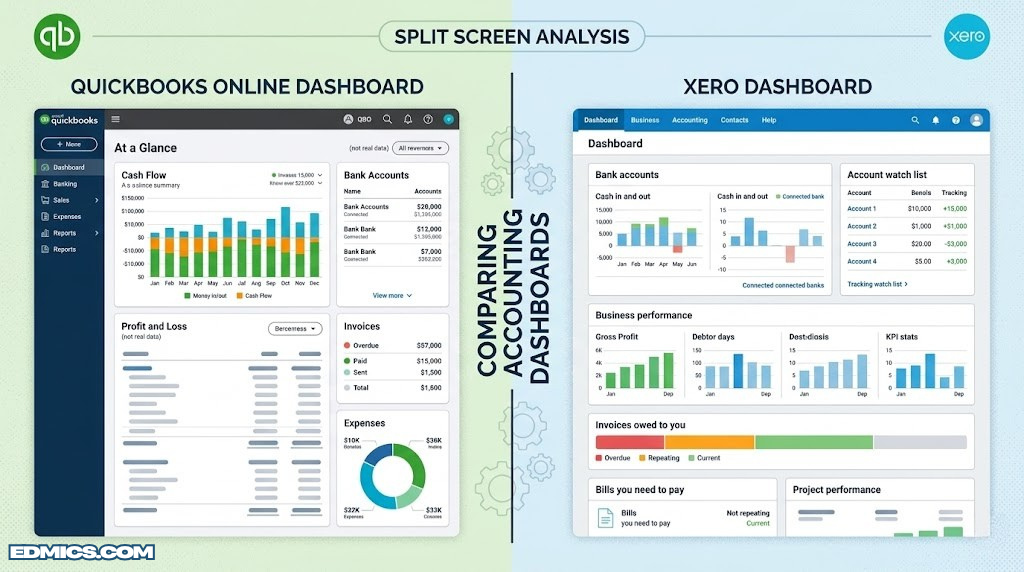
Software Comparison · Small Business Accounting
QuickBooks vs Xero: A Complete Side-by-Side Comparison for Small Business Owners
Two of the most popular cloud accounting platforms, tested feature by feature — pricing, invoicing, bank feeds, reporting, payroll, and more — so you can pick the one that actually fits how your business runs.
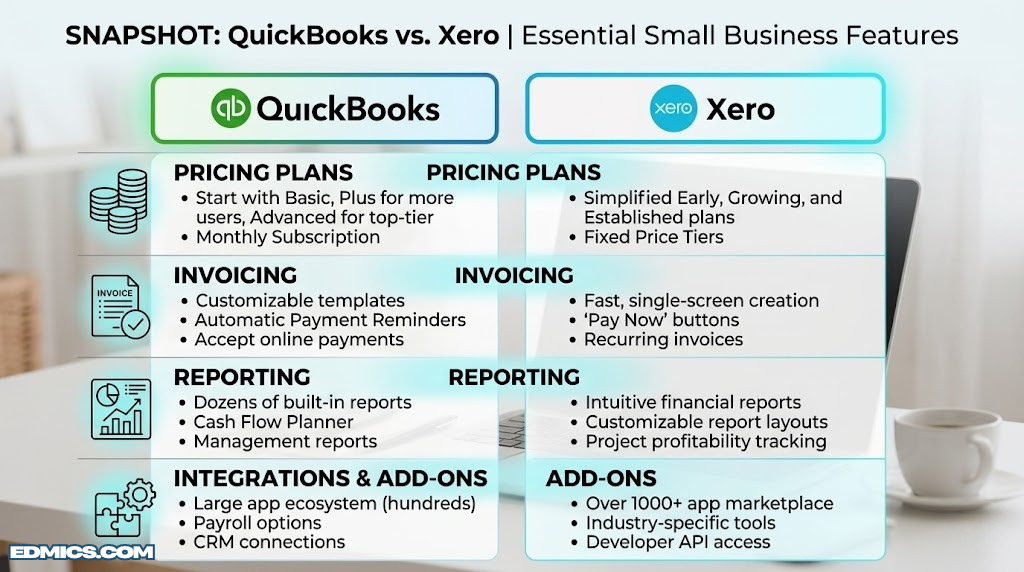
A quick visual snapshot of where each platform tends to lead — details on every category below.
If you’ve narrowed your search for accounting software down to two names, there’s a good chance they’re QuickBooks Online and Xero. Both are cloud-based, both promise to take the headache out of bookkeeping, and both have loyal fan bases among accountants and small business owners alike. But “both are good” isn’t a decision — and the differences between them matter a lot once you start sending invoices, reconciling bank feeds, running payroll, or trying to make sense of your income statement at the end of the month.
This guide walks through every part of the experience that actually affects day-to-day use: setup, pricing tiers, invoicing tools, bank reconciliation, reporting, inventory, payroll, integrations, mobile apps, support, and security. If you’re new to accounting software altogether, it might help to first skim our accounting basics primer so the terminology in this comparison makes sense right away. By the end, you should have a clear picture of which platform fits your business — not just which one has more features on paper.
Section 01
Quick Verdict: QuickBooks vs Xero at a Glance
Neither platform is “better” in an absolute sense — they’re built for slightly different users. QuickBooks Online tends to win for businesses that need robust payroll, deep reporting, and a huge accountant network in the United States. Xero tends to win for businesses that want unlimited users on every plan, a cleaner interface, and strong multi-currency support for international operations. Here’s the short version before we go deep on each category.
| Category | QuickBooks Online | Xero |
|---|---|---|
| Best for | Established small businesses needing payroll & deep reports | Startups, freelancers, and international teams |
| Starting price | Lower-cost entry plan, limited users | Slightly higher entry price, unlimited users |
| User limits | Capped per plan (1–25 users) | Unlimited users on every plan |
| Invoicing | Strong, with online payment links | Very strong, with online quoting built in |
| Bank reconciliation | Reliable bank feeds, good matching rules | Excellent feeds, smart bank rule suggestions |
| Reporting | Extremely deep, customizable reports | Clean, modern reports with less granularity |
| Inventory | Built-in inventory tracking (higher tiers) | Basic inventory, better via add-ons |
| Payroll | Native, full-service payroll add-on | Available but more limited by region |
| Mobile app | Feature-rich, slightly busier UI | Minimal, fast, well-reviewed |
| Learning curve | Moderate | Gentle |
The short answer: if you already have a bookkeeper or accountant who works in QuickBooks, or you’ll need payroll and inventory in the same subscription, lean QuickBooks. If you’re a lean team that wants every employee to log in without paying per-seat, or you bill clients in multiple currencies, lean Xero. Keep reading — the details below will tell you which scenario you’re actually in.
Section 02
What Is QuickBooks Online?
QuickBooks Online is the cloud version of Intuit’s long-running accounting software family, and it’s the platform most accountants in the United States were trained on. It’s built around the idea of a single dashboard that ties together everything a small business owner needs: bank transactions, invoices, bills, payroll, sales tax, and reports. The desktop version of QuickBooks still exists, but the online edition is what most new businesses sign up for because it updates automatically, works from any browser, and syncs directly with bank accounts.
The product is organized into tiers — typically a Simple Start plan for solo operators, a Plus-style plan for businesses that need inventory and project tracking, and an Advanced plan for larger teams that want more users, custom permissions, and batch operations. Payroll is sold as an add-on (or bundled in higher-tier “Payroll” packages), and there’s a separate self-employed product aimed at freelancers and gig workers who mostly need to track mileage and separate business from personal expenses.
Who Tends to Use QuickBooks Online
In practice, QuickBooks Online is most common among businesses that already work with a CPA or bookkeeping firm, because the overwhelming majority of U.S. accounting professionals are fluent in it. Retailers, contractors, restaurants, and service businesses with employees gravitate here partly because of the native payroll integration and partly because of how deep the reporting goes — you can slice a profit and loss statement by class, location, or customer in ways that satisfy even demanding investors or lenders.
If your business model involves physical products, QuickBooks’ inventory tracking (available from the Plus tier up) handles cost of goods sold, reorder points, and stock valuation without needing a separate system. That ties directly into concepts like depreciation for the equipment used to produce or move that inventory, which QuickBooks also tracks as fixed assets.
The Honest Downsides
The most common complaint about QuickBooks Online is the per-user pricing model. Every plan caps the number of people who can log in, and adding seats means moving up a tier even if you don’t need the extra features that come with it. The interface, while powerful, can also feel cluttered to first-time users — there are a lot of menus, and Intuit periodically reorganizes them, which can be disorienting if you’re used to an older layout. Finally, Intuit has been known to push frequent upsells for payroll, payments, and other add-on services directly inside the dashboard, which some users find intrusive.
If you’re weighing QuickBooks against a different lightweight competitor rather than Xero specifically, our QuickBooks vs FreshBooks comparison covers that matchup in more detail.
Section 03
What Is Xero?
Xero is a cloud-native accounting platform that started in New Zealand and has since built a strong presence worldwide, particularly among startups, agencies, e-commerce sellers, and businesses with an international footprint. Unlike QuickBooks, which evolved from desktop software, Xero was designed for the browser from day one — and that shows in how clean and uncluttered the interface feels.
Xero’s plan structure is simpler on paper: an entry-level plan for very small businesses or sole traders, a standard plan that adds bill payment and multi-currency support, and a top-tier plan that adds project tracking and expense claims. The defining feature across every tier is that there’s no per-user fee — you can invite your accountant, bookkeeper, business partner, and every employee who needs visibility, and none of them count against a seat limit. That single decision shapes a lot of how Xero gets used inside organizations.
Who Tends to Use Xero
Xero is especially popular with businesses that operate across borders. Its multi-currency handling is considered best-in-class, automatically pulling exchange rates and revaluing foreign-currency balances, which matters if you invoice clients in euros while paying suppliers in U.S. dollars. Agencies, consultancies, SaaS startups, and e-commerce brands selling internationally tend to find Xero’s workflow intuitive because it mirrors how a lot of modern software is built — minimal menus, a strong search function, and a dashboard that surfaces what’s overdue or upcoming without digging.
Bookkeepers who manage multiple client files also tend to appreciate Xero’s practice management tools, which let them switch between client organizations from a single login. For businesses thinking about how their books connect to bigger financial decisions — like whether to lease or buy equipment, or how to structure financial planning around seasonal cash flow — Xero’s cleaner reports can make those conversations easier to have with a non-accountant business partner.
The Honest Downsides
Xero’s reporting, while attractive, doesn’t go quite as deep as QuickBooks’ in terms of customization — if you need to build highly specific custom reports with dozens of filter combinations, you may find yourself exporting to a spreadsheet more often. Payroll support also varies significantly by country; in some regions it’s fully built in, while in others it’s handled through a third-party add-on, which can be confusing during setup. Finally, because Xero has a smaller installed base among U.S. accountants compared to QuickBooks, finding a local bookkeeper who already knows the platform can occasionally take a bit more searching.
Section 04
Pricing Compared: QuickBooks vs Xero
Pricing is where the philosophical difference between these two platforms becomes most concrete. QuickBooks prices by plan tier and by number of users, while Xero prices purely by plan tier with unlimited users included everywhere. Both companies run frequent introductory discounts for new sign-ups, so exact dollar figures shift often — what matters more is understanding the structure of each pricing model so you can predict what you’ll actually pay once those promotional periods end.
| Plan tier | QuickBooks Online | Xero |
|---|---|---|
| Entry tier | 1 user, basic income/expense tracking, invoicing | Unlimited users, capped invoice/bill quantity per month |
| Mid tier | 3 users, bill management, time tracking | Unlimited users, unlimited invoices/bills, multi-currency |
| Higher tier | 5 users, inventory, project profitability | Unlimited users, project tracking, expense claims |
| Top tier | Up to 25 users, custom permissions, batch invoicing | Add-on modules layered onto top plan |
| Payroll | Add-on, priced per company + per employee | Region-dependent add-on or third-party |
| Free trial | Typically offered (often instead of intro discount) | Typically offered |
What This Means for Your Wallet
If you’re a true solo operator with no employees and no need for a bookkeeper to log in separately, QuickBooks’ entry tier and Xero’s entry tier land in a similar ballpark — the difference is usually small. The pricing gap widens once a second or third person needs access. With QuickBooks, adding your bookkeeper as a user often means jumping to a higher tier (or paying for an additional seat), whereas with Xero, inviting your bookkeeper, your business partner, and your tax preparer costs nothing extra at any tier.
On the flip side, if you need full-service payroll bundled tightly with your books, QuickBooks’ payroll add-on is generally more mature and more deeply integrated in the U.S. market, which can offset the per-user pricing if payroll is a major part of your monthly workflow.
Whatever you save on software fees is worth putting somewhere productive — whether that’s reinvesting in the business or parking it in one of the best places to invest extra cash this year. Either way, treat the subscription cost as one line item in a broader picture of where your money is working hardest for you.
QuickBooks Pricing Pros
- Mature, full-service payroll bundling in the U.S.
- Inventory and project profitability included at mid-to-higher tiers
- Wide accountant availability often offsets switching costs
QuickBooks Pricing Cons
- Per-user limits force tier upgrades as your team grows
- Add-ons (payments, payroll) can add up quickly
- Higher tiers needed for permission controls
Xero Pricing Pros
- Unlimited users on every plan, no seat math
- Multi-currency included from the mid tier up
- Predictable cost as your headcount grows
Xero Pricing Cons
- Entry tier caps the number of invoices/bills per month
- Payroll pricing and availability vary a lot by country
- Some advanced reporting needs third-party apps

Office Pick
Thermal Label Printer for Invoices & Shipping
Whichever platform you choose, a dedicated label printer makes packing slips, shipping labels, and barcode tags painless — no ink cartridges, no jammed paper trays.
Check Price on AmazonSection 05
Core Accounting Features Compared
Strip away the marketing and both platforms are built on the same foundation: double-entry bookkeeping, a chart of accounts, and a general ledger that ties every transaction back to the accounting equation. If you’ve never worked with these concepts before, our guide to double-entry bookkeeping explains why every transaction needs a matching debit and credit, and how that discipline is what makes your books trustworthy to a lender or investor.
Where the two platforms diverge is in how much they let you customize that foundation. QuickBooks gives you granular control over your chart of accounts, account types, and sub-accounts, plus the ability to tag transactions by class and location for segmented reporting. Xero keeps the chart of accounts simpler by default but is just as capable once you start adding tracking categories, which function similarly to QuickBooks’ classes.
Journal Entries & Manual Adjustments
Both platforms support manual journal entries for things like depreciation, accruals, and corrections — essential if your accountant needs to apply the golden rules of accounting at month-end. QuickBooks’ journal entry screen is dense but flexible, showing debit and credit columns side by side with account search built in. Xero’s manual journal screen is visually lighter and includes a built-in option to mark entries as tax-exempt or apply specific tax rates per line, which is handy in regions with VAT or GST.
Multi-Currency & Foreign Transactions
This is one of the clearest differentiators. Xero’s multi-currency support is available from its mid-tier plan and handles automatic exchange rate updates, foreign currency bank accounts, and revaluation of outstanding balances when rates shift. QuickBooks does offer multi-currency, but it’s often gated to specific tiers or regions, and some users find the workflow for switching a customer’s currency less intuitive than Xero’s.
Fixed Assets & Depreciation
QuickBooks includes a fixed asset management feature in its higher tiers that can calculate straight-line depreciation automatically once you record a purchase as an asset. Xero offers a similar fixed asset register, also capable of running depreciation schedules, though some users find QuickBooks’ version slightly more automated out of the box. Either way, understanding how depreciation actually works will help you sanity-check whatever the software calculates for you — software automates the math, but it doesn’t replace understanding the concept.
Section 06
Invoicing & Accounts Receivable
For most small businesses, invoicing is the single most-used feature in either platform — it’s how money actually comes in the door. Both QuickBooks and Xero let you create branded, professional invoices, set up recurring billing for retainer clients, accept online payments directly from the invoice, and automatically chase late payers with reminder emails. The differences show up in the details of how flexible and fast that workflow feels day to day.
QuickBooks Invoicing
QuickBooks invoices are highly customizable — you can adjust layout, add custom fields, and apply different templates for different types of customers (a retail invoice versus a service invoice, for example). Progress invoicing, where you bill a percentage of a larger project as work is completed, is a standout feature for contractors and agencies. QuickBooks Payments integrates tightly, letting customers pay by card or bank transfer directly from the emailed invoice, with the deposit showing up in your bank feed ready to match.
Xero Invoicing
Xero’s invoicing screen is famously fast — many users describe it as the quickest way to get an invoice out the door of any platform they’ve tried. Repeating invoices are simple to set up, and Xero’s online invoicing includes a built-in “Online Invoicing” view that lets customers see, comment on, and pay invoices through a branded portal. Xero also has a strong quoting feature that converts directly into an invoice once a customer accepts, which is genuinely useful for service businesses that quote before they bill.
Bills & Accounts Payable
On the other side of the ledger, both platforms let you enter and pay bills from vendors, track due dates, and batch payments. Understanding the relationship between what you owe and what you’re owed — the difference between accounts payable and accounts receivable — is fundamental to reading your own cash position correctly, and both tools surface this through an aging summary that shows exactly how much is overdue and by how long.
QuickBooks’ bill-pay workflow tends to be deeper if you’re using its bundled bill payment service, with more granular approval routing on higher tiers. Xero’s bill entry screen mirrors its invoicing screen closely, which means less context-switching if you’re the one entering both sides of the ledger.
Where QuickBooks Invoicing Shines
- Progress invoicing for milestone-based projects
- Deep customization of invoice templates and fields
- Tight integration with QuickBooks Payments deposits
Where Xero Invoicing Shines
- Faster invoice creation for high-volume billing
- Built-in quote-to-invoice conversion
- Clean customer-facing online invoice portal
Section 07
Bank Feeds & Reconciliation
Bank reconciliation is the part of accounting software that does the most invisible work — and the part that, when it goes wrong, causes the most frustration. Both QuickBooks and Xero connect directly to thousands of banks and credit cards, pulling transactions automatically each day so you’re not manually typing in every charge. The real test is how well each platform matches those transactions to the invoices, bills, and existing entries already in your books.
How QuickBooks Handles Reconciliation
QuickBooks’ bank feed screen presents incoming transactions in a list with suggested matches based on amount, date proximity, and payee history. You can set up bank rules that automatically categorize recurring transactions — for example, always coding a specific vendor’s charges to “Software Subscriptions.” The formal reconciliation tool, which compares your books to a bank statement balance at month-end, is thorough and produces a clear report showing any discrepancy down to the cent.
How Xero Handles Reconciliation
Xero’s reconciliation screen is often singled out as one of its best features — transactions appear on one side, suggested matches on the other, and a single click confirms the match. Xero’s “Find & Match” function is particularly good at spotting that a single bank deposit actually corresponds to three separate invoice payments, splitting it correctly without manual math. Bank rules in Xero can also apply tax rates and tracking categories automatically, not just account codes.
Why This Matters Beyond Bookkeeping
A clean reconciliation isn’t just busywork — it’s what makes every other report in the system trustworthy. If your bank feed is full of unmatched or duplicated transactions, your cash flow statement will be wrong, your bank balance on the dashboard won’t match reality, and any decision you make based on those numbers inherits that error. If you’ve never reconciled an account manually, walking through our guide on how to reconcile a bank statement step by step will make it much easier to spot when either platform’s automation has gotten something wrong.
Both platforms let multiple bank and credit card accounts feed in simultaneously, and both flag duplicate transactions reasonably well. In day-to-day use, most reviewers give a slight edge to Xero for the speed and intuitiveness of the matching screen itself, while QuickBooks edges ahead when you need more complex rule conditions (matching based on memo text patterns, for instance).

Office Pick
Portable Receipt & Document Scanner
Feed paper receipts straight into a digital folder so nothing gets lost before reconciliation day — pairs nicely with either platform’s receipt-capture mobile app.
Check Price on AmazonSection 08
Reporting & Dashboards
Every accounting platform eventually boils down to three core reports: the profit and loss (income statement), the balance sheet, and the cash flow statement. Both QuickBooks and Xero generate all three automatically from the transactions you’ve already entered — you don’t build them by hand, but you do need to know how to read them to catch errors and make decisions.
The Standard Financial Statements
If terms like “retained earnings” or “current liabilities” still feel fuzzy, our beginner’s guide to balance sheets and our broader how to read a balance sheet walkthrough both apply directly to whichever platform you choose — the report layout differs slightly, but the underlying logic is identical. Similarly, our income statement guide explains exactly what each line in a QuickBooks or Xero profit and loss report actually represents.
QuickBooks Reporting Depth
QuickBooks’ reporting library is enormous, and on higher tiers you can build genuinely custom reports — choosing exactly which columns appear, filtering by class, location, customer, vendor, or product, and saving those custom views for reuse every month. For businesses that need to hand a lender or investor a very specific report format, this flexibility is a real advantage. The dashboard itself surfaces a snapshot of income, expenses, profit and loss trends, and outstanding invoices right on login.
Xero Reporting Style
Xero’s reports lean toward clarity over configurability. The standard profit and loss, balance sheet, and cash flow statements are clean, easy to export, and easy to share with a non-accountant business partner. Xero also offers a “Short-Term Cash Flow” report that projects your cash position forward based on upcoming bills and invoices — a feature many small business owners find more immediately useful than a dozen customizable report templates they’ll never open.
Tracking Categories & Segmentation
Both platforms let you tag transactions for segmented analysis — QuickBooks calls these “classes” and “locations,” Xero calls them “tracking categories.” If you run a business with multiple locations, departments, or revenue streams, setting these up early makes every future report dramatically more useful, letting you compare performance across segments the same way you’d compare components of national income across sectors of an economy — same idea, applied to your own business instead of a country.
| Report type | QuickBooks Online | Xero |
|---|---|---|
| Profit & Loss | Highly customizable, savable templates | Clean default, lighter customization |
| Balance Sheet | Detailed, with comparison periods | Standard layout, easy export |
| Cash Flow | Standard cash flow statement | Includes short-term cash flow forecast |
| Segmentation | Classes & locations (higher tiers) | Tracking categories (most tiers) |
| Custom report builder | Extensive, on higher tiers | Limited; often paired with add-ons |
| Dashboard snapshot | Income, expenses, invoices, P&L trend | Bank balances, invoices, bills, watchlist |

Office Pick
External Monitor for Dual-Screen Bookkeeping
Running reports while reconciling transactions is much easier with a second screen — keep your dashboard open on one side and source documents on the other.
Check Price on AmazonSection 09
Inventory Management Compared
If you sell physical products, inventory tracking can be a deciding factor all on its own. The core need is the same regardless of platform: know how many units you have, what they cost, and how that cost flows through to your cost of goods sold when an item sells.
QuickBooks Inventory
QuickBooks’ inventory tools, available from its Plus tier upward, track quantity on hand, set reorder points that trigger low-stock alerts, and automatically adjust cost of goods sold using a weighted average cost method as items are sold. You can create purchase orders directly from the platform, and inventory items link cleanly into invoices and sales receipts so stock levels update the moment a sale is recorded. For businesses with a moderate number of SKUs — say, a few hundred — this built-in functionality is often enough to avoid a separate inventory system entirely.
Xero Inventory
Xero’s native inventory features are intentionally lighter — it tracks items, quantities, and average cost, and links them to invoices and bills, but it doesn’t include features like reorder alerts or purchase order automation out of the box. For businesses with simple stock needs, this is plenty. For anything more complex — multi-location warehouses, barcode scanning at scale, or serial number tracking — Xero users typically connect a dedicated inventory management app through its integration marketplace, which adds capability but also adds another subscription and another system to keep in sync.
Cost of Goods Sold & Asset Valuation
Whichever platform you use, the inventory sitting in your warehouse is an asset on your balance sheet until it sells, at which point its cost shifts to an expense. This is the same fundamental logic covered in our piece on depreciation and asset valuation — inventory isn’t depreciated the same way equipment is, but the underlying principle of moving value from “asset” to “expense” over time is closely related, and getting it right is what keeps your gross margin figures accurate.
For retailers running a physical storefront alongside online sales, accurately counting what’s actually on the shelf is just as important as what the software says you have. A reliable coin counting machine for end-of-day cash drawer reconciliation, paired with counterfeit detection tools, keeps the cash side of your business as tight as the inventory side — both eventually flow into the same set of books.
QuickBooks Inventory Strengths
- Reorder point alerts built in
- Purchase orders generated natively
- Good fit for moderate SKU counts without add-ons
Xero Inventory Limitations
- No native reorder alerts or purchase orders
- Best paired with a third-party inventory app for scale
- Simpler costing model out of the box
Section 10
Payroll & Tax Compliance
Payroll is one of the highest-stakes features in either platform — get it wrong and you’re dealing with unhappy employees and potential penalties, not just a misaligned report. It’s also one of the areas where regional differences matter the most, so the comparison below describes general patterns rather than guarantees for your specific location.
QuickBooks Payroll
QuickBooks’ payroll add-on is deeply integrated, particularly in the United States, where it can calculate federal and state tax withholdings, file payroll tax forms, and even handle year-end tax document preparation for employees. Because payroll runs are recorded directly into the same ledger as everything else, your profit and loss statement reflects wage expenses automatically without a separate import step. Tiered payroll plans typically differ based on whether tax filings are fully automated versus self-service.
Xero Payroll
Xero’s payroll capability is strong in the regions where it’s been built out most extensively, offering similar automatic tax calculations and direct deposit. In markets where Xero’s native payroll isn’t available or as mature, users typically connect a dedicated payroll provider through Xero’s integration marketplace, which syncs payroll journal entries back into Xero automatically. The net result can look similar day to day, but it means an extra account to manage and an extra monthly fee to budget for.
Sales Tax, VAT & Compliance
Beyond payroll, both platforms handle sales tax (or VAT/GST, depending on region) by applying tax rates to invoices and bills, then generating a report you can use to file with the relevant tax authority. Neither platform files sales tax automatically in most regions — that part still typically requires manual submission or a connected filing service. Whatever the local rules, the underlying accounting needs to follow recognized standards; if you want to understand the framework that governs how transactions should be recorded and reported in the first place, our explainer on GAAP covers the principles both platforms are designed to support.
Income Tax Season
Come tax season, both platforms can export the data your tax preparer needs, or sync directly with tax software depending on your accountant’s setup. If you’re a freelancer or small business owner who files your own taxes rather than using a CPA, it’s worth understanding how your bookkeeping data maps into tax software — our comparisons of TurboTax vs H&R Block and TurboTax vs FreeTaxUSA can help you choose the right tool on that side of the process, separate from your day-to-day bookkeeping platform.
Practical tip: before committing to either platform’s payroll add-on, search specifically for “[platform name] payroll [your state or country]” rather than relying on the general marketing page. Payroll feature availability and pricing structure both vary more by region than almost any other feature in either tool.

Office Pick
Fireproof Safe for Payroll & Tax Records
Digital records are great until your computer isn’t — keep signed payroll documents, tax filings, and EINs backed up physically in a fireproof, waterproof safe.
Check Price on AmazonSection 11
Integrations & App Ecosystem
Almost no business runs on accounting software alone — it connects to a payment processor, a point-of-sale system, an e-commerce store, a CRM, and often a payroll or HR tool too. Both QuickBooks and Xero maintain large app marketplaces, and the depth of those marketplaces is itself a major selling point.
QuickBooks App Marketplace
Because QuickBooks has been around longer and has a massive U.S. user base, its app marketplace is enormous, covering everything from time tracking and e-commerce platforms to industry-specific tools for construction, restaurants, and nonprofits. Many popular small business tools build a “QuickBooks integration” as their default accounting connection before they build one for any other platform, simply due to market share.
Xero App Marketplace
Xero’s marketplace is smaller in absolute numbers but notably strong in certain categories — particularly inventory management, project management, and tools built for agencies and professional services firms. Many apps designed in or popular outside the U.S. prioritize Xero integrations, which matters if your tech stack leans international.
CRM & Customer Management
One of the most common integration needs is connecting accounting data with a CRM, so that sales pipeline activity and invoicing stay in sync without double data entry. Both platforms integrate with major CRM providers, though the depth of the integration (real-time sync versus daily batch, for example) varies by specific app. If you’re evaluating CRM options for the first time, our roundup of top CRM software picks for small businesses is a useful starting point regardless of which accounting platform you land on.
Spreadsheets Still Matter
Even with rich integrations, there’s almost always a moment where data needs to leave the accounting platform and land in a spreadsheet — for a board presentation, a loan application, or a custom analysis neither platform’s report builder quite covers. Both QuickBooks and Xero export cleanly to spreadsheet formats, and how you work with that exported data afterward often comes down to personal or team preference; our comparison of Excel vs Google Sheets covers the tradeoffs if your team hasn’t settled that question yet.
Section 12
Mobile Apps: Accounting on the Go
For business owners who spend most of their day away from a desk — on job sites, in client meetings, or traveling — the mobile app isn’t a nice-to-have, it’s where most of the actual data entry happens. Both platforms offer iOS and Android apps, but they feel noticeably different to use.
QuickBooks Mobile App
The QuickBooks mobile app mirrors much of the desktop experience, which is a double-edged sword: it’s feature-rich, letting you create invoices, capture receipts with your camera, track mileage automatically, and check reports on the go, but the sheer number of options can feel busy on a small screen. Receipt capture is a particular strength — snap a photo of a receipt and QuickBooks attempts to extract the vendor, date, and amount automatically, attaching the image as backup documentation.
Xero Mobile App
Xero’s mobile app takes a more minimalist approach, focusing on the tasks owners do most often while mobile: sending invoices, reconciling bank transactions with a swipe-based interface, and capturing receipts via its companion expense app. Many users describe the Xero app as feeling closer to a well-designed consumer app than enterprise software, which lowers the barrier for non-accountant staff to use it for expense submission.
Working from Anywhere
If your “office” is genuinely wherever you happen to be — a coffee shop, a job site trailer, an airport lounge — the hardware you’re working from matters almost as much as the app itself. A lightweight, long-battery-life tablet makes reviewing reports or approving invoices between meetings far less painful than squinting at a phone screen; our roundup of best tablets covers solid options that double well as a mobile bookkeeping device even outside an academic context.
| Mobile feature | QuickBooks Online | Xero |
|---|---|---|
| Invoicing on mobile | Full-featured, matches desktop closely | Streamlined, fast to send |
| Receipt capture | Automatic data extraction from photos | Via companion expense app |
| Bank reconciliation | Available, denser layout | Swipe-based, very fast |
| Mileage tracking | Automatic via GPS | Available, less prominent |
| Overall feel | Powerful but busier | Minimal and consumer-friendly |
Section 13
Customer Support & Learning Resources
No matter how intuitive a platform feels, there will be a moment — usually right before a deadline — when something doesn’t behave the way you expect, and how quickly you can get help matters.
QuickBooks Support
QuickBooks offers phone, chat, and community forum support, with availability varying by plan tier — higher tiers generally get priority access to support agents. Because QuickBooks has such a large user base, its community forums and third-party tutorial content (YouTube channels, blog walkthroughs, bookkeeping courses) are extremely extensive, so for common questions, a quick search often turns up an answer faster than waiting for a support agent.
Xero Support
Xero leans more heavily on email and chat support along with a well-organized help center, and is generally well-regarded for the clarity of its written documentation. Xero also runs a certification program for accountants and bookkeepers, which means that if you’re working with a Xero-certified advisor, they’ve gone through structured training on the platform specifically.
Working with a Bookkeeper or Accountant
For many small businesses, the most important “support resource” isn’t the software vendor at all — it’s the bookkeeper or accountant who reviews the books monthly. Because QuickBooks has a larger installed base among U.S. accounting professionals, finding someone already fluent in it can be easier, though Xero’s certified advisor network has grown substantially and is strong in many regions and industries, especially among firms that work with startups and international clients.
If you’re the one doing the books yourself and want to build genuine accounting literacy rather than just clicking through software menus, investing in some structured learning pays off regardless of which platform you choose. Options range from short courses to full credentials — our guides to AI and business certifications and accredited online business degrees cover paths for owners and aspiring bookkeepers who want that foundation, and for those considering a deeper career pivot, our breakdown of MBA programs touches on how financial literacy fits into broader business education.
Long support calls or training videos are also a good excuse to invest in a decent pair of noise-cancelling headphones — useful for staying focused during a tutorial or a screen-share troubleshooting session without your home or office noise bleeding into the call.
Section 14
Security & Data Protection
Your accounting platform holds some of the most sensitive data your business has — bank account numbers, customer payment details, employee social security numbers if you run payroll. Both QuickBooks and Xero are built by large, established companies with dedicated security teams, encryption in transit and at rest, and regular third-party security audits, so the baseline protection on either platform is solid.
Account-Level Protections
Both platforms support two-factor authentication, and both let account administrators control which users can see which data — though, as covered earlier, the granularity of those permission controls is generally deeper on QuickBooks’ higher tiers, while Xero’s permission model is simpler but still allows restricting access to payroll or sensitive reports.
What Security Software Can’t Do
No amount of cloud encryption protects you from losing access to your own records if a laptop is stolen, a hard drive fails, or — in a more old-fashioned scenario — a filing cabinet floods or burns. Cloud accounting reduces this risk significantly compared to desktop-only software, but supporting documents (signed contracts, physical receipts your accountant prefers in hard copy, incorporation paperwork) often still exist on paper. A fireproof document safe remains one of the cheapest insurance policies a small business can buy for the handful of physical documents that matter most.
Backups & Data Exports
Both platforms allow exporting your full data set — transactions, reports, and attachments — which is worth doing periodically regardless of how much you trust the cloud. If you ever switch platforms, change accountants, or need to provide records during an audit, having an independent backup means you’re never entirely dependent on being able to log in. For context on why audit-readiness matters even for small businesses that have never been audited, our piece on the purposes and advantages of an audit explains how clean, well-organized records benefit you long before any auditor ever asks for them.

Office Pick
Portable SSD for Financial Record Backups
Export your accounting data periodically and keep a copy somewhere that isn’t the cloud — a small external SSD is fast, durable, and easy to store securely.
Check Price on AmazonSection 15
Which One Should You Choose?
By now you’ve seen how the two platforms compare category by category. The honest truth is that for a large share of small businesses, either platform would work fine — the choice comes down to which set of tradeoffs matches your specific situation. Here’s how to think about it based on common business profiles.
Choose QuickBooks Online If…
- You already work with (or plan to hire) a U.S.-based bookkeeper or CPA, since the odds are high they already know QuickBooks well.
- You need full-service payroll tightly integrated with your books, especially in the United States.
- You sell physical products and want built-in inventory tracking with reorder alerts and purchase orders.
- You need to produce highly customized, segmented reports for investors, lenders, or internal stakeholders.
- Your team is small enough that per-user pricing tiers won’t force frequent upgrades.
Choose Xero If…
- You want your bookkeeper, accountant, business partner, and staff to all have access without paying per seat.
- You operate internationally and need strong, automatic multi-currency handling.
- You value a clean, fast, modern interface over deep customization options.
- Your business is service-based or project-driven rather than inventory-heavy.
- You’re a startup or small team that expects to grow headcount and wants predictable software costs as you do.
Making the Decision Itself
If you’re still torn, it can help to step back from the feature list entirely and think about how you make decisions for your business generally. Our overview of decision-making frameworks and the related walkthrough of the decision-taking process apply just as well to choosing software as they do to bigger strategic calls — define the problem clearly (what does your bookkeeping actually need to do?), list real alternatives, weigh them against your specific constraints, and commit.
It’s also worth considering how your accounting platform fits into your organizational structure as it stands today — a sole proprietor, a small LLC with two partners, and a company with department heads each have genuinely different needs from the “users and permissions” side of either platform, independent of which has more invoicing features.
Finally, remember that switching platforms later, while not fun, isn’t catastrophic — both QuickBooks and Xero offer data migration tools, and most accountants have handled a platform switch before. If one of the tips for improving business efficiency that resonates most with you is “stop avoiding decisions because they might not be permanent,” that applies here too. Pick the one that fits today’s business, and revisit the decision if your business changes shape significantly down the line.
Section 16
Frequently Asked Questions
Is QuickBooks or Xero easier to use for someone with no accounting background?
Xero generally has the gentler learning curve thanks to its minimal interface and fewer menus, which can feel less intimidating to a first-time user. QuickBooks is more powerful but presents more options up front, which some beginners find overwhelming initially. That said, both platforms offer guided setup wizards, and most new users feel comfortable with either one within a few weeks of regular use, especially if they pair the software with a basic understanding of accounting fundamentals first.
Can I switch from QuickBooks to Xero, or from Xero to QuickBooks, without losing my data?
Yes, both platforms support data migration, and there are established conversion tools and services designed specifically for moving between QuickBooks and Xero. Historical transactions, the chart of accounts, customer and vendor lists, and open invoices and bills can typically all be transferred. That said, migrations work best with the help of an accountant or bookkeeper familiar with the process, since some historical reports may need to be exported separately as a backup reference even after the migration is complete.
Does Xero have payroll, or do I need a separate tool?
Xero does offer payroll, but its availability and feature depth vary significantly depending on your country. In regions where Xero’s native payroll is well developed, it functions similarly to QuickBooks’ payroll add-on, calculating taxes and handling direct deposit. In regions where it’s less developed, businesses typically connect a dedicated third-party payroll provider through Xero’s app marketplace, which then syncs payroll entries back into the books automatically.
Which is cheaper overall, QuickBooks or Xero?
For a single user with no employees, the entry-level plans for both platforms tend to land in a similar price range, though exact figures change frequently with promotional pricing. The bigger cost difference appears as your team grows: QuickBooks charges by user count across most tiers, so adding people often means upgrading plans, while Xero includes unlimited users on every plan. Businesses with several people needing access — including bookkeepers and accountants — often find Xero more cost-predictable over time.
Can my accountant or bookkeeper access my books remotely on either platform?
Yes, both platforms are cloud-based specifically so that an accountant or bookkeeper can log in remotely, review transactions, make adjustments, and run reports without needing to be physically present or exchange files. QuickBooks allows accountant access through a dedicated accountant-user role, while Xero allows you to invite an advisor at no additional cost thanks to its unlimited-user model. Either way, remote collaboration with your accounting team is a core feature, not an afterthought.
Which platform works better for businesses operating internationally or invoicing in multiple currencies?
Xero is generally considered stronger here, with multi-currency support that automatically updates exchange rates and revalues foreign balances, available from its mid-tier plan. QuickBooks does support multi-currency, but availability and depth can vary more by region and plan tier. If a significant portion of your invoicing or supplier payments happens in a currency other than your home currency, it’s worth testing this specific workflow in both platforms before committing.
Is there a completely free version of QuickBooks or Xero?
Neither platform offers an ongoing free plan for general business use, though both regularly offer free trial periods so you can test the interface and core features before subscribing. QuickBooks does offer a separate, more limited self-employed product aimed at freelancers and gig workers, which is priced lower than its small business plans but is not the same as the full QuickBooks Online experience covered throughout this comparison.
Which is better for a business that sells physical products and needs inventory tracking?
QuickBooks has a meaningful edge here for businesses with moderate inventory complexity, since its built-in inventory tools include reorder alerts, purchase order generation, and automatic cost of goods sold calculation from its Plus tier upward. Xero’s native inventory features are simpler, tracking quantities and average cost without reorder automation, so inventory-heavy Xero users more often pair it with a dedicated inventory app. For very simple stock needs, either platform’s built-in tools may be sufficient.
Do I need an accountant to use QuickBooks or Xero, or can I manage my books myself?
Many small business owners manage day-to-day bookkeeping themselves in either platform — sending invoices, categorizing bank transactions, and paying bills don’t require formal accounting training. However, certain tasks (correctly handling depreciation, complex payroll tax filings, or preparing books for a loan application) benefit significantly from professional review, even if only periodically. A common approach is to handle routine entries yourself and have an accountant or bookkeeper review the books monthly or quarterly.
Do both platforms integrate with e-commerce platforms and payment processors?
Yes, both QuickBooks and Xero offer integrations with major e-commerce platforms and payment processors, allowing sales, fees, and refunds to flow into your books automatically rather than being entered manually from a separate dashboard. The specific integrations available, and how granular the synced data is (individual transaction-level detail versus daily summary totals, for example), vary by app, so it’s worth checking the specific integration page for your e-commerce platform of choice before assuming feature parity between the two accounting platforms.
Is my financial data secure with either QuickBooks or Xero?
Both platforms are operated by established companies with dedicated security teams, encryption for data in transit and at rest, and support for two-factor authentication on user accounts. From a security infrastructure standpoint, both are considered safe choices for storing sensitive financial data. The bigger practical risk for most small businesses isn’t the platform itself but account-level hygiene — weak passwords, shared logins, or former employees retaining access — so enabling two-factor authentication and reviewing user access periodically matters regardless of which platform you choose.
Section 17 · Final Verdict
QuickBooks vs Xero: The Bottom Line
After working through pricing, invoicing, bank reconciliation, reporting, inventory, payroll, integrations, mobile apps, support, and security, the pattern that emerges isn’t “one platform is better” — it’s that each platform was built around a different default user, and that default shows up in dozens of small decisions throughout the product.
QuickBooks Online
Built for businesses that want depth: deep reports, deep inventory tools, deep payroll integration, and the largest network of accountants and apps to support all of it. The tradeoff is per-user pricing and a busier interface.
Xero
Built for businesses that want simplicity and scale: unlimited users, a fast and clean interface, and excellent multi-currency handling. The tradeoff is less granular reporting and more reliance on add-ons for inventory and payroll in some regions.
If you remain genuinely undecided after all of this, the free trial periods both companies offer aren’t just a formality — they’re the fastest way to find out which interface clicks for you, specifically. Import a few real invoices, connect one bank account, and run a single report in each. The platform that feels less like work after twenty minutes is usually the right answer, regardless of what any feature comparison says on paper.